

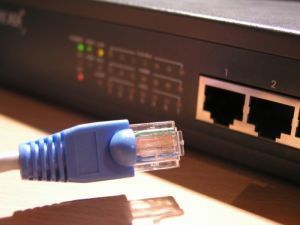
When an error message saying, “Network cable is unplugged” is displayed, it generally means that the computer can detect that there is an ASDL and/or Cable Connection pre-configured on the computer, but an Ethernet cable and/or a cable that is supposed to be plugged into the modem is unplugged.
In the case that all of the cables are plugged in correctly but the error message is still displayed, there are three possible problems.
Kinked Cable
One of the cables may have a kink. The old cable will have to be replaced with a new one. To do so, visit one’s local hardware shop or contact one’s Internet service provider for more information.
Improper Configuration
Someone may have begun configuring the network settings but stopped halfway through. In order to fix this, contact one’s Internet service provider and ask them to provide: one’s IP Address, Default Gateway, Preferred DNS Server, and Alternate DNS Server. If using a router, ask them to send a technician over to decide what the problem is instead.
If one is not using a router, continue reading. Otherwise, the problem is now in the Internet service provider’s hands.
- Launch the Start Menu.
- Click “Control Panel.”
- Double-click “Network Connections.”
- In the “General” tab, click “Internet Protocol (TCP/IP).”
- Click “Properties.”
- Click “Use the following IP address:” and “Use the following DNS servers:”
- Enter the information that the Internet service provider provided.
- Click “Ok” and test to see that the Internet is working.
Virus
A virus could have disabled the ports required to access the Internet via a web browser. The most common virus of this kind is Trojan Horse Dialler 17.E, frequently obtained by downloading patched for instant messaging networks or P2P networking systems. To find out if this is the problem, follow the instructions below:
- Launch the Start Menu.
- Click “All Programs.”
- Click “Accessories.”
- Click “Command Prompt.”
- Type ping www.google.com.
- Press.
Pinging www.l.google.com [72.14.253.103] with 32 bytes of data:
Reply from 72.14.253.103: bytes=32 time=172ms TTL=243
Reply from 72.14.253.103: bytes=32 time=171ms TTL=243
Reply from 72.14.253.103: bytes=32 time=171ms TTL=243
Reply from 72.14.253.103: bytes=32 time=171ms TTL=243
Anyone who receives the above or something similar can still access the Internet, but the above signals that some of their ports have been disabled. If this is the case, run a full computer virus scan with an anti-virus program (such as AVG Free). If the virus on the computer is a Trojan Horse Dialler 17.E, follow the instructions given below. If a virus other than Trojan Horse Dialler 17.E is on the computer, search Google with the name of the virus. Print off any instructions that may work.
- Launch the Start Menu.
- Click “Control Panel.”
- Click “Add or Remove Programs.”
- Click on “Newdotnet” or something similar and click “Uninstall.”
- Clear the cache in Internet Explorer, Mozilla Firefox, and Java. Refer to “How do I clear my cache?“
- Reboot the computer.
If problems persists, contact either a technician or the Internet service provider. All problems can be resolved if the correct solution is found.

Peter
I’ve been struggling with the Network Cable is Unplugged message for the most of today. Definitely, the solutions above only work if the message is somehow true but in my case I got the message immediately after doing a recovery of my system disks. I know everything was working (I could take the cable out and put it in another PC and it immediately works). Searching the internet many people solve the problem by changing the Speed & Duplex (see http://support.microsoft.com/kb/910389). In my case the solution was to simply first unplug all USB devices (including keyboard and mouse) and to then start the computer. Then while the computer was running, just plug the USB devices back in.