

Everyone likes safety. The safety of confidential information is always of special concern. Therefore, information protection is a necessity and can be useful to companies and individuals who care about their intellectual property’s confidentiality. People who want their e-mails kept confidential and their e-mail attachments readable only to the intended recipient can appreciate information protection.
GnuPG Shell is a software tool that keeps information safe by using the strong protection that OpenPGP standard offers (RFC2440).
GnuPG Shell is a cross platform graphical front end for GNU Privacy Guard.
GnuPG Shell can encrypt, decrypt, and sign files to verify signatures and manage private and public keys.
In addition to source code, installation packages for Debian Linux, RedHat Linux, and Microsoft Windows are provided.
How GnuPG Shell Works
GnuPG Shell is a GUI front end for GnuPG command line utility. So, it provides the same functionality as GnuPG utility but in a far more convenient and easy to use way. Users do not need to remember all of GnuPG’s command line options. Simply install GnuPG Shell and start protecting information.
GnuPG Shell encrypts files with asymmetric keypairs that other GnuPG users individually generate. The resulting public keys can be exchanged with other users in a variety of ways, such as Internet key servers or by ordinary files to which public keys can be exported. They must always be exchanged carefully to prevent identity spoofing by corrupting public key and ‘owner’ identity correspondences. It is also possible to add a cryptographic digital signature to a file so the file integrity and sender can be verified if a particular correspondence relied upon has not been corrupted.
Download
GnuPG Shell depends on GnuPG command line utility, which can be downloaded from the GnuPG official web-site.
Latest version
GnuPG Shell v1.0
| Package Description | Package File | md5 hash |
|---|---|---|
| Microsoft Windows Installer | gnupgshell-1.0.0.windows.zip | a8e278d2ce0389e0be298a37f30fdf65 |
| Debian Linux Installer | gnupgshell-1.0.0.i386.deb.gz | 670fc49edcfbe58b80ae1c1facf0e920 |
| RedHat Linux Installer | gnupgshell-1.0.0.i386.rpm.gz | cc80f7ec9c5cca9bfc683e8d05e879d3 |
| Source Code | gnupgshell-1.0.0.tar.gz | c350b3580aaeb141083e89efe5d47459 |
You can use WinMD5Free to verify these packages with the provided md5 hashes.
Screenshots
Here are several GnuPG Shell screenshots made under Windows and Linux:
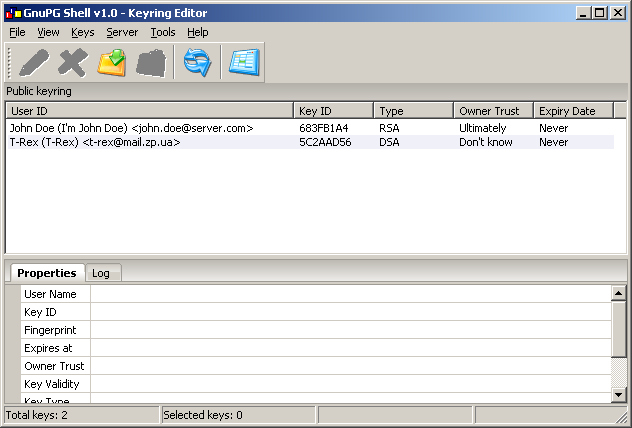
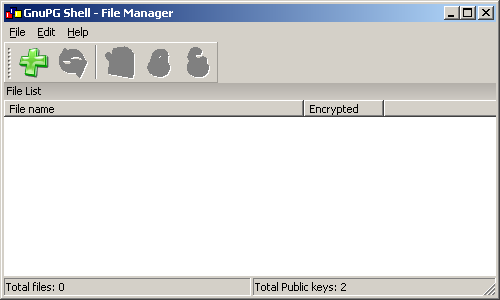
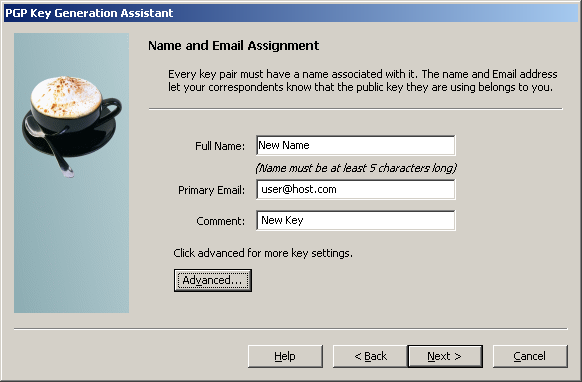
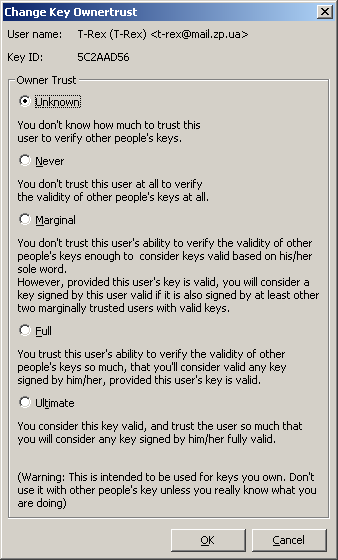
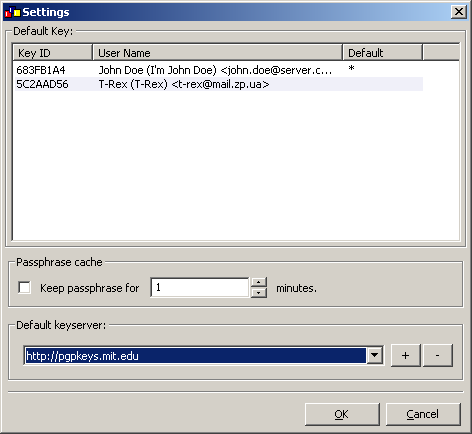
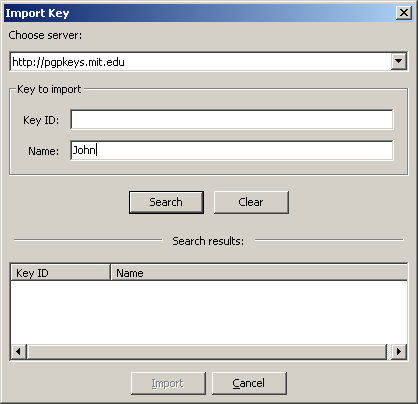
Video Tutorials
There are several video tutorials that show how to use GnuPG Shell:
- HOWTO: Install GnuPG Shell and Create a Key Ring
- HOWTO: Encrypt and Decrypt Files
- HOWTO: Import and Export Key Rings
Information for Software Developers
GnuPG Shell is an open source software created with:
- Python– An interpreted, interactive, object oriented, extensible programming language.
- wxWidgets – A cross-platform GUI and tools library for GTK, MS Windows, and MacOS.
- Code::Blocks – A cross-platform IDE built around wxWidgets, designed to be extensible and configurable.
Compiling GnuPG Shell under Microsoft Windows
GnuPG Shell source code archive contains Visual Studio 2005 solution and projects, including all 3rd party libraries needed for compilation. First of all, in order to compile GnuPG Shell under Windows, download wxWidgets source code and build it (wxWidgets-2.8.6 or newer is needed). There is a video tutorial that shows how to build wxWidgets library under Windows, setup environment variable, and configure Visual Studio. See wxWidgets and Visual Studio 2005 (Windows). After compiling wxWidgets library, open build/wxGnuPGShell.sln file (a Visual Studio 2005 solution file) and build it.
In order to create the installer package, download NSIS (NullSoft Scriptable Install System) and install it. After installing NSIS, create install package: Right-click on setup/Setup.nsi file and select “Compile NSIS Script” menu item.
Compiling GnuPG Shell under Linux
GnuPG Shell source code archive contains Makefile for Linux. In order to build GnuPG Shell from sources under Linux, download and compile wxWidgets library (wxWidgets-2.8.6 or newer with Unicode support) or install development wxWidgets packages (wxGTK-2.8.6 or newer). After successfully compiling wxWidgets, navigate to build directory and execute make command. Also, wxWidgets source code package contains workspace and project files for Code::Blocks IDE.
- build/wxGnuPGShell.workspace – Code::Blocks workspace
- build/wxGnuPGShell.cbp – GnuPG Shell project
- externs/build/propgrid/propgrid.cbp – wxPropertyGrid library project
- externs/build/wxTranslationHelper/wxTranslationHelper.cbp – wxTranslationHelper library project
In order to install compiled GnuPG Shell binary, call the make install command (NB. Users have to have root privileges that can be obtained by executing sudo make install).
Compiling GnuPG Shell under MacOS
GnuPG Shell is an open source cross-platform software that can be compiled under MacOS X. Unfortunately, for now GnuPG Shell source code archive do not contain project file or Makefile for MacOS. Volunteers who can help to create project file for XCode and/or Makefile for MacOS are being searched for. In order to offer help, please contact Will Spencer, GnuPG Shell’s maintainer.
License
GnuPG Shell is a free software, released under the GNU General Public License.


J R van Zijl
I am running Linux Mint 17.3. The support manager says that I have Gnupg & Gnupg Shell installed, but I can’t find out how to run it. Please help me solve this problem.
my name
Hi, there is an issue with the md5sum. The md5 is for the i386 linux package is only correct when extracted. You might want to clarify this for some people.
john
can this tool be used in command line?
something like:
gpg –import markit-public-key.txt
gpg –list-keys
gpg -se -r prqibapp@cihub.com [filename of the file to be encrypted]
wyoMurf
I see people complained about the fact that the source and package
files are corrupted, and can’t be used.
This isn’t quite accurate. They are not corrupted, they are simply
double-compressed. That’s why you were seeing positive results
from gzip -t. The windows zip file looks OK.
So, everyone, until the authors correct the situation, if you wish to
use the package or source files, first gunzip them, then move them
back to the original compressed file name:
wget …. gnupgshell-1.0.0.i386.deb.gz
gunzip gnupgshell-1.0.0.i386.deb.gz
mv gnupgshell-1.0.0.i386.deb gnupgshell-1.0.0.i386.deb.gz
gunzip gnupgshell-1.0.0.i386.deb.gz
dpkg -i gnupgshell-1.0.0.i386.deb
and away you go. Same basic procedure for all the other .gz files listed.
me1010
Why?
This doesn’t make any sense at all, and is quite confusing. The double compressed gz file is actually triple compressed – since a .deb file is also a compressed file… the download size is nearly identical to the doubly uncompressed deb file. Again – why???? It makes me distrust the archive. Also, it would be nice if the source included updated build scripts…
desbest
I have GnuPG 1.4.15 installed on Windows, but the GunPG Shell installer doesn’t recognise it as being installed.
WillSpencer
What version of Windows are you running?
What directory did you install GnuPG into?
marko
This kind of app has been one of the most needed in Linux, because seahorse and nemo-seahorse are still lame as can be.
gnupgshell though, i couldn’t even install after a couple of hours of entertainment with dpkg and make dependency errors.
As others mentioned, dpkg says the deb file is not in the deb format.
Trying to make from source generated all kinds of wx errors…
So, i give up. Can’t waste that much time just to even try this app. It’s faster to just keep going on the command line.
As with most Linux devs, I think you guys should have plugged into the seahorse feature development, rather than trying to reinvent the wheel.
22 years after Linus started and Zimmerman wrote pgp, we still don’t have a full-featured, stable Linux gui for pgp… Even gpg4win in Windows is far ahead of any Linux pgp gui, and doesn’t look like that’s about to change… :^(
Glessn
Installed it on Debian Wheezy, but getting following error on run
/usr/bin/wxGnuPGShell: error while loading shared libraries: libgtk-x11-2.0.so.0: cannot open shared object file: No such file or directory
I have GnuPG 1.4.12 installed. Any idea to fix above problem?
Mario Rossi
I have GnuPG 1.4.12-7+deb7u1 installed. I think is the same version you have. The language of the OS is Italian. Sorry, I can’t help you. You have to wait the answer of the developers.
WillSpencer
I’m currently running Mint and that library is here:
/usr/lib/x86_64-linux-gnu/libgtk-x11-2.0.so.0
Perhaps you need to install libgtk?
Mario Rossi
This program is great and works perfectly! I use Debian 7 Wheezy on an IBM PC. GnuPGShell is the only one effective working GUI, at this time, that allow GPG symmetric encryption in a Gnome enviroment. Seahorse just manage the encryption keys for the time being, and GPA perform asymmetric encryption only. I just had some now solved problems at the very beginning after installing it, with messages “Segmentation faults” from the terminal and abnormal termination of the program each time I clicked “Add file” but, once cleaned the system with bleachbit, all worked flowlessly and fine. It’s very important, according to my experience, to download the *.deb file with wget and to install the package with the command: sudo dpkg -i gnupgshell-1.0.0.i386.deb. You can then easily create an application launcer for GnuPGShell with the Gnome GUI application “alacarte” in the Gnome menu. Just for information, launcing the program from the terminal with the command: /usr/bin/wxGnuPGShell, the following message appears: (wxGnuPGShell:5107): Gtk-WARNING **: /build/buildd-gtk+2.0_2.24.10-2-i386-Tg7Q_2/gtk+2.0-2.24.10/gtk/gtkwidget.c:9967: widget class `GtkPizza’ has no property named `row-ending-details’. But this fact affect in no way the good functionality of the application. So, thank you very much to the developers! It wou8ld be great if you could in the future add functionality like “wipe file”, “hash file” and “view file”. Thank you very much once more.
Stray Cat
I would like to try this front end, but I can’t because signatures are not provided for the various packages available here. Neither should anyone else.
DanielMemetic
I’ve provided md5 hashes for each of the downloadable packages.
RP
Hi and thanks for this program. I am currently doing a research for usability of various cryptography programs and this one seems a good candidate for its simplicity. The goal is a cryptography program that is immediately usable by everyone : no technical background is required. Here is what should be done in future versions, keep up the good work!
– Maybe a possibility to encrypt/decrypt the clipboard : this will be a good thing for webmails for example.
– Wizard-like encryption/decryption for beginners (just like the key generation).
I’m looking at your source code.
As a source of inspiration, I always take PGP as a reference. Even if it’s not open source and does not permit commercial usage in the free version, it’s for me the best program regarding usability of cryptography.
U
I also experienced the corrupted zip file problem. But I recommend other users use Wget to download the files, which would help you out.
John
“GnuPG not installed on your system. Please, install it first.”
How about you let the user decide whether it is installed or not???
“Retry?”
“Yes,” nothing happens
“Retry?”
“No”
“Aborting…” – never finishes, so have to click “Cancel”
Please, add an option to browse for gpg.exe or something, cuz this is ridiculous.
Will.Spencer
That sounds like a good idea. We’ll add that to the features list for the next release.
Carlos Eugenio
I have tried several times to download the DEB file and the TAR file and both have problems when I tried to install. They are corrupted. Could you check them please?
Will.Spencer
They aren’t corrupted, but some unzip programs have compatibility issues.
anon
i have the same problem downloading from the latest version of xubuntu, extracting with fileroller 2.32.2 – both the deb and rpm (checked with alien) are unrecognisable after extracting them from the archive…. if you’re not using something compatible with the tool used in the most common linux os, then you should rethink some things..
Will.Spencer
anon:
Please post exact commands and errors.
I am using Ubuntu.
$ gzip -t gnupgshell-1.0.0.i386.deb.gz
$ gzip -t gnupgshell-1.0.0.i386.rpm.gz
$ gzip -t gnupgshell-1.0.0.tar.gz
$ unzip -t gnupgshell-1.0.0.windows.zip
Archive: gnupgshell-1.0.0.windows.zip
testing: gnupgshell-1.0.0.windows.exe OK
No errors detected in compressed data of gnupgshell-1.0.0.windows.zip.
$ unzip -t gnupgshell-1.0.0.zip
Archive: gnupgshell-1.0.0.zip
testing: gnupgshell/ OK
testing: gnupgshell/src/ OK
testing: gnupgshell/src/wxgnupgshelladvkeysettings.cpp OK
testing: gnupgshell/src/wxgnupgshellapp.h OK
testing: gnupgshell/src/quit.xpm OK
testing: gnupgshell/src/wxgnupgshellexpiration.cpp OK
testing: gnupgshell/src/new.xpm OK
testing: gnupgshell/src/delete.xpm OK
testing: gnupgshell/src/wxgnupgshelltrust.cpp OK
testing: gnupgshell/src/wxGnuPGShellAboutDialog.cpp OK
testing: gnupgshell/src/wxGnuPGShellAboutHeader.psd OK
testing: gnupgshell/src/resource.h OK
testing: gnupgshell/src/cut.xpm OK
testing: gnupgshell/src/exit-16x16x32b.xpm OK
testing: gnupgshell/src/app_resources.h OK
testing: gnupgshell/src/wxGnuPGShell.res OK
testing: gnupgshell/src/wxgnupgshellfilecheck.cpp OK
testing: gnupgshell/src/floppy.xpm OK
testing: gnupgshell/src/fileopen.xpm OK
testing: gnupgshell/src/public-16x16x32b.xpm OK
testing: gnupgshell/src/wxgnupgshellsettings.h OK
testing: gnupgshell/src/wxgnupgshellkeygenwizard.cpp OK
testing: gnupgshell/src/wxgnupgshellpasskey.cpp OK
testing: gnupgshell/src/addbookm.xpm OK
testing: gnupgshell/src/htmbook.xpm OK
testing: gnupgshell/src/wxGnuPGWrapper.h OK
testing: gnupgshell/src/encrypt-16x16x32b.xpm OK
testing: gnupgshell/src/wxgnupgshellkeygenwizard.h OK
testing: gnupgshell/src/wxgnupgshellfilecheck.h OK
testing: gnupgshell/src/wxGnuPGShellAboutHeader.xpm OK
testing: gnupgshell/src/app_resources.cpp OK
testing: gnupgshell/src/wxgnupgshellpasskey.h OK
testing: gnupgshell/src/exefile.xpm OK
testing: gnupgshell/src/wxgnupgshellfilemanager.cpp OK
testing: gnupgshell/src/pen_yellow-16x16x32b.xpm OK
testing: gnupgshell/src/wxGnuPGKeyListCtrl.h OK
testing: gnupgshell/src/wxgnupgshellkeyringeditor.cpp OK
testing: gnupgshell/src/wxgnupgshellbackup.h OK
testing: gnupgshell/src/wizard.xpm OK
testing: gnupgshell/src/makefile.vc OK
testing: gnupgshell/src/retreive-16x16x32b.xpm OK
testing: gnupgshell/src/wxGnuPGKeyListCtrl.cpp OK
testing: gnupgshell/src/wxGnuPGShellImportKey.cpp OK
testing: gnupgshell/src/wxgnupgshellexpiration.h OK
testing: gnupgshell/src/wxGnuPGKey.h OK
testing: gnupgshell/src/wxGnuPGShellSelectRecipient.h OK
testing: gnupgshell/src/art/ OK
testing: gnupgshell/src/art/refresh.ico OK
testing: gnupgshell/src/art/retreive.ico OK
testing: gnupgshell/src/art/file_manager.ico OK
testing: gnupgshell/src/art/send.ico OK
testing: gnupgshell/src/art/add.ico OK
testing: gnupgshell/src/art/delete.ico OK
testing: gnupgshell/src/art/sign.ico OK
testing: gnupgshell/src/art/secret.ico OK
testing: gnupgshell/src/art/public.ico OK
testing: gnupgshell/src/art/pen_yellow.ico OK
testing: gnupgshell/src/externdata.txt OK
testing: gnupgshell/src/wxGnuPGWrapper.cpp OK
testing: gnupgshell/src/sign-16x16x32b.xpm OK
testing: gnupgshell/src/wxGnuPGShellSelectRecipient.cpp OK
testing: gnupgshell/src/files.txt OK
testing: gnupgshell/src/wxgnupgshellkeyringeditor.h OK
testing: gnupgshell/src/wxGnuPGShell.rc OK
testing: gnupgshell/src/copy.xpm OK
testing: gnupgshell/src/refresh-16x16x32b.xpm OK
testing: gnupgshell/src/wxwin32x32.xpm OK
testing: gnupgshell/src/wxGnuPGShellAboutDialog.h OK
testing: gnupgshell/src/secret-16x16x32b.xpm OK
testing: gnupgshell/src/delete-16x16x32b.xpm OK
testing: gnupgshell/src/powered_by_wxwidgets_88x31.xpm OK
testing: gnupgshell/src/listview.xpm OK
testing: gnupgshell/src/wxgnupgshelleditkey.h OK
testing: gnupgshell/src/wxgnupgshellsettings.cpp OK
testing: gnupgshell/src/wxGnuPGShellAboutHeader.png OK
testing: gnupgshell/src/wxGnuPGKeyPair.h OK
testing: gnupgshell/src/wxgnupgshellbackup.cpp OK
testing: gnupgshell/src/wxGnuPGShellRevokeKey.cpp OK
testing: gnupgshell/src/wxgnupgshelladvkeysettings.h OK
testing: gnupgshell/src/send-16x16x32b.xpm OK
testing: gnupgshell/src/redo.xpm OK
testing: gnupgshell/src/wxgnupgshellfilemanager.h OK
testing: gnupgshell/src/file_manager-16x16x32b.xpm OK
testing: gnupgshell/src/wxGnuPGKeyPair.cpp OK
testing: gnupgshell/src/wxgnupgshelltrust.h OK
testing: gnupgshell/src/wxgnupgshellapp.cpp OK
testing: gnupgshell/src/wxGnuPGKey.cpp OK
testing: gnupgshell/src/wxGnuPGShell.pjd OK
testing: gnupgshell/src/wxgnupgshelleditkey.cpp OK
testing: gnupgshell/src/dir_up.xpm OK
testing: gnupgshell/src/wxGnuPGShellRevokeKey.h OK
testing: gnupgshell/src/settings-16x16x32b.xpm OK
testing: gnupgshell/src/wxGnuPGShellImportKey.h OK
testing: gnupgshell/externs/ OK
testing: gnupgshell/externs/src/ OK
testing: gnupgshell/externs/src/propgrid/ OK
testing: gnupgshell/externs/src/propgrid/propgrid.cpp OK
testing: gnupgshell/externs/src/propgrid/advprops.cpp OK
testing: gnupgshell/externs/src/propgrid/odcombo.cpp OK
testing: gnupgshell/externs/src/propgrid/manager.cpp OK
testing: gnupgshell/externs/src/propgrid/props.cpp OK
testing: gnupgshell/externs/src/propgrid/extras.cpp OK
testing: gnupgshell/externs/src/propgrid/Makefile.in OK
testing: gnupgshell/externs/src/wxTranslationHelper/ OK
testing: gnupgshell/externs/src/wxTranslationHelper/wxTranslationHelper.cpp OK
testing: gnupgshell/externs/include/ OK
testing: gnupgshell/externs/include/wx/ OK
testing: gnupgshell/externs/include/wx/propgrid/ OK
testing: gnupgshell/externs/include/wx/propgrid/advprops.h OK
testing: gnupgshell/externs/include/wx/propgrid/odcombo.h OK
testing: gnupgshell/externs/include/wx/propgrid/propdev.h OK
testing: gnupgshell/externs/include/wx/propgrid/propgrid.h OK
testing: gnupgshell/externs/include/wx/propgrid/Doxyfile OK
testing: gnupgshell/externs/include/wx/propgrid/pg_dox_mainpage.h OK
testing: gnupgshell/externs/include/wx/propgrid/propgrid.doxygen OK
testing: gnupgshell/externs/include/wx/propgrid/extras.h OK
testing: gnupgshell/externs/include/wx/propgrid/manager.h OK
testing: gnupgshell/externs/include/wx/wxTranslationHelper/ OK
testing: gnupgshell/externs/include/wx/wxTranslationHelper/wxTranslationHelper.h OK
testing: gnupgshell/externs/build/ OK
testing: gnupgshell/externs/build/propgrid/ OK
testing: gnupgshell/externs/build/propgrid/propgrid.dsw OK
testing: gnupgshell/externs/build/propgrid/propgrid.2.8.4.dsw OK
testing: gnupgshell/externs/build/propgrid/propgrid.depend OK
testing: gnupgshell/externs/build/propgrid/propgrid.layout OK
testing: gnupgshell/externs/build/propgrid/propgrid.2.8.4.dsp OK
testing: gnupgshell/externs/build/propgrid/propgrid.vcproj OK
testing: gnupgshell/externs/build/propgrid/propgrid.cbp OK
testing: gnupgshell/externs/build/propgrid/propgrid.dsp OK
testing: gnupgshell/externs/build/wxTranslationHelper/ OK
testing: gnupgshell/externs/build/wxTranslationHelper/wxTranslationHelper.layout OK
testing: gnupgshell/externs/build/wxTranslationHelper/wxTranslationHelper.depend OK
testing: gnupgshell/externs/build/wxTranslationHelper/wxTranslationHelper.vcproj OK
testing: gnupgshell/externs/build/wxTranslationHelper/wxTranslationHelper.cbp OK
testing: gnupgshell/AUTHORS OK
testing: gnupgshell/lang/ OK
testing: gnupgshell/lang/run.cmd OK
testing: gnupgshell/lang/POupdate.cmd OK
testing: gnupgshell/lang/MOcreate.bat OK
testing: gnupgshell/lang/POcreate.cmd OK
testing: gnupgshell/bin/ OK
testing: gnupgshell/bin/art/ OK
testing: gnupgshell/bin/art/email.ico OK
testing: gnupgshell/bin/art/refresh.ico OK
testing: gnupgshell/bin/art/about.ico OK
testing: gnupgshell/bin/art/retreive.ico OK
testing: gnupgshell/bin/art/file_manager.ico OK
testing: gnupgshell/bin/art/send.ico OK
testing: gnupgshell/bin/art/add.ico OK
testing: gnupgshell/bin/art/doc_stop.ico OK
testing: gnupgshell/bin/art/exit.ico OK
testing: gnupgshell/bin/art/delete.ico OK
testing: gnupgshell/bin/art/settings.ico OK
testing: gnupgshell/bin/art/sign.ico OK
testing: gnupgshell/bin/art/secret.ico OK
testing: gnupgshell/bin/art/public.ico OK
testing: gnupgshell/bin/art/encrypt.ico OK
testing: gnupgshell/bin/art/pen_green.ico OK
testing: gnupgshell/bin/art/doc_add.ico OK
testing: gnupgshell/bin/art/warning.ico OK
testing: gnupgshell/bin/art/pen_yellow.ico OK
testing: gnupgshell/README OK
testing: gnupgshell/CHANGELOG OK
testing: gnupgshell/NEWS OK
testing: gnupgshell/build/ OK
testing: gnupgshell/build/Makefile OK
testing: gnupgshell/build/wxGnuPGShell.vcproj OK
testing: gnupgshell/build/Ankh.Load OK
testing: gnupgshell/build/description-pak OK
testing: gnupgshell/build/wxGnuPGShell.workspace OK
testing: gnupgshell/build/wxGnuPGShell.layout OK
testing: gnupgshell/build/wxGnuPGShell.depend OK
testing: gnupgshell/build/build.spec OK
testing: gnupgshell/build/wxGnuPGShell.cbp OK
testing: gnupgshell/build/wxGnuPGShell.sln OK
testing: gnupgshell/COPYING OK
testing: gnupgshell/setup/ OK
testing: gnupgshell/setup/license.txt OK
testing: gnupgshell/setup/Setup.nsi OK
No errors detected in compressed data of gnupgshell-1.0.0.zip.
Fred Smith
How do is set my key ring to be a local file instead of a keyserver on the internet?
Giridhari
I am getting a corrupt zip-file error when I try to extract the Windows Installer.
memenode
Try downloading it again. I just tried it and it works fine.
Litson
I have Installed GnuPG Shell v1.0 . It is running perfectly in GUI style. How can I call this program from my own application (.net or SSIS package) and pass the file I want to Encrypt through shell/command line. Please reply soon , its urgent.. Thank You
Ringo
Hi,
I watched your How-to video on encrypt & decrypt only 1 file, how can I decrypt multi files in only 1 command line?
Thanks.
Ringo
memenode
Have you tried just dragging and dropping two files into the window or using that green plus button?