

If you have just purchased Microsoft Office, you will be required to activate this product directly with Microsoft. Microsoft product activation is set up as an anti piracy feature. This feature is created in order to verify that your Microsoft Office suite is not a fake copy and is legitimately licensed to you as the end user. The process of activating your Microsoft Office is generally quick, easy and anonymous.
Below is a step by step process on how the activation process works.
Licensing Agreement
The activation process works by verification of the Office product key and its corresponding licensing agreement. Each Microsoft software application comes with a product key that must be entered when installing the program, which will also determine the licensing agreement for the software.
In order for the key to work and allow activation, the application must be installed only on a specific number of computers that the license allows. For personal users, Microsoft Office can be used on only one computer at a time. For business users, special licenses are provided to specifically dictate the number of machines that can be used to install the software.
It is important to note that if you try to activate Microsoft Office on more computers than the licensing agreement permits, the activation will fail.
There are two ways to activate your Microsoft Office Suite. The first way is via the Internet and the second is by phone.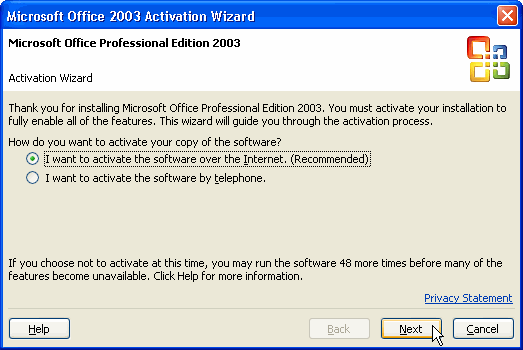
Activation via Internet
The easiest way to activate your Microsoft Office software is via the internet; it is practically automatic and anonymous. When you try to install Microsoft Office, an installation wizard will pop up and ask you to activate your product. At this time, it will ask you for the product key. Enter the product key into the box and then click on the button to activate your product via the internet.
Once you choose to activate your product via the internet, the wizard will open your Internet connection and connect to one of Microsoft’s servers for assistance. The wizard then sends the Microsoft server the product key for Office. Verification will be done to tell whether the product key is legitimate and the number of machines that can have this software installed. The Microsoft computer then checks if it has any records of this program being on more computers than licensed.
If your product key complies with the license, Microsoft’s computer will then create a confirmation number that is sent back to your Office software for activation. At this point, your Office software will receive the confirmation ID and you will receive a message on your computer screen that your activation has been successful.
You need to activate your product each time you install it on a new computer or reinstalling it on your computer.
Activation by Telephone
If you do not have a internet connection, you can activate your Office software suite by telephone. After starting the installation wizard, if you choose to activate Office software by telephone, the telephone number will appear on the screen.
Call this number with your computer on and the screen showing the product key. You will either have to talk to a voice automated computer or live operator. The operator or computer will ask for your product key, which you can either or type in. The operator or computer then sends this number to the Microsoft server to validate your product key. Microsoft checks if it has any records of this program being run on more computers than permitted.
If the product key complies with the license, Microsoft’s computer will then create a confirmation number that is sent back to the operator. The activation code will be read out, which you have to ultimately enter it into your computer. At the end, you should see a confirmation message indicating success.
Grace Period and Reduced Functionality Mode
After installing your Office software suite, you can go ahead and use the software without activating it initially. This is aimed at making the activation convenient for end users. However, you must activate the software within 50 launches of installation, or Office will restrict your functionality.
If your software has not been activated, you will receive a message when launching Office telling you how many more times you are allowed to launch the software. If you do not activate your Office software suite within 50 launches, the software will notify you that it has gone into a ‘reduced-functionality’ mode and ask you to activate immediately. This means that you will no longer be able to edit or create new documents. Your documents will not be deleted, but will be available only for viewing and printing.
Office will return to normal operating status only after activation.
Registration
After you receive a prompt that states activation was successful, you will also receive a message to register your Office software. Registration is different from activation and you do not need to register your product to receive full functionality.
Registration is for users who would like to receive regular updates or more information on how to use Office effectively.

Gillian Hope
I am trying to register it after activation as every time I open word it brings up the end user licensing agreement which you must accept to carry on.
I go to the microsoft site and the page is no longer available. can you help at all with not having to accept the agreement every time I open word?
kristi
When i tried to activate my Office 2003 i was told that i had reach the maximum allowable activations. Over the years since i purchased Office 2003 i have gone through many computer upgrades, usually because of hardward failure. I’m not trying to use the programs on more than one computer at a time. I simply had to replace old failing computers. I only have one computer at a time that i’m trying to use my copy of Office 2003 on. So what am i supposed to do about activation?
memenode
If you changed the motherboard or CPU it recognizes that as a new computer rather than the same one. If you have an OEM version of Office (came with your original computer or was bought as such) you can only run it on one machine, the one it was first activated on so if the motherboard and CPU was changed, and it counts it as a different machine it wouldn’t activate. Here’s the MS Support answer on this.
LEC
Thank you for the informative article. I want to purchase 2003 as I like the interface better than the later versions of Office. Given your description of the activation process here, how is it possible for ‘used’ versions of 2003 to be sold online? I would presume that these have already been activated by a user already.
Thank you.
memenode
I would be careful about buying Microsoft stuff online, especially eBay. There’s lots of false advertising out there. It’s hard to be sure that what you’re buying really comes with a clean activation key.
That said, I think it should be possible to buy used, but the previous owner must be the owner of the original and has only one legal chance of making a transfer under the condition of not retaining any more copies of it.