

The Microsoft Outlook email application is one of the longest supported email clients on the market. In production for more than 15 years, Microsoft engineers continue to add capabilities to the software suite to include a number of information management capabilities such as tracking tasks, Outlook Calendar, and public share folders. End-users are able to purchase Microsoft Outlook to run in a stand-alone mode on a home or work computer as well as purchasing the entire Microsoft Office productivity suite of applications. Regardless of the mode of operation the program is being run, end-users will have the need to determine how to change an Outlook password.
What is the Purpose of an Email Program?
Email programs (or client applications) are created to help computer users send and receive email on one or more email accounts. Over the past decade, email program producers have included the ability to manage one to many email accounts via a common interface. This capability saves the end-user time by not having to login to every email account to check mail across multiple services such as Yahoo, Gmail, Hotmail, and work or school accounts. With the improved functionality of web mail via IMAP, consumers are able to check email via web browser when away from the home computer as well. In addition to Microsoft Outlook, other commonly used email programs include Pegasus Mail, IBM Lotus Notes, and Mozilla Thunderbird.
Microsoft Outlook Version History
Microsoft Outlook has been in development since the release of Microsoft Exchange Server 5.5. Since first release, the application has undergone significant changes. Outlook now includes a large number of information management capabilities that are integrated with the software. The improvements include the ability to synchronize contacts, calendar events, tasks, and notes. Microsoft continues to produce Outlook for use on both the Microsoft Windows and MAC OS X operating systems at the time of this writing. Major releases of Microsoft Outlook include:
Outlook for MS-DOS (Included with Microsoft Exchange Server 5.5)
Outlook for Windows 3.1x (Included with Microsoft Exchange Server 5.5)
Outlook for Macintosh (Included with Microsoft Exchange Server 5.5)
Outlook 97 Version 8.0 January 1997
Outlook 98 Version 8.5 June 1998
Outlook 2000 Version 9.0 June 1999
Outlook 2002 Version 10.0 May 2001
Outlook 2003 Version 11.0 October 2003
Outlook 2007 Version 12.0 November 2006
Outlook 2010 Version 14 July 15, 2010
Outlook 2011 for Mac Version 14 October 26, 2010
Outlook 2013 Version 15 January 29th, 2013
How Do You Change the Microsoft Exchange Password?
If your school or work uses a Microsoft Exchange Server, you may have the need arise to change your Microsoft Exchange account’s password. Note that if running Outlook on a home computer, these steps will likely not apply since home account’s commonly use a POP-3 email account in conjunction with an Internet Service Provider (ISP) or via a web-based email service. Note, when the Microsoft Exchange password is changed, the end-user must next change the password on the email client or email functionality may be temporarily interrupted.
Step 1 – Depress the “CTRL,” “ALT,” and “DELETE” keys simultaneously on the client computer.
Step 2 – Select the “Change Password” menu button on the subsequently displayed pop-up window.
Step 3 – Input the “user name” and choose the domain for the Exchange account you want to change the password for.
Step 4 – Input the old account password in the appropriate text field.
Step 5 – Enter the new password in the two applicable text fields and select the “OK” menu button.
Step 6 – If the new password entries match, a message stating “Your password has been changed” will be displayed on the computer.
Alternatively, in Outlook 2010 the Exchange password can be modified from the Outlook 2010 interface.
Step 1 – Launch Outlook 2010 by double clicking the program icon located on the computer’s desktop.
Step 2 – Select the “File” menu tab.
Step 3 – Choose the “Account Settings” menu option and then pick the “Account Settings” menu label.
Step 4 – Choose the “Exchange” account and then select the “Change” menu button.
Step 5 – Make the desired changes on the subsequently displayed screen.
Step 6 – Make additional Exchange account settings by clicking the “More Settings” menu button.
Step 7 – Under the Outlook 2010 “Advanced” menu tab, select additional Exchange mailboxes to open or configure if you have more than one assigned to you by the Exchange administrator.
How to Change an Outlook 2003 Password
Microsoft Outlook 2003 will replicate changes made to Microsoft Exchange account passwords if the task is accomplished on the same computer. Although Outlook 2003 is not the most up-to-date version of the software client, it remains in use by a number of organizations and end-users throughout the world. A common task that arises for these users is to change the email account password on a home laptop or computer.
Step 1 – Open the Microsoft Outlook 2003 application by double-clicking the program icon located on the computer’s desktop.
Step 2 – Choose the “Tools” menu label located on the Outlook 2003 file menu.
Step 3 – Select the “email Accounts” menu choice.
Step 4 – Pick the “View or change existing email accounts” menu option.
Step 5 – Select the “Next” menu option.
Step 6 – Double-click the desired email account for the password change.
Step 7 – Enter the new Outlook 2003 password in the “Password” text field that is beneath the “Logon information” text field.
Step 8 – Choose the “Next,” and “Finish” menu options to finish changing the Outlook 2003 password on your computer.
How to Change an Outlook 2007 Password
Outlook 2007 was actually released in calendar year 2007 and was the first release of Microsoft Outlook to use HTML vice Internet Explorer rendering of HTML formatted email.
Step 1 – Launch the Microsoft Outlook 2007 client application by double-clicking the program icon located on the computer’s desktop.
Step 2 – Choose the “Tools” file menu option.
Step 3 – Select the “Account Settings” menu option.
Step 4 – Pick the email account that requires the password change.
Step 5 – Select the “Change” menu button.
Step 6 – Enter the new password in the “Password” field.
Step 7 – Select the “Test Account Settings” menu option.
Step 8 – Choose the “Close,” “Next,” and “Finish” buttons to finish changing the Outlook 2007 password.
*Note: If Outlook 2007 is being used with a network using Microsoft Exchange Server, the Exchange Server password has to be changed to match that entered in Outlook or the email client will not function properly.
How to Change an Outlook 2010 Password
When Microsoft Outlook 2010 was released, Microsoft included a number of new features into the software application. These included: a ribbon interface in all views of the program, improved grouping of conversations to include messages from all folders, a better “To-Do” bar, a “People Pane,” and Social Networking features.
Step 1 – Launch Microsoft Outlook 2010 by double-clicking the program icon located on the computer’s desktop or from the “Program Files” sub-menu.
Step 2 – Choose the “File” menu label from the Outlook “file” menu.
Step 3 – Click the “Account Settings” menu choice.
Step 4 – Select the “Exchange Account” to modify the password (by default the current Microsoft Exchange account in-use will be selected).
Step 5 – Select the “Change” menu button.
Step 6 – Enter the new password in the “Password” text box located beneath the “Logon Information” menu label.
Step 7 – Select the “Save” menu button. On the same window, select the “Remember password” check box to avoid having to enter the email account password every time you start Microsoft Outlook 2010. This will allow other computer users who have access to you account to send or receive email without permission if selected.
How to Change an Outlook 2011 Password for Mac OS X
Outlook for Mac 2011 was the replacement for Entourage on computers running the Mac OS X operating system. Designed to feature improved compatibility with Outlook for Windows, Outlook 2011 is the first native version of Microsoft Outlook created for the Mac OS X operating System. With the release of Service Pack 1 (v 14.1.0) in April of 2011, Outlook 2011 for Mac is now capable of synchronizing notes, tasks, and calendar items with Microsoft Exchange 2007 and 2010.
Step 1 – Launch Outlook 2011 for Mac.
Step 2 – Select the “Tools” file menu option.
Step 3 – Click the “Accounts” menu option.
Step 4 – Choose the “Email Account” menu item.
Step 5 – Select the email account that requires the password change.
Step 6 – Enter the new password for the account in the “Password” text field.
Step 7 – Exit from the current screen to save the changes to the Outlook 2011 password.
How to Setup Outlook 2013 Email
Microsoft Outlook 2013 is the most current release of the popular Outlook email client by Microsoft.
Step 1 – Launch Outlook 2013. If this is the first time the program has been launched, the Microsoft Outlook Start-up wizard will open. If this is the case for you, select the “Next” menu button and on the “Email Accounts” page choose the “Next” button to being setup of Outlook 2013.
Step 2 – Alternatively, if the Microsoft Outlook Start-up wizard does not start, select the “File” menu option from the “Outlook toolbar” and choose the “Add Account” menu option located above the “Account Settings” menu button.
Step 3 – Depending on how the end-user has logged into the computer, Outlook 2013 may automatically fill-in the user name and email address on the “Auto Account Setup” page. If these settings are per-filled, and correct, select the “Next” menu button. If not correct (or unfilled), enter the correct settings.
Step 4 – Once the “Next” button is selected, Outlook 2013 will search to find the email server settings. If found, it will prompt the user to enter the “user name” and “password” for the account. When entering the user name, ensure the fully qualified email address is used for the entry.
Step 5 – On successful configuration, Outlook 2013 will display a “Congratulations” text box. Select the “Finish” menu button to complete configuration of Outlook 2013.
Step 6 – If Outlook is not able to locate the configuration information for your email account, select the “Manually configure server settings” menu option followed by selecting the “Next” menu button.
Step 7 – On the “Choose Services” menu, select the “Internet E-Mail” menu option followed by clicking the “Next” menu button.
Step 8 – Enter the user name to be displayed when sending email and email address in the appropriate text fields.
Step 9 – For server information, select “IMAP” or “POP3” depending on the email service type you are configuring for use with Outlook 2013.
Step 10 – In the “Incoming mail server box” enter the “IMAP” or “POP” email server names.
Step 11 – Enter the “SMTP” server name in the “Outgoing mail server (SMTP)” text box.
Step 12 – In the “Logon” information box, enter the email address in the “User Name” text field.
Step 13 – In the “Password” text box, enter the email account’s password. Select the “Remember password” check box if you desire Outlook to remember the account’s password.
Step 14 – Select the “More Settings” menu option located at the bottom of the window. Then, enter the SMTP authentication information.
Step 15 – Choose the “Incoming Server” menu option (either IMAP or POP3) and choose “SSL” for the incoming encryption connection type.
Step 16 – Select “TSL” for the outgoing server encryption type.
Step 17 – If using POP3 email, you will need to select the “Leave a copy of message on the server” check box located under the “Delivery” menu if you want all messages to be left on the email server.
Step 18 – Select the “Next” menu button on the “Add New Account” page. Choose the “Close” menu button to exit from the “Test Accounts Settings” window.
Step 19 – Click the “Finish” menu button on the “Congratulations” page to complete setting up the Outlook 2013 account.
How to Change a Windows Live Password
Step 1 – Open your computer’s web browser by double-clicking the program icon located on the computer’s desktop.
Step 2 – Enter the Windows Live ID password reset URL in your browser’s toolbar.
Step 3 – Select the “I forgot my password” menu option.
Step 4 – Choose the “Reset your password” menu choice.
Step 5 – Enter the “Windows Live ID” and input the “Captcha” characters that are displayed on the screen. Click the “Next” menu button.
Step 6 – Select one of the four available methods to reset the Windows Live password: Use my trusted PC, Customer support, send a code to my mobile phone, or email a reset link.
Step 7 – Follow the default directions to continue resetting the Windows Live password.
Step 8 – If you known your Windows Live password, login to the account.
Step 9 – After logging in to the account, select the “Account Security” menu choice.
Step 10 – Select the “Change” menu option and input both the old and new passwords.
Step 11 – Select the “Save” menu button to finish changing the Windows Live password.
Steps to Change a Hotmail Password
A popular free email service that is commonly associated with Microsoft Outlook is Windows Hotmail. In order to change a Hotmail password, the end-user must visit the Windows Live Hotmail login page.
*Note, Windows Hotmail has recently been re-branded to http://www.outlook.com/. Although the Hotmail “brand” name is on the way out, the steps below should be equivalent when changing your Outlook.com email password.
Step 1 – Open the computer’s Internet browser (ensuring your are connected to the Internet).
Step 2 – Enter the Windows Live Hotmail login URL in the browser’s address bar.
Step 3 – Enter the login and password for the Hotmail account that requires the password change.
Step 4 – Select the “Change” menu option located under the “password reset” text label.
Step 5 – Enter the old Hotmail password in the appropriate field. Then, enter the new password in the appropriate location.
Step 6 – Confirm your new password entry.
Step 7 – Select the “Save” menu button. Hotmail will now return you to the Hotmail login page.
How to Change an Outlook Express Password
Outlook Express was formerly bundled with early versions of the Microsoft Windows Operating System. Although no longer supported by Microsoft, there are a large number of consumers who continue to use the program. If using the application on a network running Microsoft Exchange Server, Outlook Express will require the email account password to be updated when the Exchange password is modified.
Step 1 – Launch the Outlook Express email application by double-clicking the program icon located on the computer’s desktop.
Step 2 – Select the “Tools” and “Accounts” menu choices.
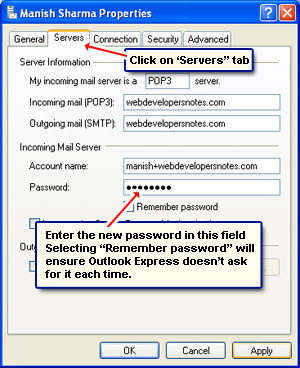
Step 3 – Choose the “Mail” menu tab.
Step 4 – Select the “Properties” menu option.
Step 5 – Choose the “Services” menu tab. Remove or delete the password entry in the “password” field.
Step 6 – Enter your new email password. You can select the “Remember Password” check box to have the email client “remember” the password on future uses of the program.
Step 7 – Select the “Apply” and “OK” buttons. Then, choose the “Close on Internet Accounts” menu option to finish modification of the Outlook Express password.
Robert Beachler
None of this works on the Outlook 365 setup at all. There are no password fields in any account settings unless it prompts you.
Janice
I followed the above instructions, but the new password is not ACCEPTED.
Barbara Schey
How do I change my outlook password
Ajay Khule
Hi Barbara,
Considering you have Microsoft Outlook 2007 on your machine, following some simple steps will help you to change your password.
> Click on Tools.
> Choose Account Settings.
> Select e-mail account and then change.
> Enter new password in the password field.
> Click Test Account Settings.
> Click Close, Next and Finish.
Done with your password setting.
Terry
Please tell me how to change my password on Outlook 2010. I am getting hacked so bad it’s stupid. I can’t figure it out or find out on line. Please help. Thank you very much
Joseph Malone
Thanks for info, but the email password must not to be change before from Internet provider?