

MSOCACHE (Local Install Source) is a setup feature that Microsoft deploys with Microsoft Office 2003. It is a hidden folder that is installed on the target computer’s local hard drive. It can occupy up to 290 Megabytes (MB) of space depending on the Microsoft Office programs that are installed on the computer. This feature eliminates the need to insert the Microsoft Office installation CD to later install components that were not included in the initial configuration options.
What Does MSOCACHE Do?
MSOCACHE is not just for making it easier for the user to install Microsoft Office components. It is also used to repair Office installations and update the software suite of applications. The application has a built-in detection system that detects low disk space on computers. There has to be at least 1.5 gigabytes (GB) of available space for MSOCACHE to install on a computer. If the application detects more than the required amount of free space, then the hard drive with the most free space saves the image. When the feature is activated, the hidden folder labeled “MSOCACHE” will be saved to the root folder of the drive determined to be most suitable for the installation.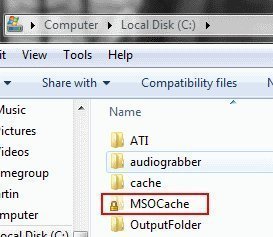
Can You Delete MSOCACHE?
Microsoft recommends that files are left in place. This is to avoid the annoyance of having to insert the Office installation CDs into the computer every time an Office update is downloaded or setup changes are made to any of the Office applications. Microsoft recommends that the “Local Installation Source Tool” is used to remove the files from the computer. The tool is not included with Microsoft Office. It has to be downloaded from the Office Resource Kit available at the Microsoft Office web site. The primary reason that Microsoft recommends using the tool is to remove registry entries that Microsoft Office makes when the backup files are installed on the computer.
Can MSOCACHE Be Used When Deploying Admin Installation Images?
The Local Install Source feature cannot be used in this manner for Microsoft Office 2003 since it uses files that are stored in compress, cabinet files. However, installations can be done via CD images that are fully copied to a network, and will allow users to customize the configuration of the installations on their network computers.
Pia
Hi,
My question :_
“How to remove dupluicated calender mails in Microsoft Outllok 2003?”
Many Thanks,
Pia 🙂