

Unprotecting an Excel sheet is surprisingly easy. If your Excel sheet is password protected and you do not know the password, there is no way that you can unprotect the sheet in that particular workbook – but you can create a new workbook which will contain exactly the same formulas, formatting and values that will not be protected and will be editable.
How to Unprotect a Non-Password Protected Excel Sheet
- Open up the Excel document.
- Click on the “Review” tab.
- Click “Unprotect Sheet” or “Unprotect Workbook.”
How to Unprotect a Password Protected Excel Sheet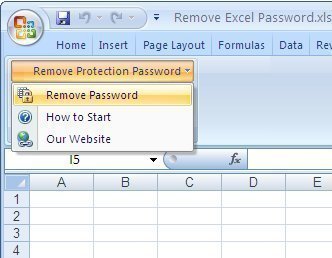
- The first way to do this is to copy and paste the contents into a new workbook. This sounds very simple and is very simple but most people do not even consider this option due to its simplicity.
- In the case that your Excel sheet is password protected and you cannot select the cells on the Excel sheet, you are going to need to make use of a web-based spreadsheet solution – namely Google Spreadsheet.
- Upload your spreadsheet into Google Spreadsheet.
- You can now already edit the file, from within Google Spreadsheet. If you wish to make a copy that you can also edit in Excel, simply export the spreadsheet into an .xls file. Simple.
How to Remove Protection from an Excel Sheet using Google Docs
Another way to remove protection from an Excel sheet without the password or access to the document creator is to import it into the Google Docs Spreadsheet program, which will remove protection once the document is imported.
Step 1 – Create a Google account at gmail.com or use an existing one.
Step 2 – Log into Google Docs with a google account at: docs.google.com by entering a login name and password.
Step 3 – Click “Upload” then the “Select Files to Upload” option on the subsequent window.
Step 4 – Use the Google file chooser to locate the spreadsheet file to be uploaded and that protection will be removed from.
Step 5 – View and edit the data file after it is successfully imported into Google Docs.
Patricia
Very useful, my last resort was to upload to t Google Spreadsheet, but it unlocked (un-password protected) the excel file and I then I download the file to another name.
Matheus Moraes
Thank you very much! You nailed! I tried other methos such as visual basic scripts and software and all i got was my excel crashing.
Peter Loder
So useful. I was sent a locked Excel 2010 to use, but with a number of silly bits of formatting that needed changing. The Alt+F11 option didn’t seem to work for me (I got no white space) but taking your suggestion of the Developer Tab (which I needed to add using File / Options / Customize ribbon) then View Code – it worked fine.
Thank you for doing this.
Randy Thomas
Amazing! Thanks a bunch
Charry Salce
what the heck! the copy paste was so simple. Thanks man!
AJ D DON
the copy and paste is the bomb. makes the protection looks like moron. Thanks guys
Yeeehaww
thanks motahfakah! Works like charm!
D Jones
This worked great for me – thank you !
barbarachan
there is a popular solution for those who have been locked out by excel worksheet. For this solution, what you need is a password recovery tool,my favourite is SmartKey Excel Password Recovery, you can Download this software from its official site
With SmartKey Excel Password Recovery, you can open you excel spreadsheet without data lost.