

A DHCP reservation is a permanent IP address assignment. It is a specific IP address within a DHCP scope that is permanently reserved for leased use to a specific DHCP client.
Users can configure a DHCP reservation in their DHCP server when they need to reserve a permanent IP address assignment. Reservations are used for DHCP enabled devices like print and file servers or other application servers that always have the fixed IP address on the network.
A reservation consists of the following information:
| Element | Description |
|---|---|
| Reservation name | Name that the administrator assigns |
| IP Address | IP address from the scope for the client |
| MAC Address | Client’s Media Access Control (MAC) address |
| Description | Description that the administrator assigns |
| Supported | DHCP reservation, Boot Protocol (BOOTP), or both |
Working with DHCP Reservations in the Microsoft DHCP Server
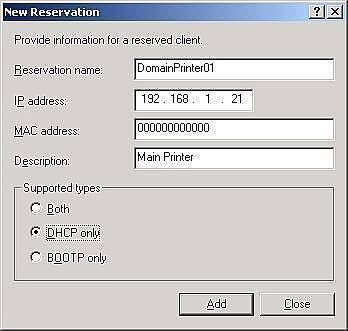
Configuring a DHCP Reservation
- Open the DHCP console.
- In the console tree, click reservations.
- On the action menu, click new reservation.
- In the new reservation dialog box, provide the values for the following fields:
- Reservation name.
- IP address.
- MAC address (without hyphens).
- Description.
- Under supported types, select one of the following options:
- Both
- DHCP only
- BOOTP only
- In the new reservations dialog box, click add then close.
Verifying the DHCP Reservation
- On the client computer, release the client’s IP address at the command prompt with the ipconfig/release command.
- On the server computer, in the DHCP console under address leases, verify that the reservation displays as inactive.
- On the client computer, renew the client’s IP address at command prompt with the ipconfig/renew command.
- On the server computer, in the DHCP console under address leases, verify that the reservation displays as active.
Client Verification
- To verify the client’s IP address, set obtain IP address automatically from TCP/IP properties.
- Use the ipconfig/all command. Verify that the DHCP server IP address for the partner network connection is the IP address of the DHCP server’s partner network connection.
- Use the ipconfig/release command to release the IP address from the DHCP server.
- Use the ipconfig/renew command to renew the IP address from DHCP server.
Bounmy
Hi ….
I want to be your membership I am writing from Laos.
See you soon.
narendra
gud stuff thanks