

DVI (Digital Visual Interface) is a video connector designed by the Digital Display Working Group (DDWG), aimed at maximizing the picture quality of digital display devices such as digital projectors and LCD screens. It is crafted for transporting uncompressed digital video information to a display screen. It is partly compatible with the High-Definition Multimedia Interface (HDMI) standard in digital mode (DVI-D), and VGA in analog mode (DVI-A).
DVI Vs. Older Video Technologies
Previous standards such as Video Graphics Array (VGA) were designed exclusively for CRT-based devices and hence did not take into consideration ‘discrete time’. In such standards, the source, while transmitting each horizontal line of the image, varies the output voltage to represent the desired brightness level. The CRT responds to these voltage level changes by varying the intensity of the electron beam as it scans from one end of the screen to the other.
In digital systems, the brightness value for each pixel needs to be selected so as to display the image properly. The decoder achieves this by sampling the input signal voltage at regular intervals. This technique has some inherent problems. Because these are purely digital signals, there will be some level of distortion if the sample is not taken from the center of the pixel. Also, there is also the possibility of crosstalk interference.
DVI takes an entirely different approach. With DVI, the required brightness level of each pixel is transmitted in a binary code. This way, every pixel in the output buffer of the source device will correspond directly to one pixel in the display device. DVI is free from the noise and distortion which is inherent in analog signals.
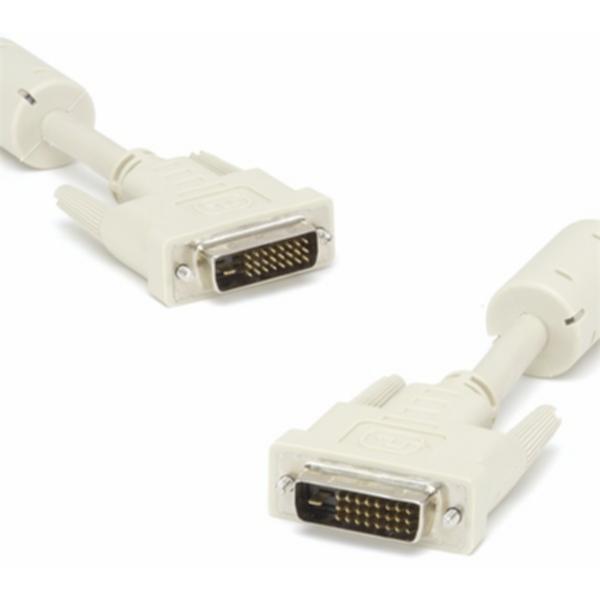
DVI Technology
The data format used in DVI is based on the Panel Serial format that uses TMDS (Transition Minimized Differential Signaling). Each DVI link consists of four twisted pair of wires (one each with a color code of red, blue and green, and one for a clock signal) to transmit 24 bits per pixel. The clock signal is virtually the same as that of the analog video signal, while the picture is sent electronically line by line with blanking intervals separating each line and frame, without using any packetization method. Also, DVI does not use compression, and if a modified part of an image is to be transmitted, then DVI has no choice but to retransmit the entire frame once again.
For a single DVI link, the maximum possible resolution for 60 Hz is 2.6 megapixels. Therefore, DVI connectors are provided with an option to connect a second link if there is a need for more that 2.6 megapixels of resolution. In fact, the DVI specification limits the cutoff point of each link at 165 MHz’s. Every display mode which may require less than this can use the single link mode, while those exceeding the set limit must switch to the dual link mode. The second link can also be switched on when more than 24 bits per pixel are required, in which case the second link transmits the LSBs.
DVI is the only standard that uses both digital and analog transmission options in the same connector. Most of the competing standards, such as Open LDI and LDVS, are based exclusively on digital technology.
As an extension to the above mentioned point, DVI connectors are classified into DVI-D (DVI Digital), DVI-A (DVI Analog), and DVI-I (Digital and Analog). If there is a provision for a second link, that connector is referred to as DVI-DL (Dual Link).
DVI/HDCP
Some DVD players and television sets come with DVI/HDCP connectors, which, even though are physically same as the DVI connectors, also have the additional ability to transmit a HDCP signal (encrypted) using the HDCP protocol for copyright protection.
DVI on Fiber
For those looking to get the very best performance out of their video gear, the standard of DVI (Digital Visual Interface) is highly regarded in the industry. DVI is a connection standard developed by the Digital Display Working Group consortium (DDWG) that is designed to deliver the highest quality video signals to high definition TV’s, digital monitors and DLP projectors by sending video signals uncompressed without any degradation.
DVI on Fiber is the method of sending high quality, uncompressed signals through fiber optic cables (usually for moderate to long distances). Fiber optic cables are generally made out of extremely thin glass type rods that send signals via light pulses instead of electricity. DVI fibers are generally used for pro amateur and professional audio and video set ups to maintain extremely high quality reproduction. Two main reasons why DVI is used on fiber is that, it can send lots of information quickly- commonly referred to as high bandwidth and that there is low loss of signal when traveling far distances. 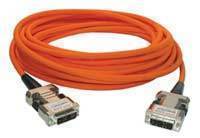
DVI on Fiber for High Bandwidth
DVI was designed to send large amounts of data. It has the ability to send both single streams of data and dual streams of data. In a single stream of data, DVI can send a digital video stream at up to 3.7 Gbits/s, with a dual video stream, it is possible to send up to 7.4 Gbits/s or more. This means that you can get the most out of your current video equipment (e.g. DVD player) allowing your display to show incredibly high quality images. The more data your display is able to receive, usually the more detailed an image will be, thus DVI on fiber gives most users an extremely thick pipeline to send digital video signals to moderate and high end displays that are able to reproduce quality images.
DVI on Fiber for Low Loss of Signal
Another very important reason many high end components use DVI on fiber is to send high quality video signals over far distances without any degradation. It should be noted that with certain types of cables (e.g. copper) distances of as little as 15 feet can have an effect on signal strength which ultimately means that your digital signal will be degraded. For high quality signals 15 feet or more, many videophiles use DVI on fiber optic cables. Fiber optic cables do not use electricity, but pulses of light to send data. Since light can travel extremely far distances without any practical degradation, DVI on fiber is a popular choice.
DVI on Fiber Considerations
It should be noted that in general, fiber optic cables should avoid sharp turns or corners when installed. Usually, the best way to minimize signal degradation is with a relatively straight path from video device to display screen. Another consideration one should have is that DVI on fiber optic cables is generally much more expensive than other types of cables (e.g. copper). However, for those that require the ultimate in visual quality, DVI on fiber optic cables is an excellent choice.
Follow Us!