

Hotmail, which the Microsoft Corporation owns and operates, is a free web based email program that is extremely similar to other types of free web based email providers. Hotmail offers its users 1 gigabyte of storage for their emails and attachments. Each attachment included in an email message cannot exceed 10 MB.
Accessing a Hotmail Email
There are two ways to access a Hotmail email. The first is through any computer with an Internet connection and a web browser and the second is through POP3 access. POP3 access allows users to use an application such as Windows Outlook, Outlook Express, or other email applications to access email from their computer and not necessarily the Internet.
Accessing Hotmail via the Web
One of the reasons that Hotmail is so popular is because it is easy to use. Users can access their email from practically any computer in the world as long as it has both Internet access and a web browser. For instance, in order to access Hotmail, simply go to Hotmail.com and log into an email account (registration and account setup is necessary before hand). From this point, choose the Inbox. The inbox is where new email and email that has been read and saved for later viewing can be found. The inbox is easy to navigate and emails in it can be sorted by date, alphabetically, or even file size. At this point, click the desired email and the web browser will open up a new or smaller sized window to view the email message.
In addition, users can view attachments, reply to an email, compose a new email, create drafts, etc. from this web based application. Hotmail makes it easy to be anywhere in the world, but still be in touch without having to worry about company firewalls or using only one specific computer to access email.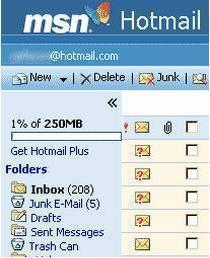
Accessing Hotmail via POP3
A Hotmail account can also be accessed through POP3 access. Those who use email applications such as Microsoft Outlook or Outlook Express can easily sync these applications with their web based Hotmail account. It should be noted that Microsoft does not offer this service for free for new Hotmail members. This service is offered for a fee of $44.95 per year, but includes extras such as 2 GB of storage space, the ability to add 20 MB attachments, no graphical advertising, and the ability for Microsoft Outlook 2003 users to sync with their Hotmail accounts.
Hotmail users since March of 2005 or before may still be able to sync to MS Outlook 2003 or 2002 for free. Instructions on how to do so are listed below:
- Open MS Outlook and click the Tools Menu, then click Email accounts. From this menu, click Add a New Email Account and click Next.
- Choose HTTP and click Next.
- Input user information, which includes a user name and password. Select the type of mail service provider, which is HTTP.
- Choose the amount of security needed by checking or leaving the Remember Password box unchecked. Please note, do not select the Log on Using Secure Password Authentication (SPA) check box.
- Click Next and if everything is complete, click Finish.
The POP3 process is now complete. When MS Outlook is opened, the user will see his/her Hotmail emails in a separate folder. It will be stated as a Hotmail folder found in the Outlook folder list.
Accessing a Hotmail Account with POP3 for Free
There are software programs available that give access to Hotmail email accounts via POP3 applications. Most of these types of software programs are simulators that connect to a Hotmail account. These programs make it easy for users to view all their email from all different sources (including Hotmail) in one easy location. Free programs include freepop.org, getmail.com, and mrpostman.surceforge.net. There are also programs on sale, one of which is Hot Popper, which is available at boolean.ca/hotpop.

Essam
elfersan_1964@HOTMAIL.com
John Davenport
In the last few days my usual access to my hotmail account has apparently been changed by probably idiotic teenagers being let loose (by microsoft ?). I want to be able to access my hotmail account without all the present trouble – and quickly,
jwaters
after i delete an email it takes me back to the previous message rather than showing me the “next” message, that is, the more recent one. How do i control what happens after i’ve read a message and deleted it?
karleen
how do i fix my hotmail to read next page. it is asking for next date at bottom instead of the little arrows to go to the next page.
Cori
OMG what a disaster! I login to hotmail and see that it has changed. I see some icons at the top all in blue and text in white and then a huge screen that just keeps loading and eventually just stays blank/white. So, I am now not able to see my inbox at all. I was able to get into it earlier today before the changes of the site took effect then wham-o! I am using Windows 7 on a PC that is only a few months old. I’ve had little to no probs. Not sure what to do now. I have very important documents that come to me via hotmail and could cause a problem. If this isn’t resolved I’ll have to make several calls and find another email address to use besides hotmail. 🙁
Cori
nm looks like it’s fixed back to the old hotmail. That was really weird.
laban
please help me how to find my profile.
Elaine
how can i set my computer to notify me when an email is received, i want to leave my inbox open and minimise it but have notification when an email comes in
memenode
You can look for a notifier program like DynAdvance Notifier or a browser add-on like WebMail Notifier. Windows Live Mail might come with that feature too in case you’re not using that.
alan kirsch
can get to emails on inbox but browser wonyt open window to read emails yyyy and solution ???
tankerman
i have a O2Xda11 mobile but i cannot read my email they come with a kink to read but i cannot open it
Kate Carpenter
I used to be able to separate emails to and from different people into different folders which was really useful. Now they seem to be all strung together and all go into the different folders even though the emails have no connection with each other. If I send two separate emails to two separate people, sometimes they are separate in my sent box, but just because I sent them within a few minutes of each other they seem to be joined together if I try to move them to different folders. I can’t be sure that if I reply to one of them, that the recipient isn’t recieving all the others – TOTALLY INAPPROPRIATE.