

Charter Communications is the third largest cable TV provider in the United States. Besides cable TV, Charter Communications also offers high-speed Internet and a variety of phone services. While Charter’s service is not available in all areas within the United States, the company does have over 5 million customers in 29 states.
When you sign up for Charter Communication’s high speed Internet service which is categorized as cable broadband, you will either receive or be able to create a user name. This user name not only gives you access to common Internet features such as e-mail, website development tools and the ability to customize your Internet experience, it also offers the ability to access your Charter Communications account information.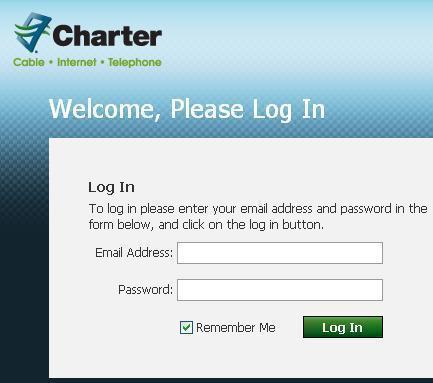
Note that in order to log-in to your Charter e-mail service, you will need to enter your Charter user name and password. Your Charter e-mail log-in user name will be your full Charter e-mail address (e.g.yourname@charter.net). You will also require a Charter password. Initially, a user name and password will be created for you by Charter; however, once you log-in for the first time using your username and the password, you can then change your password to one of your choice. In addition, you can also create additional user names for others in your family.
Logging in to Charter
To login into your Charter Email Account, please follow these three steps:
- Visit the following website: Charter
- On the upper right-hand corner click on Check EMail
- Enter your Charter user name and password and click Log-in

Cindy
log in page won’t open since Dec 23
Danny Hayes
Log in page wont open since last Friday!
local electrician
Appreciate the relevant post. It categorically helped me out. I have a better grasp of this now.
andre
I lakes yahoo email.thanks to yahoo
Tim Anderson
Awfully helpful cheers, I presume your trusty visitors could quite possibly want far more writing such as this keep up the great work.
reviews for consumers
Discovered this on MSN and I’m happy I did. Effectively written article.
That you are a quite persuasive writer. I can see this in your article.
Isaac JD Annan
You are superp and very good at it.
Thanks for your good technical support.
This best site so far I have seen in the world and will like to join, even now.
bye