Home     Blog

How to Remove WGA

How to Remove WGA

To remove Windows Genuine Advantage, particularly the validation tool from your Windows-based machine, you need to: Go to your Windows folder, usually at C:Windows. Search for the folder named 'Downloaded Program Files'. Note that Windows Genuine Advantage, which is found embedded on Microsoft Windows OS products, consists of two distinct elements, namely the Validation Tool and the Notification tool. If you are running a Microsoft Windows Server 2003-operated syste

[ read more ]

How to Use the Windows Vista Activation Wizard

How to Use the Windows Vista Activation Wizard

In order to functionally activate Microsoft Windows Vista OS versions using the Windows Vista activation wizard, you need to do the following: Click on the Start button found on the leftmost bottom portion of the desktop Click on the Computer option from the selection Then click on Properties from the list of options Click on the Click Here option in order to functionally activate your Windows Vista OS version (please be advised that in order to do this, you would need to have administ

[ read more ]

How to Uninstall Windows

How to Uninstall Windows

The Microsoft Windows Operating System (OS) is one of the most widely deployed operating systems in the world. Microsoft upgrades the OS every two to four years in order to bring the latest functionality, features, and security upgrades to the end-user. Unfortunately, each new version of Windows does not prove to be compatible or supported by the hardware users attempt to install the upgrade. This can be for a number of reasons from insufficient RAM to not enough available hard drive space resid

[ read more ]

How to Activate Windows 7

How to Activate Windows 7

Activating Windows 7 is different than registering Windows 7. When you register, you let Windows know you exist so they can add you to their roster. When you activate Windows 7, you verify that the copy you have is legal. In other words, you punch in a key code that lets Windows know that you purchased a legal copy rather than getting a pirated copy. It's necessary to activate because if you don't, you won't have access to all of the Windows features after thirty days. You can ac

[ read more ]

Microsoft Product Keys

Microsoft Product Keys

Product keys are usually in the form of a line of alphanumeric characters. These is included with most types of software products that you purchase. When buying a software and installing it, you are usually prompted to enter your product key. This may take place after opening the program or even before installing it. The product key help to ensure that the software you bought is proper and registered legally. They also help to stop illegal software distribution to those who did not buy the softw

[ read more ]

How to Delete the Operating System from a Computer

How to Delete the Operating System from a Computer

The first thing anyone should do when deleting an operating system from a computer, is backup the computer's contents. This is because deleting the operating system involves deleting the partition of the hard drive that is located on, causing all data to be lost. The user can backup his/her files by going to My Computer, copying the Local C Drive, and pasting it to another hard drive on the same computer, CD/DVD, USB flash drive, online server, external hard drive, or memory card. Boot Disk

[ read more ]

How to Create a Windows Vista Boot Disk

How to Create a Windows Vista Boot Disk

In order to create a Windows Vista boot disk, the Windows Vista operating system's ISO file must be located and downloaded. Microsoft, Dell, and several other computer manufacturers have this file as a downloadable version of the operating system disk, and allows users to create their own disk without having to wait for a physical copy to be sent to them. The file is also available through a number of black market sources on the Internet, specifically in P2P networks and torrent sharing websites

[ read more ]

How to Fix Internal Error 2753

How to Fix Internal Error 2753

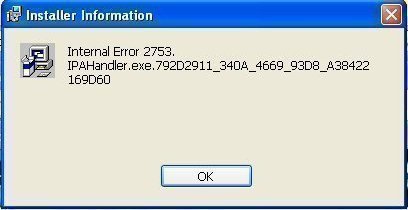
Internal Error 2753 refers to a problem associated with Windows Installer that prevents programs from being installed on a computer. Internal Error 2753 may be displayed through a number of programs and can cause the user a great amount of distress when trying to install a new software. While Internal Error 2753 can be difficult to repair, causing many users to reinstall their entire operating system, it can be fixed via the Windows DOS Command Prompt. What is Windows Installer? Windows In

[ read more ]

How to Uninstall Vista

How to Uninstall Vista

Although Vista is the most recent and technologically advanced operating system available from Microsoft, many users still consider Windows XP or other operating systems more stable. One of the reasons that many end users who have Windows Vista loaded onto their computer want to uninstall it is that many computers just are not powerful enough or configured properly to take advantage of all of Vista's features. Uninstalling Vista is, in most cases, a fairly simple process. The process takes about

[ read more ]

How to Find a Windows XP Product Key

How to Find a Windows XP Product Key

The Windows XP Product Key is necessary if the user wants to install or reinstall Microsoft Windows XP onto his/her computer. This key is a security tool designed to stop counterfeiting and software piracy. The Windows XP Product Key is necessary for installation and reinstallation, so the user must have the Product Key available for use. If the user purchased his/her computer from an OEM (Original Equipment Manufacturer) such as Dell or Sony, a Windows XP Product Key should be easily found o

[ read more ]

Page 1 of 212