

NAT (Network Address Translation) is a technique for preserving scarce Internet IP addresses.
Why NAT?
The current Internet uses IP addresses in the form xxx.xxx.xxx.xxx. A sample IP address might be 202.187.4.212.
Because of the way these IP addresses are allocated, there started to be a shortage of available IP addresses.
The current IP (Internet Protocol) revision in use on the Internet is IPv4. IPv6 is largely a response to this potential IP address shortage.
Unfortunately, IPv6 is going to take decades to implement. A much quicker fix was needed, and that fix was NAT.
Private Address Space for NAT
To conserve IP address space, networks that are not directly connected to the Internet are often given private address space.
Private address space are ranges of IP address that cannot be routed over the Internet.
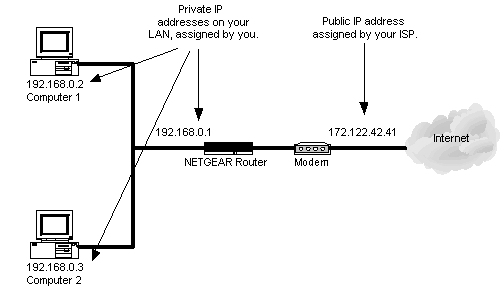
Private address space is often called “RFC 1918” space, because private address space is defined in RFC 1918 – Address Allocation for Private Internets.
RFC 1918 defines three sets of private address space:
Start End Network Size 10.0.0.0 10.255.255.255 /8 172.16.0.0 172.31.255.255 /12 192.168.0.0 192.168.255.255 /16
The use of private address space conserves IP addresses because any person or company can use the same private address space repeatedly.
If someone has a 10.0.0.x network in his/her house, IBM has a 10.0.0.x network, HP has a 10.0.0.x network, and Apple has a 10.0.0.x network, they are all using the same range of IP addresses.
The limitation is that private address space is non-routable. This means that any computer on these private IP addresses cannot (directly) connect to the Internet.
Network Address Translation to the Rescue!
The solution to work around this limitation is NAT (Network Address Translation).
A NAT device, usually a firewall or a router, is placed between the private network and the Internet.
When computers on the private network want to communicate on the Internet, the NAT device quickly and silently modifies the packets they send to have a normal IP address.
When systems on the Internet send reply packets, the NAT device routes those reply packets back to the correct system on the private network.
In this way, hundreds or thousands of computers on the private network can share just one IP address on the public Internet.
For example, someone might have 250 computers on the 192.168.1.x network and one firewall providing NAT services on the IP address 216.17.138.210. Any time one of the hosts communicates across the Internet, the NAT firewall changes the packets’ IP address to 216.17.138.210. When reply packets come from the Internet, the NAT firewall sorts them out and sends them to the correct internal host.
With NAT, all outgoing packets are forwarded to the NAT server. At the NAT server, the source address of these outgoing packets are modified, and then forwarded to the Internet. All incoming packets are transmitted to the NAT server. At the NAT server, the addresses of the packets are changed to internal IP addresses, and are then returned to the source which sent the packet.
The computer that has NAT installed can be configured as either of the following:
- Network address translator server.
- A basic Dynamic Host Configuration Protocol (DHCP) server
- A Domain Name System (DNS) proxy.
- A Windows Internet Name Service (WINS) proxy.
In Routing and Remote Access Service (RRAS), NAT can be used to provide basic Internet connectivity for small offices or home offices. NAT also offers a number of security features which can be used to secure the network resources on your private network. In addition, DNS queries can be sent to a DNS server defined in NAT. NAT also supports a DHCP-compatible IP configuration.
Types of NAT
The type of NAT just described is called One-to-Many NAT. This is because many hosts share one IP address.
It is also possible to implement One-to-One NAT. This is where a host with a private IP address is given a dedicated public IP address in the NAT device. One-to-One NAT is used to support some poorly designed protocols that do not work well over NAT.
How NAT Works
When a computer running NAT receives a packet from an internal client, it replaces the packet header and translates the client’s port number and internal IP address to its own port number and external IP address. It then sends the packet to the destination host on the Internet and keeps track of the mapping information in a table, so that it can route the reply to the appropriate client computer. When the computer running NAT receives a reply from the Internet host, it again replaces the packet header and sends the packet to the client. Both the client computer and the Internet host appear to be communicating directly with each other.
For example, a client computer with the IP address 192.168.10.2 wants to contact a Web server with the IP address 131.110.30.4. The client is configured to use 192.168.1.1 as the default gateway, which is the internal IP address of the computer running NAT. The external IP address of the computer running NAT is 131.110.5.1. In this example, the NAT process occurs as follows:
- The client computer sends a packet to the computer running NAT. The packet header indicates that the packet originates from port 1074 on the computer with the IP address 192.168.10.2 and has a destination of port 80 on 131.110.30.4.
- The computer running NAT changes the packet header to indicate that the packet originates from port 1563 on host 131.110.5.1, but does not change the destination. The computer running NAT then sends the packet to the Web server over the Internet.
- The external Web server receives the packet and sends a reply. The packet header for the reply indicates that the packet originates from port 80 on 131.110.30.4 and has a destination of port 1563 on host 131.110.5.1.
- The computer running NAT receives the packet and checks its mapping information to determine the destination client computer. The computer running NAT changes the packet header to indicate a destination of port 1074 on 192.168.10.5, then sends the packet to the client. The packet’s source remains as port 80 on 131.110.30.4, which is the Web server’s IP address.
As mentioned previously, NAT translates IP addresses and associated TCP/UDP port numbers on the private network to public IP addresses which can be routed on the Internet. When this translation occurs, NAT assigns a unique port number to the session as well. A client computer is mapped to a single public IP address assigned by the ISP of the organization or assigned by the Internet Network Information Center (InterNIC). Through this mapping, NAT is then able to return responses to the correct client computer. Information on these mapping are stored in the NAT Session Mapping table.
The default configuration is that NAT translates IP addresses and TCP/UDP ports in the IP datagrams, which in turn result in the changing of these fields within the IP, TCP, and UDP headers:
- Source IP address
- TCP, UDP and IP checksum
- Source port.
Understanding the Limitations of NAT
There are a few protocols that NAT is unable to perform network address translation for. For NAT to work and perform network address translation, it needs the IP information or port number information in the IP header and TCP header of packets. NAT uses IP addresses and the TCP port and UDP port within the TCP header, UDP header, and IP header to translate NAT traffic. While you can use a NAT editor to translate FTP traffic through a NAT system, this is not true for all protocols. A NAT editor only works for a few protocols such as FTP and PPTP. The protocols that are basically unable to pass NAT, is probably one of the most significant limitations of NAT.
A few limitations of NAT are listed here:
- When NAT is implemented through Routing and Remote Access, only the IP protocol is supported. The following protocols are protocols that NAT cannot perform address translation on:
- Simple Network Management Protocol (SNMP)
- Lightweight Directory Access Protocol (LDAP)
- Kerberos version 5
- Component Object Model (COM)
- Distributed Component Object Model (DCOM)
- Microsoft Remote Procedure Call (RPC)
- The latest Microsoft IP Security protocol (IPSec) that provides IP header encryption through Authentication Header (AH) cannot pass over NAT.
- Domain controllers are unable to replicate over the NAT server.
The NAT Session Mapping Table
The information contained in the NAT Session Mapping table enables NAT to return responses to the correct client computer.
The information stored in the NAT Session Mapping table is listed here:
- Protocol; specified as either TCP or UDP, it is the protocol utilized to forward packets.
- Direction; specified as either inbound traffic, or as outbound traffic
- Private Address; the internal client computer’s private IP address.
- Private Port; the private port number for the session.
- Public Address; the public IP address as assigned by the ISP of the organization or by the Internet Network Information Center (InterNIC)
- Public Port; port number assigned to the session.
- Remote Address; IP address which the client wants to access.
- Remote Port; port number assigned to session.
- Idle Time; for tracking of the entries within the NAT Session Mapping table. Entries are removed when no traffic is sent over the specific connection for a predefined time period.
Understanding the Differences between NAT and Internet Connection Sharing (ICS)
Internet Connection Sharing (ICS) is another feature that provides Internet connectivity to hosts using an interface. ICS provides a single public IP address to connect to the Internet, fixed address range for hosts, DNS proxy for name resolution, and automatic IP addressing. ICS is also easy to configure.
While a NAT implementation through Routing and Remote Access is the recommended approach, you can use Internet Connection Sharing for exceptionally small networks. You can use ICS to connect the whole network to the Internet. This is due to the ICS feature providing a translated connection – all computers can access resources on the Internet. Much like NAT, when ICS is used, private IP addresses are hidden from the public network. Public external addresses are used over the public network. While NAT includes the Basic Firewall feature that only allows response traffic to be forwarded to the private network, ICS includes the Internet Connection Firewall service for the same functionality.
One of the main features of using ICS is that it is preconfigured. ICS automatically configures the internal address of the computer hosting the shared connection as 192.168.0.1. Internal clients are assigned addresses in the 192.168.0.0/24 address range. Internal clients exist on the identical physical subnet. All internal clients point to the ICS computer for DNS resolution. The shared external interface has a single public address.
With a NAT implementation, the NAT server can be configured with any private IP address as its internal address. You can also disable the DNS proxy and DHCP server features if you have a DNS server and DHCP server configured within your environment. With NAT, you can use multiple interfaces. The shared external interface can be configured with a single public address or with multiple public addresses.
You can install ICS using Network And Dial-Up Connections. NAT is installed through the Routing And Remote Access console.
NAT Design Requirements
A few NAT-specific design requirements are listed here:
- Define the characteristics of the data passing through the NAT server. Requirements should include data confidentiality and the quantity of data the NAT server should handle.
- The resources residing in the private network which should be accessible to Internet users.
- The time duration for which users need access using the Internet connection.
- The response time for those applications accessing resources using the Internet connection.
- Router characteristics, including current WAN connections, protocols being used in the rivate network, and placement of existing routers.
- Future network expansion.
Designing a NAT Strategy
The factors that should be included when you define and design a NAT strategy are listed below:
- Determine whether NAT is indeed the proper address translation mechanism for your network. Factors to include in this decision should be:
- Requirements of the users
- Type of client computers that NAT must support
- Size of the organization
- Existing infrastructure
- Determine which protocols and applications will not be able to pass through NAT. For instance, NAT cannot perform address translation on Simple Network Management Protocol (SNMP) and Lightweight Directory Access Protocol (LDAP).
- Determine the type of connection which will be used. With a demand-dial interface, the connection is only established when the client specifically requests the connection. With a persistent connection, the connections are permanent connections, and remain open all the time.
- Determine the private network IP addressing scheme and the number of public IP addresses to acquire.
- Determine which interfaces are going to be configured with private IP addresses, and which interfaces will be configured with public IP addresses.
- Determine the optimal number of connections required to ensure availability and improved performance or your NAT solution.
- Determine whether your implementation of NAT will encompass multiple Internet connections for redundancy purposes.
- Determine the servers that will be configured as NAT servers.
- Determine whether NAT will allow Internet users to be able to access resources on the private network.
- Determine how access to resources on the private network will be assigned and maintained.
- Determine whether filters will be configured to restrict users located within the private network from accessing the Internet.
- Determine whether NAT will be performing the following functions in addition to network address translation:
- Issue IP addresses.
- Handle DNS resolution requests.
When client computers access resources on the Internet, they use fully qualified domain names (FQDNs) which need to be resolved to IP addresses by DNS servers. You therefore need to determine which method will be used for DNS name resolution for client computes that need to access the Internet.
The methods which you can use to define the DNS server which clients can use to resolve fully qualified domain names (FQDNs) are listed here:
- You can manually configure each client computer. This method should be utilized if you want to use different DNS name resolution methods for different client computers.
- You can define the DNS server NAT so that the FQDNs are automatically resolved for client computers.
The advantages and disadvantages of using certain IP configuration methods are discussed now. The information provided can be useful when you need to decide on the IP configuration method to use with your NAT design.
The advantages of using the NAT IP address assignment feature as the IP configuration method are listed here.
- Misconfigurations are reduced, and hardly any time is required to assign IP configuration information.
- No additional expenses are needed.
- Multiple network segments are supported.
The disadvantage of using the NAT IP address assignment feature is that it is only available for DHCP clients.
The advantages of using a DHCP server as the IP configuration method are listed next:
- Misconfigurations are reduced, and hardly any time is required to assign IP configuration information.
- Multiple network segments are supported.
The disadvantages of using a DHCP server as the IP configuration method is listed below:
- The DHCP server can only be accessed and used for IP address assignment by DHCP client computers.
- Additional expenditure is required for setting up of the DHCP server(s).
The advantages of using Automatic Private IP Assignment (APIPA) as the IP configuration method are listed here:
- Misconfigurations are reduced, and hardly any time is required to assign IP configuration information.
- No additional expenditure is necessary.
The disadvantages of using Automatic Private IP Assignment (APIPA) as the IP configuration method is listed below:
- Not all Windows client computers can use APIPA.
- APIPA also only supports one segment SOHO or branch office networks.
The advantage of using manual configuration as the IP configuration method is listed here:
- All Windows client computers can be manually configured.
The disadvantages of using manual configuration as the IP configuration method is listed below:
- Susceptible to misconfigurations.
- Extremely time consuming and intricate to manage as the network expands.
NAT Server Placement and NAT Server Requirements
The NAT server should reside on the private network, and should have the following components:
- One network adapter card configured with the internal private IP addresses connecting the internal private client computers. You can define one or multiple NAT server interfaces to the private branch office network or small office or home office (SOHO).
- One network adapter configured with the public IP address which connects to the Internet.
A few recommendations for placing NAT servers within your environment are listed here:
- IP forwarding should not be enabled on the interface of the NAT server which is connected to the Internet.
- IP routing should be enabled on the interfaces of the NAT server which are connected to private network segments/small office or home office (SOHO).
- Private network segments/SOHO should be isolated from the Internet.
To improve NAT server performance and optimize your NAT server hardware, consider the following recommendations:
- Use a dedicated computer to run NAT. When using a dedicated NAT server, you provide the following key features for your NAT implementation:
- Preventing other services and applications from running on the same computer as NAT means that these services/applications do not use system resources. System resources are dedicated to NAT which in turn provides optimal NAT server performance.
- You would also be preventing other services and applications from being the cause of the NAT server needing to be restarted, or shutting down.
- Using a persistent Internet connection would ensure that the NAT server can at all time connect to the Internet.
- Using a higher data rate Internet connection leads to improved performance of traffic passing through the Internet connection.
NAT Security
NAT does provide some security features that you can use to secure your private internal network and its resources from unauthorized access. Remember that NAT should not be used an alternative to implementing a firewall solution, if necessary.
While NAT security is on the whole sound, you can use the security features provided by NAT to enhance security of your NAT implementation further. The security requirements of the organization should be used as the basis for implementing a few NAT security features.
One of the primary objectives of implementing NAT security should be to restrict inbound traffic on the NAT server.
Routing and Remote Access Service (RRAS) IP packet filters can be used to restrict incoming or outgoing IP address ranges based on information in the IP header. You can configure and combine multiple filters to control network traffic.
A few important characteristics of IP packet filters are listed below:
- IP packet filters restrict all traffic sent through routers.
- IP packet filters restrictions are cumulative over multiple routers/interfaces.
Unwanted traffic that should be filtered usually includes:
- Unauthorized Internet users attempting to access resources on the private network.
- Applications/games which are not supported by your organization.
When to use IP packet filters:
- To restrict traffic being sent to, or from a specific computer, you can filter on source/destination IP address range.
- To restrict traffic coming from, or being sent to a specific IP address range of a network segment, you can filter on source/destination IP address range.
- To restrict traffic being transmitted to/from a particular application, you can filter on protocol number.
With NAT, you can configure two types of IP packet filters. When defining criteria for the packet filters, you can use whatever combination of IP header information.
The types of IP packet filters configurable for NAT are:
- Inbound IP packet filters: Here, traffic is filtered based on the IP address of the workstation attempting to access the private network. NAT by default drops all inbound requests to access private network resources. Therefore, you need to specifically allow access to private network resources using some additional configuration.
- Outbound IP packet filters: These filters are used to filter or restrict traffic attempting to access the Internet.
There may be occasions when you want specific Internet users or VPN users to access resources on the private network, or access a Web server residing on the private network. The methods which you can utilize to map external public IP addresses and ports to private IP addresses and private ports so that internal private resources can be accessed are discussed here:
- NAT address mappings: You can use a special port to map specific Internet users to resources within the private network, and in doing so, provide Internet users with access to resources residing within the private network. A special port can be defined as a static mapping of a public IP address and port number combination to a private IP address and port number. Administrators can configure a NAT address mapping for each specific private network resource that Internet users are allowed to access. The actual number of private network resources that you can make available to Internet users to access is determined by the number of TCP/UDP port numbers.
- NAT address pools: The NAT address pool feature can be used to allow VPN users and Internet users to access private network resources. The NAT server requests for one of the public IP addresses with a specific TCP/UDP port number to resources in the private network.A few basic rules for using NAT address pools are listed here:
- Administrators must provide the private network IP addresses of the servers which the NAT server can connect users to.
- Administrators have to implement a port restricting strategy to limit the traffic that is allowed to access the private network.
upendra
what happen if more than one client in the private network views a page or video ….the view count of the same will increase or it will remain same no matter how many clients in the private network views the page or video.
Ajeet Singh
excellent article……
venky
Great explanation; now my concept is totally clear on NAT.
Ben
This is the most detailed article I have seen. It is the only article I have read that talked about NAT.I had never really understood NAT’s exact purpose until now.
Arunava Roy
Great explanation; now my concept is totally clear on NAT.
anup kulkarni
Very Very Good Explaination
shihab
excellent and simple explanation
thanks
Sudheer
how the nat is work between two hosts, i need some diagrametic explanation. and how the ip addresses are work in nat. i need some diagrametic and theretical explanation.
memenode
Will this presentation be of any help?
Farhan Ziya
Really understandable for new technical person…..very clear and understandable…..Thanks
sabry
good explanation! thanks..
nitin123
thanks, a simple and complete explanation
Lahiru
🙂 Thank you , its vry helpful
Manila
Very good and simple explanation. Would be useful to have 2 clients in the example.
@Bala K -For an additional internal client the computer running NAT allocates another port.
For example: second clients has IP 192.168.10.4 and port 1074 will be translated into IP 131.110.5.1 and any other available port number different than 1563 ( for example: 1564).
Bala K
So what happens if 2 internal computers place requests to the same external web server?
When the response returns to the NAT / Router, how does it know which internal computer to forward the response to?
SmileyFace
EXCELLENT explanation. Very helpful. THank you.
ganeshgk
clear cut and simple explanation…….
vijay2122
very good explanation……….
patel vijay
🙂 very good explanation dear…
seyi
clear and concise.
Rakhi
🙂 Good Explanation
shalini
🙂 simple and good explaination
Chaudhary
Excellent……………………
prashant
excellent and also a good explaination