

A broadcast address is an IP address that targets all systems on a specific subnet instead of single hosts. The broadcast address of any IP address can be calculated by taking the bit compliment of the subnet mask, sometimes referred to as the reverse mask, and then applying it with a bitwise OR calculation to the IP address in question.
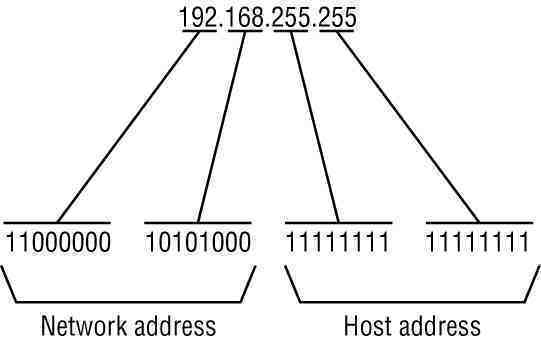
Some systems that are derived from BSD use zeros-broadcasts instead of ones-broadcasts. This means that when a broadcast address is created, the host area of the IP address is filled while displayed using binary values with zeros instead of ones. Most operating systems use ones-broadcasts. Changing systems to use zeros-broadcasts will break some communications in the wrong environments, so the user should understand his/her needs before changing the broadcast address or type.
Math Example
If a system has the IP address 192.168.12.220 and a network mask of 255.255.255.128, what should the broadcast address for the system be? To do this calculation, convert all numbers to binary values. For bitwise, remember that any two values where at least one value is 1, the result will be 1, otherwise the result is 0.
| IP Address: | 11000000.10101000.00001100.11011100 |
| Reverse Mask: | 00000000.00000000.00000000.01111111 |
| bitwise OR: | ———————————————– |
| Broadcast: | 11000000.10101000.00001100.11111111 |
Convert the binary value back to octal and the resulting value is 192.168.12.255. The tech-faq.com subnet calculator can assist in calculating network IP address values.
Setting Up a Broadcast Address
In most cases, the broadcast address will be properly set up by modern operating systems once the IP address is entered and subnet masked. In some older unix systems that use classful definitions of subnets, the broadcast address is improperly formed, and the user will need to change it.
Changing Windows Systems Broadcast Addresses
Windows systems do not allow users to change the broadcast address by hand. Users can, however, choose whether the system uses zeros-broadcasts or ones-broadcasts. To change a windows system to use zeros-broadcasts, use the following procedure:
- Log into the windows system with an administrator account.
- Open the registry editor. If unfamiliar with using the Windows registry editor, please do not perform these steps. A mistake can make the system unusable.
- Find the registry key “HKEY_LOCAL_MACHINESYSTEMCurrentControlSetServices TcpipParametersInterfaces[Adapter ID]”. Replace [Adapter ID] with the actual adapter ID the broadcast address should be changed for. Get a list of all the adapter IDs in the Windows system by opening a command line prompt and executing a “ipconfig /all” command.
- Create a new DWORD value called “UseZeroBroadcast.” Set its inital value to 1. Use a hex or binary value in this case, since 1 is the same for both numbering systems.
- Reboot the system for the changes to take effect.
Zeros-broadcast for that adapter is now enabled.
Changing Unix Systems Broadcast Addresses
Unix systems give the administrator a method to change the broadcast address to whatever value he/she sees fit to change it to. The user should be familiar with the process before changing his/her broadcast address. In some cases, when using ifconfig from the command line, the broadcast address is set to a classful based broadcast instead of the proper broadcast. Check the results with the “ifconfig” command. Unfortunately, every unix system has differing syntax for the ifconfig command and not all command options are available for every unix system. Check the ifconfig main page for help. The sample procedure below is the process used on a Linux system to change a system broadcast address.
- Open a terminal window, telnet, or ssh into the unix system in question, and log into the system.
- “Su” or “sudo” commands properly to get root privileges.
- Determine which adapter to change the broadcast address on the system to by checking the output of “ifconfig -a.”
- Execute “ifconfigbroadcast”. Replaceandwith the proper values.
- Test the configuration.
krupaharan
How can i identify which system in the network has IP address nd which system has Broadcast address…??and Is there any restrictions to number of broadcast address hosts in network…??
pls help me ….thanks in advance…..
guru
can u please explain how to convert the broadcast address to ip address.
and one more doubt i had 127.10.10.193/18 how to calculate this to broadcast address.
john
127.10.10.255
01111000.00001010.00001010.11000001 – ip in binary
00000000.00000000.00111111.11111111 – reverse mask of subnet
01111111.00001010.00001010.11111111 = 127.10.10.255
john
i mean
127.10.63.255
01111000.00001010.00 001010.11000001 – ip in binary
00000000.00000000.00 111111.11111111 – reverse mask of subnet
01111111.00001010.00 111111.11111111 – 127.10.63.255
jeeva
hi
please give me the brief explanation of broadcost and that examples
jeffrey yong
hi
Could somebody please explain how to work out the broadcast address of 216.14.55.137
Kevin Canning
Hi
Could somebody please explain how to work out the broadcast address of 181.152.241.69/26 of the 42nd and 48th usuable subnet?
Thanks for your time
memenode
A subnet calculator might help.
Harish Maliwal
How to change the broadcast ip of a network interface
Issue :
I had assigned IP 192.168.33.114 to vnet1, but in ifconfig output it was showing the same ip (192.168.43.134) and same broadcast address (192.168.43.255) on both the interface, becasue of that i was not able to ping second interface ip:
# ifconfig -a
lo0: flags=2001000849<UP,LOOPBACK,RUNNING,MULTICAST,IPv4,VIRTUAL> mtu 8232 index 1
inet 127.0.0.1 netmask ff000000
vnet0: flags=1000843<UP,BROADCAST,RUNNING,MULTICAST,IPv4> mtu 1500 index 2
inet 192.168.43.134 netmask ffffff00 broadcast 192.168.43.255
ether 0:14:4f:fb:51:af
vnet1: flags=1000842<BROADCAST,RUNNING,MULTICAST,IPv4> mtu 1500 index 3
inet 192.168.43.134 netmask ffffff00 broadcast 192.168.43.255
ether 0:14:4f:fa:c5:95
# more /etc/hosts
#
# Internet host table
#
::1 localhost
127.0.0.1 localhost
192.168.43.134 test loghost
192.168.33.114 test1
# cat /etc/hostname.vnet1
test1
Solution :
I change the /etc/hostname.vnet1 file with below entry;
# cat /etc/hostname.vnet1
192.168.33.114 netmask + broadcast
Restart the network service;
# svcadm restart network/physical
and check the ifconfig output;
# ifconfig -a
lo0: flags=2001000849<UP,LOOPBACK,RUNNING,MULTICAST,IPv4,VIRTUAL> mtu 8232 index 1
inet 127.0.0.1 netmask ff000000
vnet0: flags=1000843<UP,BROADCAST,RUNNING,MULTICAST,IPv4> mtu 1500 index 2
inet 192.168.43.134 netmask ffffff00 broadcast 192.168.43.255
ether 0:14:4f:fb:51:af
vnet1: flags=1000842<BROADCAST,RUNNING,MULTICAST,IPv4> mtu 1500 index 3
inet 192.168.33.114 netmask ffffff00 broadcast 192.168.33.255
ether 0:14:4f:fa:c5:95
wow, the IP and broadcast address has changed and i got the ping of second interface. Here my issue resolves…:-)