

An IP address can be defined as a unique numeric identifier (address) that is assigned to each computer operating in a TCP/IP based network. Manually configuring computers with IP addresses and other TCP/IP configuration parameters is not an intricate task. However, manually configuring thousands of workstations with unique IP addresses would be a time consuming, and cumbersome experience. When you manually assign IP addresses, you increase the risk of duplicating IP address assignments, configuring the incorrectsubnet masks, and incorrectly configuring other TCP/IP configuration parameters.
This is where the Dynamic Host Configuration Protocol (DHCP) becomes important. The Dynamic Host Configuration Protocol (DHCP) is a service that does the above mentioned tasks for administrators, thereby saving simplifying the administration of IP addressing in TCP/IP based networks. TCP/IP configuration was basically a manual process before the DHCP protocol was introduced. One of the main disadvantages of manually assigning IP addresses to hundreds of computers is that it could result in the assigned IP addresses not being unique. In a TCP/IP based network, to uniquely identify computers on the network, each computer must have a unique IP address. To communicate on the Internet and private TCP/IP network, all hosts defined on the network must have IP addresses. The 32-bit IP address identifies a particular host on the network.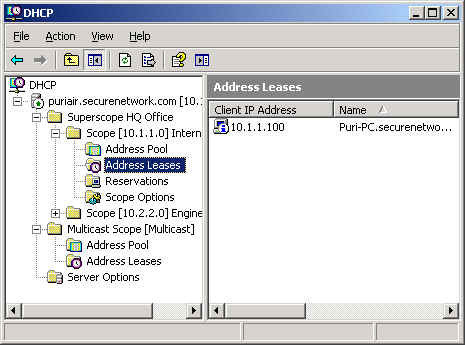
You should only use manual address assignment under these circumstances:
- When there are no configured DHCP servers on the network and the network haves multiple network segments.
- When you are configuring a computer as a DHCP server, you assign that computer a static IP address.
- When you configure computers as important network servers such as domain controllers, or DNS servers; you manually assign the IP address to these computers.
DHCP functions at the application layer of the TCP/IP protocol stack. One of the primary tasks of the protocol is to automatically assign IP addresses to DHCP clients. A server running the DHCP service is called a DHCP server. The DHCP protocol automates the configuration of TCP/IP clients because IP addressing occurs through the system. You can configure a server as a DHCP server so that the DHCP server can automatically assign IP addresses to DHCP clients, and with no manual intervention. IP addresses that are assigned via a DHCP server are regarded as dynamically assigned IP addresses. The DHCP server assigns IP addresses from a predetermined IP address range(s), called a scope.
The functions of the DHCP server are outlined below:
- Dynamically assign IP addresses to DHCP clients.
- Allocate the following TCP/IP configuration information to DHCP clients:
You can increase the availability of DHCP servers by using the 80/20 Rule if you have two DHCP servers located on different subnets.
The 80/20 Rule is applied as follows:
- Allocate 80 percent of the IP addresses to the DHCP server which resides on the local subnet.
- Allocate 20 percent of the IP addresses to the DHCP Server on the remote subnet.
If the DHCP server that is allocated with 80 percent of the IP addresses has a failure, the remote DHCP server would resume assigning the DHCP clients with IP addresses.
Because the DHCP service is a very important service in a TCP/IP based network, the following implementations are strongly recommended.
- Small networks should have at least one DHCP server.
- Large networks should have multiple implementations of DHCP servers. This implementation configuration enables the following benefits:
- Fault tolerance is provided.
- The address space can be split.
The framework for the DHCP protocol is defined in RFC 2131. The DHCP protocol stems from the Bootstrap Protocol (BOOTP) protocol. BOOTP enables clients to boot up from the network instead of booting up from the hard drive. The DHCP server has a predefined pool of IP addresses, from which it allocates IP addresses to DHCP clients. During the boot process, DHCP clients request IP addresses, and obtain leases for IP addresses from the DHCP server.
When the DHCP client boots on the network, a negotiation process called the DHCP lease process occurs between the DHCP server and client. The negotiation process comprises of four messages, sent between the DHCP server and the DHCP client.
- Two messages from the client.
- Two messages from the DHCP server.
DHCP Messages
The DHCP protocol consists of eight discrete message types:
| DHCP Message | Description |
|---|---|
| DHCP Discover | UDP broadcast from DHCP client to locate available servers. |
| DHCP Offer | DHCP server to client in response to DHCP Discover with offer of configuration parameters. |
| DHCP Request | Client response to servers either requesting offered parameters from one server and implicitly declining offers from all others, confirming correctness of previously allocated address after, e.g. system reboot, or extending the lease on a particular network address. |
| DHCP ACK | Server to client with configuration parameters, including committed network address. |
| DHCP NAK | Server to client indicating client’s notion of network address is incorrect (e.g. client has moved to new subnet) or client’s lease has expired. |
| DHCP Decline | Error message from DHCP client to server indicating network address is already in use. |
| DHCP Release | Message from DHCP client to server releasing network address and canceling remaining lease. |
| DHCP Inform | Client asking DHCP server only for local configuration parameters because the client already has externally configured network address. |
DHCP scopes
A scope can be defined as a set of IP addresses which the DHCP server can allocate or assign to DHCP clients. A scope contains specific configuration information for clients that have IP addresses which are within the particular scope. Scope information for each DHCP server is specific to that particular DHCP server only, and is not shared
between DHCP servers. Scopes for DHCP servers are configured by administrators.
A DHCP has to have at least one scope, which includes the following properties.
- The specified range of IP addresses which are going to be leased to DHCP clients.
- The subnet mask.
- The DHCP scope options (DNS IP addresses, WINS IP addresses).
- The lease duration. The default of 8 days is suitable for small networks.
- Any reservations. Reservations include elements such as a client always receiving the same IP addresses and TCP/IP
configuration information when it starts.
Therefore, when you start designing your DHCP strategy, and you are defining the scopes for your DHCP servers, you should clarify the following.
- The start and end addresses which would define the range of addresses you want to utilize.
- The subnet mask of the particular subnet.
- The amount of time that the lease should be for the IP addresses leased from your scopes.
- All other TCP/IP configuration information which you want assigned to DHCP clients.
- Determine those IP addresses that you want to reserve for clients.
- Determine whether any clients using statically assigned IP addresses need to be excluded from the address
pool.
If you have multiple scopes, remember that clients can only obtain IP addresses from the subnet to which they belong. Clients cannot obtain IP addresses from scopes that are connected with different subnets. However, if your clients should be able to obtain IP addresses from other scopes, you can configure a superscope.
A superscope is the grouping of scopes under one administrative entity that enables clients to obtain IP addresses, and renew IP addresses from any scope that is part of the superscope.
Superscopes are typically created for under the following circumstances:
- The existing scope.s IP addresses supply is being depleted.
- You want to use two DHCP servers on the same subnet. This is usually for providing redundancy.
- You need to move clients from one range of IP addresses to a different range of IP addresses.
The DHCP Lease Process
The DHCP lease process, also known as the DHCP negotiation process, is a fairly straightforward process.
The DHCP lease process is described below:
- The DHCP Discover message is sent from the client to the DHCP server. This is the message used to request an IP address lease fro a DHCP server. The message is sent when the client boots up. The DHCP Discover message is a broadcast packet that is sent over the network, requesting for a DHCP server to respond to it.
- The DHCP servers that have a valid range of IP addresses, sends an offer message to the client. The DHCP Offer message is the response that the DHCP server sends to the client. The DHCP Offer message informs the client that the DHCP server has an available IP address. The DHCP Offer message includes the following information:
- IP address of the DHCP server which is offering the IP address.
- MAC address of the client.
- Subnet mask.
- Length of the lease.
- The client sends the DHCP server a DHCP Request message. This message indicates that the client accepted the offer from the first DHCP server which responded to it. It also indicates that the client is requesting the particular IP address for lease. The client broadcasts the acceptance message so that all other DHCP servers who offered addresses
can withdraw those addresses. The message contains the IP address of the DHCP server which it has selected. - The DHCP server sends the client a DHCP Acknowledge message. The DHCP Acknowledge message is actually the process of assigning the IP address lease to the client.
Understanding DHCP and DNS Integration
Domain Name System (DNS) is the main name resolution method used to provide clients with name to IP address resolution. This in turn enables clients to locate resources on the network.
The Dynamic DNS (DDNS) feature, initially introduced in Windows 2000, enables clients to automatically register their IP addresses and host names with a DNS server. When the DHCP service is running on a server, the DHCP server register the IP address of clients in DNS when the clients receive IP addresses from the DHCP server. The client no longer contacts the DDNS server to register its IP addresses because the Windows Server 2003 DHCP service dynamically updates the DNS records on behalf the client.
With Windows Server 2003 DHCP, three options are available for registering IP addresses in DNS. The options can be configured for the DHCP server, or for each individual scope.
The options which can be specified to enable/disable the DHCP service to dynamically update DNS records on behalf of the client are:
- The DHCP server can be configured to not register any IP address of the DHCP clients when it assigns IP addresses to these clients.
- The DHCP server can be configured to at all times register all IP address of clients when they receive IP addresses from the DHCP server.
- The default option results in the DHCP server registering the IP addresses of clients with the authoritative DNS server, based on the client.s request for an IP address.
The Advantages of using DHCP
The main advantages of using DHCP are summarized below:
- DHCP is included with popular server packages: To implement DHCP requires no additional costs.
- Centralized, simpler management of IP addressing: You can manage IP addressing from a central location.
- DHCP also provides for the simple deployment of other configuration options, such as default gateway and DNS suffix.
- Because the system assigns IP addresses, it leads to less incorrect configurations of IP addresses. This is mainly due to IP configuration information being entered at one location, and the server distributing this information to clients.
- Duplicated IP addresses are prevented.
- IP addresses are also preserved. DHCP servers only allocate IP addresses to clients when they request them.
- The DHCP service can assign IP addresses to both individual hosts, and multicast groups.
Multicast groups are used when communication occurs with server clusters. - DHCP service supports clustering. This enables you to set up high availability DHCP servers.
- In Windows Server, DHCP integrates with Dynamic DNS (DDNS). This facilitates dynamic IP address management because the DHCP server registers the client computer.s Address (A) records and pointer (PTR) records in the DNS database when the client obtains an IP address. This is made possible through DHCP integration with Dynamic DNS
(DDNS). - You can monitor the pool of available IP addresses, and also be notified when the IP address pool reaches a certain
threshold. - Through authorizing DHCP servers in Active Directory, you can restrict your DHCP servers to only those that are
authorized. Active Directory also allows you to specify those clients that the DHCP server can allocate addresses
to. - Dynamic IP addressing through DHCP easily scales from small to large networking environments.
The Disadvantages of using DHCP
The main disadvantages of using DHCP are summarized below:
- The DHCP server can be a single point of failure in networking environments that only have one DHCP server.
- If your network has multiple segments, you have to perform either of the following additional configurations:
- Place a DHCP server on each segment
- Place a DHCP relay agent on each segment
- Configure routers to forward Bootstrap Protocol (BootP) broadcasts.
- All incorrectly defined configuration information will automatically be propagated to your DHCP clients.
Designing a DHCP Strategy
In order for DHCP to operate successfully, all of your client computers should be able to contact the DHCP server, and contact it at any time. DHCP relies on the network topology, and is in turn relied on by all TCP/IP based hosts within your networking environment.
The factors that should be included or determined, when you design a DHCP strategy and determine the placement of the DHCP servers are listed below:
- Determine the network topology.
- Determine the number of hosts on your network.
- Determine the number of subnets that DHCP will be supporting
- Determine the location of your routers.
- Determine the transmission speed between your network segments.
- Determine whether Dynamic DNS (DDNS) will be used.
- Determine the number of clients that DHCP will be allocating IP addresses to.
- Determine the location of these clients.
- Identify those clients, if any, which could possibly not be able to use DHCP for IP addresses allocation.
- Identify clients which will be using BOOTP.
- Identify the WAN links which could possibly cause a failure that could prevent clients from accessing the DHCP
server. - Define the dedicated or reserved IP addresses that should be excluded from the DHCP address pool range.
The main design requirements associated with DHCP are:
- It is recommended to implement at least two DHCP servers to provide redundancy. Having two different DHCP servers ensures a highly available DHCP infrastructure because it could prevent issues which arise when network link failure occurs.
- If your network has multiple segments, you have to perform either of the following:
- Place a DHCP server on each segment.
- Place a DHCP relay agent on each segment.
- Configure your routers to forward Bootstrap Protocol (BootP) broadcasts.
The failover methods which you should consider implementing when you design a DHCP implementation are:
- Deploy a standby DHCP server: In this failover method, the standby DHCP server is configured with the same scope of the primary DHCP server. The standby DHCP server is only brought online when the primary DHC server has a failure.
- Deploy a clustered server: Implementing a clustered server provides failover capabilities.
- Split the scopes: You can split the scopes of your DHCP servers when they are placed on different subnets.
This provides failover when the DHCP server has a failure, or when a subnet fails. When splitting the scopes, bear in mind that you do not need to split the scopes in equal proportions. It is recommended to place a larger portion of the scope on the DHCP server that actually serves the local subnet.
Determining the number of DHCP servers and placement
The number of DHCP servers you would need to implement is determined by the following factors:
- Network topology.
- Server hardware would influence the number of DHCP clients which the DHCP server would be capable of servicing.
Server hardware also affects the performance of your DHCP servers. - Network configuration.
- Routing configuration.
- Availability requirements of the DHCP servers.
- The number of clients which the DHCP servers are going to service.
In a routed network, you would need DHCP relay agents if you plan to implement only one DHCP server. It is recommended to place the DHCP server on the subnet that has the majority of hosts.
DHCP server requirements
If you are implementing only one DHCP server, you should definitely test that the DHCP server is capable of handling the client load. When deciding on which server to use to run the DHCP service, bear in mind that the performance of the server influences the performance of the DHCP service.
The performance of a server can be enhanced when the server has:
- Multiple CPUs.
- Multiple network cards.
- High performance hard drives.
If you are implementing multiple DHCP servers, place DHCP servers on all subnets which are connected via slow, unstable WAN links. This in turn prevents DHCP messages from being transmitted over the WAN.
Enabling DHCP support for non Microsoft DHCP clients
For networks that have only Microsoft client computers, setting up your DHCP clients is a fairly easy task. The type of clients which you want your DHCP server to service could lead to additional DHCP design and DHCP configuration requirements.
The different types of clients are:
- Non Microsoft DHCP clients: These clients may need support for certain DHCP features. Non Microsoft DHCP clients do not necessarily support vendor extensions.
- Non DHCP Clients: Clients that do not support DHCP have to be manually assigned with IP addresses.
- BOOTP Clients: These are clients that do not support IP leases. BOOTP clients request IP addresses whenever
they start.
DHCP Security Considerations
The aspects which you need to resolve to secure your DHCP environment are:
- Because the IP address number in a scope is limited, an unauthorized user could initiate a denial-of-service (DoS) attack by requesting/obtaining a large numbers of IP addresses.
- An unauthorized user could use a rogue DHCP server to offer incorrect IP addresses to your DHCP clients.
- A denial-of-service (DoS) attack can by launched through an unauthorized user that performs a large number of DNS
dynamic updates via the DHCP server. - Assigning DNS IP addresses and WINS IP addresses through the DHCP server increases the possibility of an unauthorized user using this information to attack your DNS and WINS servers.
To secure your DHCP environment, use the following strategies:
- Implement firewalls.
- Close all open unused ports.
- If necessary, use VPN tunnels.
- You can use MAC address filters.
- Use 128-bit Wired Equivalent Privacy (WEP) encryption in wireless networks.
- Disable broadcasting the Service Set IDentifier (SSID) in wireless networks.
DHCP Design Best Practices
The best practices for designing a DHCP environment are summarized below:
- Plan your DHCP implementation strategy. You should identify all physical and logical subnets, and each router
between your different subnets. - If your routers can be configured to forward DHCP broadcasts, apply this configuration. You need to add a DHCP
relay agent if your routers cannot be configured to forward DHCP broadcasts. - It is recommended to configure a DHCP server for size as follows:
- 10, 0000 or less clients for which to provide services.
- 1, 000 or less scopes.
- Improve the performance of your DHCP. This can be done by using the following:
- High performance hard drives.
- Hardware RAID disk controller.
- The DHCP service should not be running on a domain controller if it is going to update DNS records for legacy clients. You should place your DHCP servers and domain controllers on separate computers.
- Splitting the address range between two DHCP servers provides fault tolerance.
- Apply the 80/20 rule when you are creating scopes.
- All domain controllers should be upgraded if necessary before you deploy your DHCP
servers. - If you have two DHCP servers, and you are using reservations for clients; create the reservations on each DHCP
server. This would enable a client to obtain its IP address from either of the DHCP servers. - If possible use the following DHCP specific features:
- Secure Updates: This forces a computer to be authenticated in Active Directory before it can obtain an IP address
from a DHCP server. - Dynamic DNS (DDNS) services: The DHCP server can register IP addresses in DNS on behalf of clients.
- DHCP authorization
- Secure Updates: This forces a computer to be authenticated in Active Directory before it can obtain an IP address
Additional Reading on DHCP
The DHCP protocol is defined in RFC 2131: Dynamic Host Configuration Protocol.
Technical Tips - Tips for IT Professionals
Very useful information about DHCP. Thank you!
juliette
I mhad an ip add for my swam security system, them mmy system crashed. how do I get it back up and running ???
Ravi
This website is just too good. you cant get better than that. I M just so so thankful .. My heartiest thanking for everything in the website. cheers to you.