

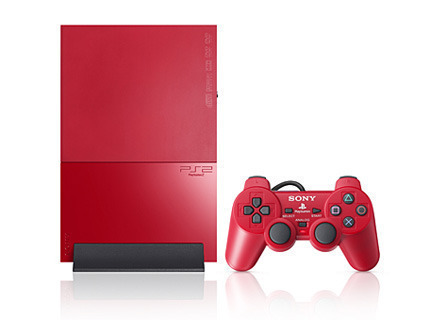
 Parental Control Settings on a PS2 allow parents to specify which movies their children are allowed to watch. While a PS2’s Parental Control Settings do not allow parents to specify times that the PS2 is accessible, they do allow parents to specify which ratings a DVD or game can have in order to be played on the PS2.
How To Access Parental Control Settings On A PS2
In order to access Parental Control Settings on a PS2, parents can enter the DVD Setup Menu, click “Custom Setup”, and select “Parental Control”. The PS2 will then display a screen that will allow a parent to turn Parental Control on and create a four-digit passcode so his/her children cannot simply change the settings. The parent can then move a bar to the left or right, signaling the PS2 to be more or less strict (left is stricter; right is less strict). The parent can then press the X button to exit the screen and save changes.
How To Reset Parental Control Settings On A PS2
If Parental Control Settings need to be removed for whatever reason, the user can do so by accessing the Parental Control menu mentioned in the previous paragraph. The user will then be prompted to enter the passcode. Since the user does not know the passcode, he/she can use the PS2 Master Passcode by pressing the Select button and entering 7444. The user can then change the strictness of the PS2 by moving the bar to the left or right or simply selecting the “Off” checkbox. The user should then ensure that the disk tray is empty and press the Reset button on the front of the PS2.
Note: The disk tray must be empty for the PS2 to save any changes made.
Arzell
I don’t care who calls me just do please. 724 434 4311
Arzell
0123,4321,7444,&all solid numbers do not work please help
Alysia
I got a used ps2 and tried to play a pg13 movie. It asked me if I wanted to temporarily move the level to 6. I answered “yes.” Then it prompted me to enter a code. I left it blank and pressed “x” or start or select. Sorry can’t remember which. The wording changed to do you want to delete passcode. Then it prompted me to input a new passcode. It worked and I watched my movie. However, I still had to put in the passcode I created until I ran across this article. I followed the above directions and viola no more passcodes! Thank you very much!
junior
On my old ass ps2, the code was 4444. It pretty lame on how Sony put different factory codes in each system. But im glad it finally works and I can watch movies on my system.
blacky
can we able to pirated games by switching of the parental control
Cynthia
The code on my PS2 was 0123, if that can help anyone! Never changed the code since we bought it …
chanel
this worked for me, as i had bought a used one 🙂 thank you!!!
Teresa
We have a PS2 that has a parental control password and we do not know it. How can we delete it?
kenny
when the password box pops up jus press no and it’ll go black. then press select and menu, then settings. next go over to custom and down to parental controls and go right then press select and enter 7444. restart complete 🙂
lani
Thanks! This really helped
Lyn
The so called master code didn’t work. None of those methods did and I thought bypassing and saying ‘no’ as suggested would work but when i got to customs the system won’t allow me access the parental code area at all.
This unit was unplugged and packed away for a few years while we renovated and the kids were moved out. Anyone with a different suggestion would be helpful. thanks
Andrew
Good guide, thanks. Totally unlocked it thanks to you.
luin
I’ve just bought a PS2 second hand, and there is a parental code set up. The previous owner does not know the code. Is there anyway of overriding or deleting the code in this case?
Thanks in advance 🙂
Annie Bessent-Rideout
What do you do if the default codes do not work to unlock the parental control?