

ActiveX is designed to be a framework to allow software components to be reused independent of the programming language used in development. One or more of these components can be used for development of software applications and digitally signed to validate the identity of the author of the component. First developed in the mid-1990’s by the Microsoft Corporation, ActiveX controls are used by Windows Media Player, Microsoft Office, Internet Explorer, and Microsoft Visual Studio and can be embedded into web pages for added functionality. A common task that arises for end-users is to determine how to install ActiveX on a personal computer.
When Was Active X First Developed?
The ActiveX framework was developed by Microsoft in 1996 due to the increased complexity of OLE 2.0 and inadequate support for COM in MFC. Later that same year with the release of Internet Explorer 3.0, ActiveX Controls were able to be embedded within HTML content using the “OBJECT” tag. The use of this tag would force the web browser to automatically install the control after being downloaded with minimal user interaction. This resulted in richer content for compatible browsers; however, introduced security dangers when browsing to websites that used ActiveX content. Since that time, Microsoft has introduced a number of controls to reduce the risk of running ActiveX content to include digitally signed installation packages, stricter default security settings in IE, and a blacklist of malicious or bad ActiveX controls.
What Does Active X Do?
Fundamentally, ActiveX controls are small blocks of programming code containing functionality that can be embedded or leveraged to create large computer programs that can be run through web browsers. Examples of content created using ActiveX Controls include displaying animation, gathering information, and viewing files. ActiveX provides similar functionality to Java Applets except they are only supported officially on the Internet Explorer web browser. Examples of commonly used Controls include list boxes, command buttons, and dialog boxes. Any programming language which supports the Microsoft COM component development can be used to create a Control to include C++, Visual Basic, C#, VB.NET, or Borland Delphi.
How to Configure ActiveX in Internet Explorer
If Internet Explorer is installed on your computer, then ActiveX is installed. A common task that arises for Windows users is figuring out how to configure ActiveX in Internet Explorer. Although recent installations of Windows come with moderate security thresholds for ActiveX controls set, many computer users will want to change the default policy settings.
Step 1 – Launch Internet Explorer by double clicking the program icon on your computer’s desktop.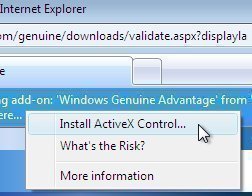
Step 2 – Select the “Tools” menu followed by clicking the “Internet Options” sub-menu.
Step 3 – Choose the “Security” menu tab and use the computer’s mouse to select the Internet Zone corresponding to the overall desired security level on the computer.
Step 4 – Choose the zone on the “Security Tab” for which you desire to manage the ActiveX controls followed by clicking the “Custom Level” menu option.
Step 5 – Scroll down the screen to the “Run ActiveX controls and plug-ins” menu option and select the “Administrator Approved” menu option.
Step 6 – Repeat step 5 for all Internet zones that you want to enable ActiveX controls.
Step 7 – Depending on the version of Internet Explorer installed on your computer, you may need to either exit and restart the browser or restart your computer for the changes to take effect.
What Does FireFox Not Support ActiveX Natively?
The primary reason that Mozilla FireFox does not natively support ActiveX technology is that it is not compatible with the Mac OS X or Linux Operating Systems. Commonly used to embed Flash applications and to add functionality to Internet Explorer (toolbars as one example), supporting development for the Windows OS would run counter to the FireFox community’s views.
Although Microsoft has made significant strides in providing additional security measures for ActiveX Controls, the technology can still server as a conduit for malware exploitation of the end-user’s computer. As a result, FireFox continues to rely on browser plugins to use and view multimedia content embedded on web pages. FireFox extensions continue to be the primary means of adding new functionality to the application.
How to Install Active X in FireFox (Older Versions)
Although FireFox does not provide native support for ActiveX Controls, the legacy Mozilla ActiveX Project (last developed in 2005), provides a free ActiveX plugin that will work on FireFox version 1.5. There are also builds for older versions of the browser.
Step 1 – Download and install the legacy version of FireFox that corresponds to the free ActiveX plugin you are going to use from OldApps.com. Mozilla does not provide support for legacy builds of the web browser, so ensure the need for using ActiveX in Mozilla is great enough to use an older version of the FireFox browser.
Step 2 – Launch the FireFox browser by double clicking the program icon on your computer’s desktop or by selecting it from the “Programs” menu.
Step 3 – Choose or click the address bar located at the top of the FireFox browser. Then download the ActiveX plugin from AdamLock.com that corresponds to the version of FireFox being used.
Step 4 – If queried to “Allow” the download of the plugin, click “Yes.” Then, on the subsequently displayed dialog box click the “Install Now” menu option for the plugin.
Step 5 – Once the add on finishes downloading, select the “Tools” menu button located on the upper toolbar.
Step 6 – Click the “Add Ons” menu option located on the drop down menu that appears and select the “Extensions” menu tab that displays on the next pop-up window.
Step 7 – Locate the “Extensions” menu tab on the next window to be displayed and find the “Mozilla Firefox ActiveX Plugin”.
Step 8 – Select the button to the right of the “Extension” entry that is labeled “Enable.”
Step 9 – Restart the FireFox web browser to finish installing the ActiveX add on.
How to Configure the ActiveX Installer Service
The Windows 7 or newer OS uses the ActiveX Controller Service to manage ActiveX controls. The service is enabled by default and is started on request by websites that use embedded controls. In order to modify the sites and options that are used by the ActiveX Installer Service, the end-user must configure the Group Policy settings through either the Local Group Policy Editor or the Group Policy Management Console (GPMC).
The ActiveX Installer Service has two policy settings: ActiveX Installation policy for sites in Trusted zones and Approved Installation Sites for ActiveX Controls. The ActiveX installation policy identifies what methods are permitted for Trusted site zones to install ActiveX controls. The Approved Installation Sites for ActiveX Controls contains a list of all of the approved installation sites that are allowed to install controls.
In this scheme, when a given website attempts to install an ActiveX control, the Installer Service will first validate that the website URL is on the approved installation listing or part of the Trusted sites zone. If it is, then the policy requirements will be verified before allowing the control to be installed.
Step 1 – Login to the computer with an account that has administrator privileges.
Step 2 – Select the “Start” menu button and then enter “gpedit.msc” in the “Search Text Field” followed by pressing the “Enter” button to launch the “Local Group Policy Editor.”
Step 3 – Select the “Yes” menu button to continue opening the “User Account Control” dialog box.
Step 4 – Beneath the “Local Computer Policy\Computer Configuration\Administrative Templates\Windows Components” tree, select the “ActiveX Installer Service” menu option.
Step 5 – Right click the “Approved Installation Sites for ActiveX Controls” in the details pane. Then, click the “Edit” button to open the “policy setting.”
Step 6 – Select the “Enabled” menu button in the “Approved Installation Sites for ActiveX Controls” dialog box and the click the “Show” menu button under the “Options” label.
Step 7 – Enter a descriptive name for the URL to allow installing ActiveX controls in the “Value” name text box. Then, enter the values for the ActiveX Installer Service host URL settings as appropriate.
How to Configure ActiveX Installation Policy for the Trusted Sites Zone
Websites that you or your organization trusts can be added to the “Trusted sites zone” to allow installation of ActiveX controls without network administrator approval. If a site uses one or more sub-domains, the wildcard character can be used in combination with a subdomain to permit multiple URLs to install controls. For example, if https://*.tech-faq.com is added to the Trusted sites zone policy setting, then all web sites at tech-faq.com will be allowed to install ActiveX controls onto a single or group of computers. Before enabling this feature, all servers in the sub-domains should be verified to be trusted.
Step 1 – Select the “Start” button and enter “gpedit.msc” in the “Search Text Field” followed by pressing the “Enter” key to launch the “Local Group Policy Editor.”
Step 2 – Select the “ActiveX Installer Service” located under the “Local Computer Policy\Computer Configuration\Administrative Templates\Windows Components” menu tree. Then, right-click the “ActiveX installation policy for sites in Trusted Zone” menu option located in the details pane.
Step 3 – Click the “Edit” menu button to open the policy setting and select the “Enabled” menu option located in the “ActiveX installation policy for sites in Trusted zones” dialog box.
Step 4 – Choose the policy settings to apply to sites in the “Trusted sites zone” under the options menu.
Step 5 – Configure desired installation options such as “silent installs,” “prompt the user,” or “Don’t install” for controls that you do not want to be installed on the computer on the current menu. Policy statements can be entered for signed, unsigned, and signed by a trusted publisher controls in this configuration menu. Controls using secure server validation (HTTPS) can also be configured to be permitted in this menu in the absence of a valid security certificate.
Step 6 – Click the “Ok” menu button to apply changes and exit the Group Policy Editor application.
Should You Install Active X Controls?
Despite the increased level of effort by Microsoft over the past several years to make ActiveX controls safer to trust and install, end-users should remain cautious with installing controls. Even if an ActiveX control or “add-on” is digitally signed and can result in an enhanced web browser experience, they still pose a security risk if malware authors go through the effort to spoof valid websites and fake valid digital signatures. If a website will work without installing a control, then the right answer is to avoid installation if possible.
Before allowing an ActiveX control to be installed on your computer there are a number of considerations that should be measured. First, is if you were expecting to receive the control from your website. If the request to install comes as a surprise and the website has not required such in the past, then proceed with caution. This could be a result of the website being hacked unless the site owners have announced an upgrade to the available service previously. Better to send an email to the site administrator or help desk and wait for a response than to download a malicious control to your computer.
Another key consideration is if you really trust the website that is attempting to download the control to your computer. If you do not absolutely trust the site trying to download the control and the stated publisher, then installation should be avoided. The publisher of the control will be displayed on the Internet Explorer dialogue box that is displayed asking you to run the file. If you do not trust either, then click the “Don’t run” menu option.
Finally, if you do not really know what the purpose of the control is or what it will do to your computer, installation should be avoided. The website that is trying to download the file to your computer should provide sufficient details to the end-user prior to installation. If you don’t see enough information displayed, then installation should be avoided until details of the installation can be validated through the website administrator or manager.

graeme gibson
have not got active X working Dll Tryed most nill resolts graeme g
Richard
I have an IPad I get a message that says java runtime environment is not installed. Switching to active X live viewer. How do I get active X for my IPad. Thanks for your help
John Hutchings
something within activex appears to have been corrupted. It is installed and has worked perfectly upto now. But, sometimes a message along the lines of ‘this needs activex to open’ and I get no further. If the download activex button is pressed nothing happens. Hope you can suggest a way around this. Thanks.
Drew
I’ve been having the same exact issues. Been up all night trying to get everything working the way it’s supposed to work
Trish
This was great to use because I could pause the movie, and follow along with my settings. This will solve my active x control problem. Thank you for putting the video out there, although the sound control is a bit sketchy.