

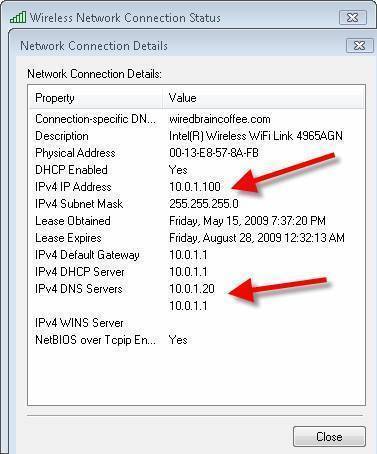
An IP (or Internet Protocol) address conflict occurs when two different systems on the same subnet are assigned or otherwise have their network interface configured to use the same IP address. It is possible to have two systems on different subnets configured with the same IP address, but not have a conflict occur due to routing limitations or because of the effects of NAT or Network Address Translation. Systems with the same IP Address on the same subnet need not have the same netmask or broadcast address for the conflict to occur.
Consequences of IP Address Conflicts
Systems handle IP address conflicts in multiple ways. In the past, many systems would simply act as if they were not in conflict, and connectivity to both or all systems would be intermittent and unreliable. In most modern operating systems, the second system to come online with the same IP address on the same subnet as another system would just disable their network interface and give an error until the situation is resolved by the administrator. This allows the original system to continue functioning without disruption, but completely breaks IP base communications for the second system. Of course, in production and critical environments, this result is preferred.
How IP Address Conflicts Cause Problems
IP address conflicts do not have a major impact on layer 3 or layer 7 communications (where most tcp/ip communications take place), but on the lower layer 2 protocols that layer 3 and above depend on. Once packets arrive to their destination network, or the subnet that the target system resides on, an ARP request is generated asking which system has the target IP address. If a routing or switching device that stores ARP information has this information cached in its ARP cache, that data is automatically used for decision making. If not, the first system responding to the request stating that it has the target IP address is added to the cache, and then packets are then forwarded to that host using its MAC (Media Access Control) address. Depending on system and network states or utilization, different systems may win the ARP response race, causing packets to be sent to one system at one time, and the other system other times. For IP communications this kind of reliability issue is unacceptable.
Resolving an IP Address Conflict
Resolving an IP address conflict is simple, merely assign one of the hosts a new, and not currently used IP address. Changing system IP addresses can have other consequences. It is common for commercial software licensing to be tied to a specific IP address. Other times, applications hard code IP addresses in their configuration files, causing application communication problems after an IP address change. Any time you change a system's IP address, it is best to test all applications for due diligence.
Avoiding an IP Address Conflict
It is prudent to use some IP address assignment tracking method to determine which IP addresses have been assigned and are active. Spreadsheets, such as Microsoft Excel, are often used to track a small number of IP address assignments such as for a standard class C subnet (254 IP addresses or fewer). If you must track more than a single subnet, or larger subnets, it's in your best interest to use a database application, or custom commercial software packages to assist in the tracking of information. In many cases, commercial packages for IP address management can be configured to also provide DNS management services as well. Understand your personal and organizational needs, and pick a solution that suits your situation.
Even in cases when management softwar is used to track IP address assignment, it is not uncommon for IP addresses to be assigned by employees, contractors and other personnel who do not have access to or concern for the IP address management solution. Before assigning an IP address to a system, always check to see if a system responds to that IP address by pinging it from a system with communication to the subnet the system would reside on. If a response to the ping is seen, assign a different IP address or resolve the conflict before placing the new system on the network.
jawares
I have quastion,,,,can two network interface have the same IP address? why?
WillSpencer
If two NICs on the same network have the same IP address, it causes all sorts of random and difficult to troubleshoot problems.
ranganathan.v
actually it is very use full for learners
rangan