

Understanding Network Attacks
A network attack can be defined as any method, process, or means used to maliciously attempt to compromise network security.
There are a number of reasons that an individual(s) would want to attack corporate networks. The individuals performing network attacks are commonly referred to as network attackers, hackers, or crackers.
A few different types of malicious activities that network attackers and hackers perform are summarized here:
- Illegally using user accounts and privileges
- Stealing hardware
- Stealing software
- Running code to damage systems
- Running code to damage and corrupt data
- Modifying stored data
- Stealing data
- Using data for financial gain or for industrial espionage
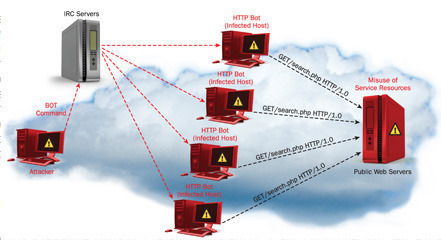
- Performing actions that prevent legitimate authorized users from accessing network services and resources.
- Performing actions to deplete network resources and bandwidth.
A few reasons for network attackers attempting to attack corporate networks are listed here:
- Individuals seeking fame or some sort of recognition. Script kiddies usually seek some form of fame when they attempt to crash Web sites and other public targets on the Internet. A script kiddie could also be looking for some form of acceptance or recognition from the hacker community or from black hat hackers.
- Possible motives for structured external threats include:
- Greed
- Industrial espionage
- Politics
- Terrorism
- Racism
- Criminal payoffs
- Displeased employees might seek to damage the organization’s data, reliability, or financial standing.
- There are some network attackers that simply enjoy the challenge of trying to compromise highly secured networks’ security systems. These types of attackers simply see their actions as a means of exposing existing security vulnerabilities.
Network attacks can be classified into the following four types:
- Internal threats
- External threats
- Unstructured threats
- Structured threats
Threats to the network can be initiated from a number of different sources, hence the reason for network attacks being classified as either external or internal network attacks/threats:
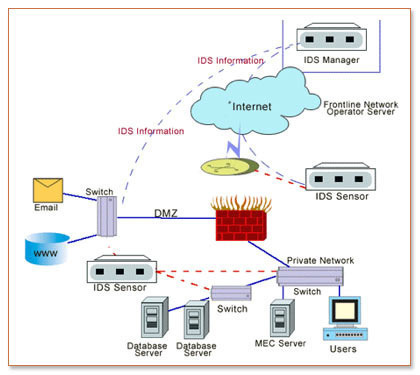
- External threats: Individuals carry out external threats or network attacks without assistance from internal employees or contractors. A malicious and experienced individual, a group of experienced individuals, an experienced malicious organization, or inexperienced attackers (script kiddies) carry out these attacks. Such attackers usually have a predefined plan and the technologies (tools) or techniques to carry out the attack. One of the main characteristics of external threats is that they usually involve scanning and gathering information. Users can therefore detect an external attack by scrutinizing existing firewall logs. Users can also install an Intrusion Detection System to quickly identify external threats.
External threats can be further categorized into either structured threats or unstructured threats:- Structured external threats: These threats originate from a malicious individual, a group of malicious individual(s), or a malicious organization. Structured threats are usually initiated from network attackers that have a premeditated thought on the actual damages and losses that they want to cause. Possible motives for structured external threats include greed, politics, terrorism, racism, and criminal payoffs. These attackers are highly skilled on network design, avoiding security measures, Intrusion Detection Systems (IDSs), access procedures, and hacking tools. They have the necessary skills to develop new network attack techniques and the ability to modify existing hacking tools for their exploitations. In certain cases, an internal authorized individual may assist the attacker.
- Unstructured external threats: These threats originate from an inexperienced attacker, typically from a script kiddie. Script kiddie refers to an inexperienced attacker who uses cracking tools or scripted tools readily available on the Internet to perform a network attack. Script kiddies are usually inadequately skilled to create the threats on their own. They can be considered bored individuals seeking some form of fame by attempting to crash websites and other public targets on the Internet.
External attacks can also occur either remotely or locally:
- Remote external attacks: These attacks are usually aimed at the services that an organization offers to the public. The various forms that remote external attacks can take are:
- Remote attacks aimed at the services available for internal users. This remote attack usually occurs when there is no firewall solution implemented to protect these internal services.
- Remote attacks aimed at locating modems to access the corporate network.
- Denial of service (DoS) attacks to place an exceptional processing load on servers in an attempt to prevent authorized user requests from being serviced.
- War dialing of the corporate private branch exchange (PBX).
- Attempts to brute force password authenticated systems.
- Local external attacks: These attacks typically originate from situations where computing facilities are shared and access to the system can be obtained.
- Internal threats: Internal attacks originate from dissatisfied or unhappy inside employees or contractors. Internal attackers have some form of access to the system and usually try to hide their attack as a normal process. For instance, internal disgruntled employees have local access to some resources on the internal network already. They could also have some administrative rights on the network. One of the best means to protect against internal attacks is to implement an Intrusion Detection System and to configure it to scan for both external and internal attacks. All forms of attacks should be logged and the logs should be reviewed and followed up.
With respect to network attacks, the core components that should be included when users design network security are:
- Network attack prevention
- Network attack detection
- Network attack isolation
- Network attack recovery
What is Hacking?
The term hacking initially referred to the process of finding solutions to rather technical issues or problems. These days, hacking refers to the process whereby intruders maliciously attempt to compromise the security of corporate networks to destroy, interpret, or steal confidential data or to prevent an organization from operating.
Terminologies that refer to criminal hacking:
- Cracking
- Cybercrime
- Cyberespionage
- Phreaking
To access a network system, the intruder (hacker) performs a number of activities:
- Footprinting: This is basically the initial step in hacking a corporate network. Here the intruder attempts to gain as much information on the targeted network by using sources that the public can access. The aim of footprinting is to create a map of the network to determine what operating systems, applications, and address ranges are being utilized and to identify any accessible open ports.
The methods used to footprint a network are:- Access information publicly available on the company website to gain any useful information.
- Try to find any anonymous File Transfer Protocol (FTP) sites and intranet sites that are not secured.
- Gather information on the company’s domain name and the IP address block being used.
- Test for hosts in the network’s IP address block. Tools such as Ping or Flping are typically used.
- Using tools such as Nslookup, the intruder attempts to perform Domain Name System (DNS) zone transfers.
- A tool such as Nmap is used to find out what the operating systems are that are being used.
- Tools such as Tracert are used to find routers and to collect subnet information.
- Port scanning: Port scanning or scanning is when intruders collect information on the network services on a target network. Here, the intruder attempts to find open ports on the target system.
The different scanning methods that network attackers use are:- Vanilla scan/SYNC scan: TCP SYN packets are sent to each address port in an attempt to connect to all ports. Port numbers 0 – 65,535 are utilized.
- Strobe scan: Here, the attacker attempts to connect to a specific range of ports that are typically open on Windows based hosts or UNIX/Linux based hosts.
- Sweep: A large set of IP addresses are scanned in an attempt to detect a system that has one open port.
- Passive scan: Here, all network traffic entering or leaving the network is captured and traffic is then analyzed to determine what the open ports are on the hosts within the network.
- User Datagram Protocol (UDP) scan: Empty UDP packets are sent to the different ports of a set of addresses to determine how the operating responds. Closed UDP ports respond with the Port Unreachable message when any empty UDP packets are received. Other operating systems respond with the Internet Control Message Protocol (ICMP) error packet.
- FTP bounce: To hide the attacker’s location, the scan is initiated from an intermediary File Transfer Protocol (FTP) server.
- FIN scan: TCP FIN packets that specify that the sender wants to close a TCP session are sent to each port for a range of IP addresses.
- Enumeration: The unauthorized intruder uses a number of methods to collect information on applications and hosts on the network and on the user accounts utilized on the network. Enumeration is particularly successful in networks that contain unprotected network resources and services:
- Network services that are running but are not being utilized.
- Default user accounts that have no passwords specified.
- Guest accounts that are active.
- Acquiring access: Access attacks are performed when an attacker exploits a security weakness so that he/she can obtain access to a system or the network. Trojan horses and password hacking programs are typically used to obtain system access. When access is obtained, the intruder is able to modify or delete data and add, modify, or remove network resources.
The different types of access attacks are:- Unauthorized system access entails the practice of exploiting the vulnerabilities of operating systems or executing a script or a hacking program to obtain access to a system.
- Unauthorized privilege escalation is a frequent type of attack. Privilege escalation occurs when an intruder attempts to obtain a high level of access, like administrative privileges, to gain control of the network system.
- Unauthorized data manipulation involves interpreting, altering, and deleting confidential data.
- Privilege escalation: When an attacker initially gains access to the network, low level accounts are typically used. Privilege escalation occurs when an attacker escalates his/her privileges to obtain a higher level of access, like administrative privileges, in order to gain control of the network system.
The privilege escalation methods that attackers use are:- The attacker searches the registry keys for password information.
- The attacker can search documents for information on administrative privileges.
- The attacker can execute a password cracking tool on targeted user accounts.
- The attacker can use a Trojan in an attempt to obtain the credentials of a user account that has administrative privileges.
- Install backdoors: A hacker can also implement a mechanism such as some form of access granting code with the intent of using it at some future stage. Attackers typically install back doors so that they can easily access the system at some later date. After a system is compromised, users can remove any installed backdoors by reinstalling the system from a backup that is secure.
- Removing evidence of activities: Attackers typically attempt to remove all evidence of their activities.
What are Hackers or Network Attackers?
A hacker or network attacker is someone who maliciously attacks networks, systems, computers, and applications and captures, corrupts, modifies, steals, or deletes confidential company information.
A hacker can refer to a number of different individuals who perform activities aimed at hacking systems and networks and it can also refer to individuals who perform activities that have nothing to do with criminal activity:
- Programmers who hack complex technical problems to come up with solutions.
- Script kiddies who use readily available tools on the Internet to hack into systems.
- Criminal hackers who steal or destroy company data.
- Protesting activists who deny access to specific Web sites as part of their protesting strategy.
Hackers these days are classified according to the hat they wear. This concept is illustrated below:
- Black hat hackers are malicious or criminal hackers who hack at systems and computers to damage data or who attempt to prevent businesses from rendering their services. Some black hat hackers simply hack security protected systems to gain prestige in the hacking community.
- White hat hackers are legitimate security experts who are trying to expose security vulnerabilities in operating system platforms. White hat hackers have the improvement of security as their motive. They do not damage or steal company data nor do they seek any fame. These security experts are usually quite knowledgeable about the hacking methods that black hat hackers use.
- Grey hat hacker: These are individuals who have motives between that of black hat hackers and white hat hackers.
The Common Types of Network Attacks
While there are many different types of network attacks, a few can be regarded as the more commonly performed network attacks. These network attacks are discussed in this section of the Article:
- Data modification or data manipulation pertains to a network attack where confidential company data is interpreted, deleted, or modified. Data modification is successful when data is modified without the sender actually being aware that it was tampered with.
A few methods of preventing attacks aimed at compromising data integrity are listed here:- Use digital signatures to ensure that data has not been modified while it is being transmitted or simply stored.
- Implement access control lists (ACLs) to control which users are allowed to access your data.
- Regularly back up important data.
- Include specific code in applications that can validate data input.
- Eavesdropping: This type of network attack occurs when an attacker monitors or listens to network traffic in transit then interprets all unprotected data. While users need specialized equipment and access to the telephone company switching facilities to eavesdrop on telephone conversations, all they need to eavesdrop on an Internet Protocol (IP) based network is a sniffer technology to capture the traffic being transmitted. This is basically due to the Transmission Control Protocol/Internet Protocol (TCP/IP) being an open architecture that transmits unencrypted data over the network.
A few methods of preventing intruders from eavesdropping on the network are:
- Implement Internet Protocol Security (IPSec) to secure and encrypt IP data before it is sent over the network.
- Implement security policies and procedures to prevent attackers from attaching a sniffer on the network.
- Install anti-virus software to protect the corporate network from Trojans. Trojans are typically used to discover and capture sensitive, valuable information such as user credentials.
- IP address spoofing/IP spoofing/identity spoofing: IP address spoofing occurs when an attacker assumes the source Internet Protocol (IP) address of IP packets to make it appear as though the packet originated from a valid IP address. The aim of an IP address spoofing attack is to identify computers on a network. Most IP networks utilize the user’s IP address to verify identities and routers also typically ignore source IP addresses when routing packets. Routers use the destination IP addresses to forward packets to the intended destination network.
These factors could enable an attacker to bypass a router and to launch a number of subsequent attacks, including:- Initiation of a denial of service (DoS) attacks.
- Initiation of man in the middle (MITM) attacks to hijack sessions.
- Redirect traffic.
A few methods of preventing IP address spoofing attacks are:
- Encrypt traffic between routers and external hosts
- Define ingress filters on routers and firewalls to stop inbound traffic where the source address is from a trusted host on the internal network
- Sniffer attacks: Sniffing refers to the process that attackers use to capture and analyze network traffic. The packets’ contents on a network are analyzed. The tools that attackers use for sniffing are called sniffers or more correctly, protocol analyzers. While protocol analyzers are really network troubleshooting tools, hackers also use them for malicious purposes. Sniffers monitor, capture, and obtain network information such as passwords and valuable customer information. When an individual has physical access to a network, he/she can easily attach a protocol analyzer to the network and then capture traffic. Remote sniffing can also be performed and network attackers typically use them.
There are protocol analyzers or sniffers available for most networking technologies including:- Asynchronous Transfer Mode (ATM)
- Ethernet
- Fiber Channel
- Serial connections
- Small Computer System Inter-face (SCSI)
- Wireless
There are a number of common sniffers that network security administrators and malicious hackers use:
- Dsniff
- Ethereal
- Etherpeek
- Network Associates’s Sniffer
- Ngrep
- Sniffit
- Snort
- Tcpdump
- Windump
To protect against sniffers, implement Internet Protocol Security (IPSec) to encrypt network traffic so that any captured information cannot be interpreted.
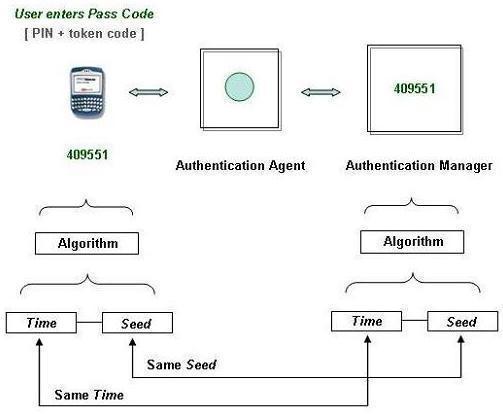
- Password attacks: Password based attacks or password crackers are aimed at guessing the password for a system until the correct password is determined. One of the primary security weaknesses associated with password based access control is that all security is based on the user ID and password being utilized. But who is the individual using the credentials at the keyboard? Some of the older applications do not protect password information. The password information is simply sent in clear or plain text – no form of encryption is utilized! Remember that network attackers can obtain user ID and password information and can then pose as authorized users and attack the corporate network. Attackers can use dictionary attacks or brute force attacks to gain access to resources with the same rights as the authorized user. A big threat would be present if the user has some level of administrative rights to certain portions of the network. An even bigger threat would exist if the same password credentials are used for all systems. The attacker would then have access to a number of systems.
Password based attacks are performed in two ways:- Online cracking: The network attacker sniffs network traffic to seize authentication sessions in an attempt to capture password based information. There are tools that are geared at sniffing out passwords from traffic.
- Offline cracking: The network attacker gains access to a system with the intent of gaining access to password information. The attacker then runs some password cracker technology to decipher valid user account information.
A dictionary attack occurs when all the words typically used for passwords are attempted to detect a password match. There are some technologies that can generate a number of complex word combinations and variations.
Modern operating systems only store passwords in an encrypted format. To obtain password credentials, users have to have administrative credentials to access the system and information. Operating systems these days also support password policies. Password policies define how passwords are managed and define the characteristics of passwords that are considered acceptable.Password policy settings can be used to specify and enforce a number of rules for passwords:
- Define whether passwords are simple or complex
- Define whether password history is maintained
- Define the minimum length for passwords
- Define the minimum password age
- Define the maximum password age
- Define whether passwords are stored with reversible encryption or irreversible encryption
Account lockout policies should be implemented if the environment is particularly vulnerable to threats arising from passwords that are being guessed. Implementing an account lockout policy ensures that the user’s account is locked after an individual has unsuccessfully tried for several times to provide the correct password. The important factor to remember when defining an account lockout policy is that a policy that permits some degree of user error, but that also prevents hackers from using the user accounts should be implemented.
The following password and account lockout settings are located in the Account Lockout Policy area in Account Policies:- Account lockout threshold: This setting controls the number of times after which an incorrect password attempt results in the account being locked out of the system.
- Account lockout duration: This setting controls the duration that an account that is locked remains locked. A setting of 0 means that an administrator has to manually unlock the locked account.
- Reset account lockout counter after: This setting determines the time duration that must pass subsequent to an invalid logon attempt occurring prior to the reset account lockout counter being reset.
- Brute force attack: Brute force attacks simply attempt to decode a cipher by trying each possible key to find the correct one. This type of network attack systematically uses all possible alpha, numeric, and special character key combinations to find a password that is valid for a user account. Brute force attacks are also typically used to compromise networks that utilize Simple Mail Transfer Protocol (SNMP). Here, the network attacker initiates a brute force attack to find the SNMP community names so that he/she can outline the devices and services running on the network.
A few methods of preventing brute force attacks are listed here:- Enforce the use of long password strings.
- For SNMP, use long, complex strings for community names.
- Implement an intrusion detection system (IDS). By examining traffic patterns, an IDS is capable of detecting when brute force attacks are underway.
- Denial of Service (DoS) attack: A DoS attack is aimed at preventing authorized, legitimate users from accessing services on the network. The DoS attack is not aimed at gathering or collecting data. It is aimed at preventing authorized, legitimate users from using computers or the network normally. The SYN flood from 1996 was the earliest form of a DoS attack that exploited a Transmission Control Protocol (TCP) vulnerability. A DoS attack can be initiated by sending invalid data to applications or network services until the server hangs or simply crashes. The most common form of a DoS attack is TCP attacks.
DoS attacks can use either of the following methods to prevent authorized users from using the network services, computers, or applications:- Flood the network with invalid data until traffic from authorized network users cannot be processed.
- Flood the network with invalid network service requests until the host providing that particular service cannot process requests from authorized network users. The network would eventually become overloaded.
- Disrupt communication between hosts and clients through either of the following methods:
- Modification of system configurations.
- Physical network destruction. Crashing a router, for instance, would prevent users from accessing the system.
There are a number of tools easily accessible and available on the Internet that can initiate DoS attacks:
- Bonk
- LAND
- Smurf
- Teardrop
- WinNuke
A network attacker can increase the enormity of a DoS attack by initiating the attack against a single network from multiple computers or systems. This type of attack is known as a distributed denial of service (DDoS) attack. Network administrators can experience great difficulty in fending off DDoS attacks, simply because blocking all the attacking computers can also result in blocking authorized users.
The following measures can be implemented to protect a network against DoS attacks:- Implement and enforce strong password policies
- Back up system configuration data regularly
- Disable or remove all unnecessary network services
- Implement disk quotas for user and service accounts.
- Configure filtering on the routers and patch operating systems.
The following measures can be implemented to protect a network against DDoS attacks:
- Limit the number of ICMP and SYN packets on router interfaces.
- Filter private IP addresses using router access control lists.
- Apply ingress and egress filtering on all edge routers.
- Man in the middle (MITM) attack: A man in the middle (MITM) attack occurs when a hacker eavesdrops on a secure communication session and monitors, captures, and controls the data being sent between the two parties communicating. The attacker attempts to obtain information so that he/she can impersonate the receiver and sender communicating.
For an MITM attack to be successful, the following sequence of events has to occur:- The hacker must be able to obtain access to the communication session to capture traffic when the receiver and sender establish the secure communication session.
- The hacker must be able to capture the messages being sent between the parties and then send messages so that the session remains active.
There are some public key cryptography systems such as the Diffie-Hellman (DH) key exchange that are rather susceptible to man in the middle attacks. This is due to the Diffie-Hellman (DH) key exchange using no authentication.
What are Viruses?
A virus is a malicious code that affects and infects system files. Numerous instances of the files are then recreated. Viruses usually lead to some sort of data loss and/or system failure.
There are numerous methods by which a virus can get into a system:
- Through infected floppy disks
- Through an e-mail attachment infected with the virus
- Through downloading software infected with the virus
A few common types of viruses are:
- Boot sector viruses: These are viruses that infect a hard drive’s master boot record. The virus is then loaded into memory whenever the system starts or is rebooted.
- File viruses or program viruses or parasitic viruses: These are viruses that are attached to executable programs. Whenever the particular program is executed, the viruses are loaded into memory.
- Multipartite viruses: These are viruses that are a combination of a boot sector virus and a file virus.
- Macro viruses: These are viruses that are written in macro languages that applications use, of which Microsoft Word is one. Macro viruses usually infect systems through e-mail.
- Polymorphic viruses: These viruses can be considered the more difficult viruses to defend against because they can modify their code. Virus protection software often find polymorphic viruses harder to detect and remove.
If a virus infects a system, use the recommendations listed here:
- Scan each system to gauge how infected the infrastructure is.
- To prevent the virus from spreading any further, immediately disconnect all infected systems.
- All infected systems should be installed from a clean backup copy, that is, a back up taken when the system was clean from virus infections.
- Inform the anti-virus vendor so that the vendor’s virus signature database is updated accordingly.
A few methods of protecting network infrastructure against viruses are:
- Install virus protection software on systems
- Regularly update all installed virus protection software
- Regularly back up systems after they have been scanned for viruses and are considered clean from virus infection.
- Users should be educated to not open any e-mail attachments that were sent from individuals they do not recognize.
What are Worms?
As mentioned previously, a virus is a malicious code that infects files on the system. A worm on the other hand is an autonomous code that spreads over a network, targeting hard drive space and processor cycles. Worms not only infect files on one system, but spread to other systems on the network. The purpose of a worm is to deplete available system resources. Hence the reason for a worm repeatedly making copies of itself. Worms basically make copies of themselves or replicate until available memory is used, bandwidth is unavailable, and legitimate network users are no longer able to access network resources or services.
There are a few worms that are sophisticated enough to corrupt files, render systems un-operational, and even steal data. These worms usually have one or numerous viral codes.
A few previously encountered worms are:
- Te ADMw0rm worm took advantage of a buffer overflow in Berkeley Internet Name Domain (BIND).
- The Code Red worm utilized a buffer overflow vulnerability in Microsoft Internet Information Services (IIS) version 4 and IIS version 5.
- The LifeChanges worm exploited a Microsoft Windows weakness, which allowed scrap shell files to be utilized for running arbitrary code.
- The LoveLetter worm used a Visual Basic Script to replicate or mass mail itself to all individuals in the Windows address book.
- The Melissa worm utilized a Microsoft Outlook and Outlook Express vulnerability to mass mail itself to all individuals in the Windows address book.
- The Morris worm exploited a Sendmail debug mode vulnerability.
- The Nimda worm managed to run e-mail attachments in Hypertext Markup Language (HTML) messages through the exploitation of HTML IFRAME tag.
- The Slapper worm exploited an Apache Web server platform buffer overflow vulnerability.
- The Slammer worm exploited a buffer overflow vulnerability on unpatched machines running Microsoft SQL Server.
What are Trojan Horses?
A Trojan horse or Trojan is a file or e-mail attachment disguised as a friendly, legitimate file. When executed though, the file corrupts data and can even install a backdoor that hackers can utilize to access the network.
A Trojan horse differs from a virus or worm in the following ways:
- Trojan horses disguise themselves as friendly programs. Viruses and worms are much more obvious in their actions.
- Trojan horses do not replicate like worms and viruses do.
A few different types of Trojan horses are listed here:
- Keystroke loggers monitor the keystrokes that a user types and then e-mails the information to the network attacker.
- Password stealers are disguised as legitimate login screens that wait for users to provide their passwords so that hackers can steal them. Password stealers are aimed at discovering and stealing system passwords for hackers.
- Hackers use Remote administration tools (RATs) to gain control over the network from some remote location.
- Zombies are typically used to initiate distributed denial of service (DDoS) attacks on the hosts within a network.
Predicting Network Threats
To protect network infrastructure, users need to be able to predict the types of network threats to which it is vulnerable. This should include an analysis of the risks that each identified network threat imposes on the network infrastructure.
Security experts use a model known as STRIDE to classify network threats:
- Spoofing identity: These are attacks that are aimed at obtaining user account information. Spoofing identity attacks typically affect data confidentiality.
- Tampering with data: These are attacks that are aimed at modifying company information. Data tampering usually ends up affecting the integrity of data. A man-in-the-middle attack is a form of data tampering.
- Repudiation: Repudiation takes place when a user performs some form of malicious action on a resource and then later denies carrying out that particular activity. Network administrators usually have no evidence to back up their suspicions.
- Information disclosure: Here, private and confidential information is made available to individuals who should not have access to the particular information. Information disclosure usually impacts data confidentiality and network resource confidentiality.
- Denial of service: These attacks affect the availability of company data and network resources and services. DoS attacks are aimed at preventing legitimate users from accessing network resources and data.
- Elevation of privilege: Elevation of privilege occurs when an attacker escalates his/her privileges to obtain a high level of access like administrative privileges, in an attempt to gain control of the network system.
Identifying Threats to DHCP Implementations
A few threats specific to DHCP implementations are:
- Because the IP address number in a DHCP scope is limited, an unauthorized user could initiate a denial of service (DoS) attack by requesting or obtaining a large numbers of IP addresses.
- A network attacker could use a rogue DHCP server to offer incorrect IP addresses to DHCP clients.
- A denial of service (DoS) attack can be launched through an unauthorized user performing a large number of DNS dynamic updates via the DHCP server.
- Assigning DNS IP addresses and WINS IP addresses through the DHCP server increases the possibility of hackers using this information to attack DNS and WINS servers.
To protect a DHCP environment from network attacks, use the following strategies:
- Implement firewalls
- Close all open unused ports
- If necessary, use VPN tunnels
- Use MAC address filters
Identifying Threats to DNS Implementations
A few threats specific to DNS implementations:
- Denial of service (DoS) attacks occur when DNS servers are flooded with recursive queries in an attempt to prevent the DNS server from servicing legitimate client requests for name resolution. A successful DoS attack can result in the unavailability of DNS services and eventual network shut down.
- In DNS, footprinting occurs when an intruder intercepts DNS zone information. When the intruder has this information, he/she is able to discover DNS domain names, computer names, and IP addresses being used on the network. The intruder then uses this information to decide which computers he/she wants to attack.
- IP Spoofing: After an intruder has obtained a valid IP address from a footprinting attack, he/she can use the IP address to send malicious packets to the network or access network services. The intruder can also use the valid IP address to modify data.
- In DNS, a redirection attack occurs when an intruder is able to make the DNS server forward or redirect name resolution requests to the incorrect servers. In this case, the incorrect servers are under the intruder’s control. A redirection attack is achieved when an intruder corrupts the DNS cache in a DNS server that accepts unsecured dynamic updates.
To protect an external DNS implementation from network attacks, use the following list of recommendations:
- DNS servers should be placed in a DMZ or in a perimeter network.
- Access rules and packet filtering should be configured firewalls to control both source and destination addresses and ports.
- Host DNS servers on different subnets and ensure that the DNS servers have different configured routers.
- Install the latest service packs on DNS servers
- All unnecessary services should be removed.
- Secure zone transfer data by using VPN tunnels or IPSec.
- Ensure that zone transfer is only allowed to specific IP addresses.
- For Internet facing DNS servers, disable recursion, disable dynamic updates, and enable protection against cache pollution.
- Use a stealth primary server to update secondary DNS servers that are registered with ICANN.
Identifying Threats to Internet Information Server (IIS) Servers (Web servers)
The security vulnerabilities of the earlier Internet Information Server (IIS) versions including IIS version 5 were continuously patched up by service packs and hotfixes available from Microsoft. Previously when IIS was installed, all services were enabled and started, all service accounts had high system rights, and permissions were assigned to the lowest levels. This basically meant that the IIS implementation was vulnerable to all sorts of attacks from hackers. Microsoft introduced the Security Lockdown Wizard in an attempt to address the security loopholes and vulnerabilities that existed in the previous versions of IIS. The Security Lockdown Wizard in IIS 6 has been included in the Web Service Extensions (WSE).
IIS is installed in lock down mode with IIS 6. The only feature immediately available is static content. Users actually need to utilize the WSE feature in the IIS Manager console tree to manually enable IIS to run applications and its features. By default, all applications and extensions are prohibited from running.
To protect IIS servers from network attacks, use the following recommendations:
- To prevent hackers from using default account names, all default account names including the Administrator account and Guest account should be changed. Utilize names that are difficult to guess.
- To prevent a hacker from compromising Active Directory, should the Web server be compromised, the Web server should be a stand alone server or a member of a forest other than the forest that the private network uses.
- All the latest released security updates, service packs, and hotfixes should be applied to the Web server.
- All sample applications should be removed from a Web server. A few sample application files are installed by default with IIS 5.0.
- All unnecessary services should be removed or disabled. This would ensure that network attackers cannot exploit these services to compromise the Web server.
- Disable parent path utilization. Hackers typically attempt to access unauthorized disk subsystem areas through parent paths.
- Apply security to each content type. Content should be categorized into separate folders based on content type. Apply discretionary access control lists for each content type identified.
- To protect commonly attacked ports, use IPSec.
- To protect the Web server’s secure areas, use the Secure Socket Layer (SSL) protocol.
- To detect hacking activity, implement an intrusion detection system (IDS).
- A few recommendations for writing secure code for ASP or ASP.NET applications are summarized here:
- ASP pages should not contain any hard coded administrator account names and administrator account passwords.
- Sensitive and confidential information and data should not be stored in hidden input fields on Web pages and in cookies.
- Verify and validate form input prior to it being processed.
- Do not use information from HTTP request headers to code decision branches for applications.
- Be wary of buffer overflows that unsound coding standardsenerate.
- Use Secure Sockets Layer (SSL) to encrypt session cookies.
Identifying Threats to Wireless Networks
A few threats specific to DNS implementations:
- Eavesdropping attacks: The hacker attempts to capture traffic when it is being transmitted from the wireless computer to the wireless access point (WAP).
- Masquerading: Here, the hacker masquerades as an authorized wireless user to access network resources or services.
- Denial of service (DoS) attacks: The network attacker attempts to prevent authorized wireless users from accessing network resources by using a transmitter to block wireless frequencies.
- Man-in-the-middle attacks: If an attacker successfully launches a man-in-the-middle attack, the attacker could be able to replay and modify wireless communications.
- Attacks at wireless clients: The attacker starts a network attack at the actual wireless computer that is connected to an untrusted wireless network.
To protect wireless networks from network attacks, use the following strategies:
- Administrators should require all wireless communications to be authenticated and encrypted. The common technologies used to protect wireless networks from security threats are Wired Equivalent Privacy (WEP), Wi-Fi Protected Access (WPA), and IEEE 802.1X authentication.
- Regularly apply all firmware updates to wireless devices.
- Place the wireless network in a wireless demilitarized zone (WDMZ). A router or firewall should isolate the private corporate network from the WDMZ. DHCP should not be used in the wireless demilitarized zone.
- To ensure a high level of wireless security, wireless devices should support 802.1X authentication using Extensible Authentication Protocol (EAP) authentication and Temporal Key Integrity Protocol (TKIP). Use IPSec to secure communication between the AP and the RADIUS server.
- The default administrative password that manages the AP should be a complex, strong password.
- The SSID should not contain the name of the company, the address of the company, and any other identification information.
- Do not utilize shared key encryption because it can lead to the compromise of the WEP keys.
- To protect the network from site survey mechanisms, disable SSID broadcasts.
Determining Security Requirements for Different Data Types
When determining security requirements for different data types, it is often helpful to categorize data as follows:
- Public data: This category includes all data that is already publicly available on the company’s website or news bulletins. Because the data is already publicly available, no risk is typically associated with the data being stolen. Users do, however, need to maintain and ensure the integrity of public data.
- Private data: Data that falls within this category is usually well known within an organization’s environment but is not well known to the public. A typical example of data that falls within this category is data on the corporate intranet.
- Confidential data: Data that falls within this category is data such as private customer information that should be protected from unauthorized access. The organization would almost always suffer some sort of loss if confidential data is intercepted.
- Secret data: This is data that can be considered more confidential and sensitive in nature than confidential data. Secret data consists of trade secrets, new product and business strategy information, and patent information. Secret data should have the highest levels of security.
Creating an Incidence Response Plan
The terminology, “incident response” refers to planned actions in response to a network attack or any similar event that affects systems, networks, and company data. An Incident Response plan is aimed at outlining the response procedures that should take place when a network is being attacked or security is being compromised.
The Incident Response plan should assist an organization with dealing with the incident in an orderly manner. Reacting to network attacks by following a planned approach that a security policy defines is the better approach.
These security policies should clearly define the following:
- The response to follow each incident type.
- The individual(s) who are responsible for dealing with these incidents.
- The escalation procedures that should be followed.
An Incident Response plan can be divided into the following four steps:
- Response: Determine how network attacks and security breaches will be dealt with.
- Investigation: Determine how the attack occurred, why the specific attack occurred, and the extent of the attack.
- Restoration: All infected systems should be taken offline and then restored from a clean backup.
- Reporting: The network attack or security breach should be reported to the appropriate authorities.
Before attempting to determine the existing state of a machine that is being attacked, it is recommended that users first record the information listed here:
- The name of the machine
- The IP address of the machine
- The installed operating system, operating system version, and installed service packs.
- All running processes and services
- List all parties that are dependent on the server. These are the individuals who need to be informed of the current situation.
- Obtain the following valuable information:
- Application event log information
- System event log information
- Security event log information
- All other machine specific event logs such as DNS logs, DHCP logs, or File Replication logs.
- Record all information that indicates malicious activities. This should include:
- All files that have been modified, corrupted, or deleted.
- All unauthorized processes running.
- Try to identify and record the source of the network attack.

hello
Thanks for spreading these types of handy details. Ones post Network Attacks definitely helps us a great deal. You can check my own write-up at the same time, for those who disagree, also you can keep ones opinion.
dan
hi i want to use internet using hotel internet connection.it is far from 3 kilometers from my house.when i go ther i use internet by my laptop becuase the hotel has wireless internet connection.but how can i use from my lap top.please give me the answer using my e-mail addres solomone56@yahoo.com
poison love
Its is realy usefull thx
blunderboy
@admins
Why there is no feature to subscribe to your site’s articles..
They are damn good and interesting….
Thanks a lot…
hanz
i know the attacker ip and i try to open his computer but its appear to have a gest password how can i let hime to now i know him and i can do someting to him bad even i will do nothing
Rabi Shrestha
can you tell me the name of the author that wrote this article..plz help its for my assignment….