

If you use Microsoft’s Internet Explorer, you probably have realized that for web pages you have already visited, these links are no longer blue, but purple. Every time you click on a blue link, when you return to that page within a short period of time (usually less than three weeks) the link will be purple to indicate that this link has been visited. While this indication can be helpful, many IE users wonder where these visited links are stored. Here is the answer:
Visited Links are a feature of the Internet Explorer browser. Most computers that run either Windows XP or Vista use Microsoft Internet Explorer Version 7. To view this feature, visit a new web page which has not be visited before, and before clicking on a hyperlink view the link’s color. If you have the standard settings, the hyperlink color should be blue. Now click on that link. You should now be on the new page. If you click to go back to the page where you were previously, you will see the link has changed its color from blue (which indicates an unused link) to purple (which indicates a visited link).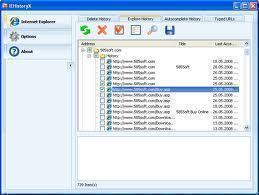
In most cases, your visited links are stored as follows: windowsapplication datamicrosoftinternet exploreruserdataindex.dat
Removing Visited Links Stored
It is usually easy to remove visited links stored. One way to do so is to visit the file tree above and delete the index.dat in your user data folder. It should be noted that you can change the original index.dat to indexold.dat so that if a problem occurs, you can easily revert back to the original data.
You can also open up your Internet Explorer 7 browser and click: Tools, Internet Options, Choose to delete Temporary Internet Files, History, Cookies, Saved Passwords and Web Form Information. Please note: It is important to back up these files before deleting, especially if you use the features of saved passwords and cookies. Most sites will request you to log-in again.

Follow Us!