Active Directory Organizational Units
An object is a set of attributes that represents a network resource, say a user, a computer, a group policy, etc and object attributes are characteristics of that object stored in the directory. For example, some of the attributes of a user object might include the user's first name, last name, department, and e-mail address in addition to others.
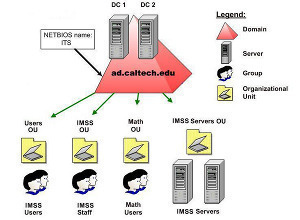
Organizational units act as a container for objects. Objects can be arranged according to security and administrative requirement in an organization. You can easily manage and locate objects after arranging them into organizational units. Administrator can delegate the authority to manage different organizational units and it can be nested to other organizational units. Create an OU if you want to:
-
Create a company's structure and organization within a domain – Without OUs, all users are maintained and displayed in a single list, the Users container, regardless of a user's department, location, or role.
- Delegate administrative control – Grant administrative permissions to users or groups of users at the OU level.
- Accommodate potential changes in a company's organizational structure – Users can easily be reorganized between OUs, while reorganizing users between domains generally requires more time and effort.
- Group objects with similar network resources – This way it is easy to perform any administrative tasks. For example, all user accounts for temporary employees can be grouped in an OU.
- Restrict visibility – Users can view only the objects for which they have access.
- How to Delegate Administrator Privileges in Active Directory
The primary reason to create organizational units is to distribute administrative tasks across the organization by delegating administrative control to other administrators. Delegation is especially important when a decentralized administrative model is developed. Delegation of administration is the process of decentralizing the responsibility for managing organizational units from a central administrator to other administrators. The [...]...
- Global Catalog in Active Directory
Domains and Forests can also share resources available in active directory. These resources are searched by Global Catalog across domains and forests and this search is transparent to user. For example, if you make a search for all of the printers in a forest, this search goes to global catalog server for its query and [...]...
- Active Directory
Active Directory (AD) is a structure used on computers and servers running the Microsoft Windows operating system (OS). AD is used to store network, domain, and user information and was originally created by Microsoft in 1996. It was first deployed on Microsoft Windows 2000. Active directories provide a number of functions to include providing information [...]...
- Tree and Forest in Active Directory
The Domain is the core unit of logical structure in Active Directory. All objects that share a common directory database and trust relationship with other domain and security policies are known as Domains. Each domain stores information only about the objects that belong to that domain. All security polices and settings, such as administrative rights, [...]...
- Logical Structure of an Active Directory
Active Directory fulfills all the needs of an organization by designing a directory structure. It provides flexibility in designing the business structure according to current and future needs for an organization, so it should be examined prior to installing active directory. In Active Directory, resources are organized in a logical structure, and this grouping of [...]...