

Understanding Active Directory Security Principal Accounts
Active Directory consists of a considerable number of objects, and variety of objects, of which, security principal accounts are one. Security principal accounts are Active Directory objects that are assigned unique security identifiers (SIDs), and are therefore used in authentication and Active Directory security. A security principal account can be defined as a user account, group account, or computer account that is assigned a SID, and is also assigned permissions to access certain network resources or Active Directory objects, and to perform certain actions on these objects. The SID is used to identify the user, group or computer. Access to Active Directory objects is controlled through granting permissions or denying permissions to security principals. A permission can be defined as the ability to access and perform an action(s) on an object. Permissions to an object are granted or denied by Administrators, or by the owner of the particular object. The security settings that are defined for a user, group, or computer determines and controls whether the particular security principal account has access to Active Directory, client computers, member servers, domain controllers, applications, and other network resources and services.
The common Active Directory objects that are regarded as security principal accounts include the following:
- User accounts: These are Active Directory objects which uniquely identify network users. A user account enables a user to log on to the domain and to access resources. A local user account enables a user to log on to a computer and access local resources on that particular computer. A domain user account enables a user to log on to a domain, and access network resources. Built-in user accounts are typically used for administrative tasks.
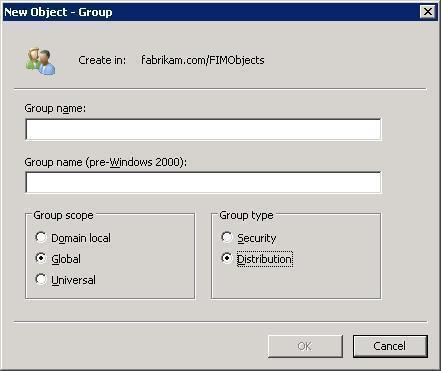
- Groups: Only security groups are regarded as security principals. Distribution groups are not considered security principals. By bundling users into security groups, an Administrator can manage security permissions for the members of the group as a single entity.
- Computer accounts: Computer accounts are typically used for authentication because they identify those client computers that belong to a domain.
A few common characteristics of security principal accounts are listed below:
- You can assign permissions to security principal accounts so that the users, group, or computers can access network resources.
- You can grant user rights to security principal accounts.
- You can use auditing to track the actions of users, groups, or computers.
Understanding the Role of Security Identifiers (SIDs) assigned to Security Principal Accounts
SIDs assists in controlling access to resources in the network. A unique SID is assigned to each security principal account when you create the accounts. A SID is used because it remains constant, even when the names of objects are changed.
The SID of a security principal account consists of the following key components:
- The domain ID
- A relative identifier
The domain ID is identical for each object within the domain. The relative identifier on the other hand is unique for each security principal. A domain in Active Directory has one domain controller that serves the role of Relative ID (RID) Master. It is the RID Master which generates the relative identifiers that are used when SIDs are created. Only one domain controller in the domain is assigned this role because any domain controller in the domain can be used to create security principal accounts, and each RID has to be unique. The domain controller serving the RID Master role controls the RID pool. This is a pool of relative identifiers that are distributed to domain controllers so that they can assign them to security principal accounts when they are created. When a domain controller’s relative identifiers are close to being depleted, the domain controller requests additional relative identifiers from the RID Master so that its supply can be replenished.
As mentioned previously, the SID assigned to a security principal account remains unique. What this means is that when the user name or any other attribute associated with a particular object changes, the SID remains the same. As you can see, it would not make any sense to control object access through the name of an object – object names might need to be changed.
A SID has the following format: S-R-IA-SA-SA-RID:
- S: Indicates the number as being a SID.
- R: Indicates the revision of the SID. SIDs has a revision of 1.
- IA: Indicates the issuing authority. The majority of SIDs uses the NT Authority, which is identity number 5.
- SA: Indicates the sub-authority.
- RID: Indicates the Relative ID that represents the security principal account.
The following section examines the manner in which the SIDs of security principals is used. The Local Security Authority (LSA) creates an access token when a user logs on to the domain. In fact, each time that a user logs on to the domain, an access token is created. It is the access token that controls the access of the particular user to resources in the domain.
The access token created by the LSA for a user contains the following elements:
- The logon name of the user.
- The SID of that particular user.
- The names of any groups to which the user belongs.
- The SIDs of those groups.
- The privileges that are assigned to the user.
The moment that a user tries to access a network resource, the system references the information in the access token and compares it to the security descriptor of the resource which the user wants to access. A security descriptor holds the following access control lists:
- Discretionary access control list (DACL): The DACL contains the ACEs that are associated with the resource.
- The ACEs controls access to the resource because it specifies whether the user, based on its SID, is allowed or denied access to the resource.
- The ACEs define whether the particular user should be audited.
- The DACL also defines which actions the user is permitted to perform on the resource.
- System access control list (SACL): The SACL contains ACEs that defines whether access to the resource should be audited.
The process that occurs when a user attempts to access a resource is summarized below:
- The system checks whether the resource that the user is attempting to access has a DACL.
- Access is granted to the user if the resource has no DACL. This basically means that no access control exists for this particular resource.
- When the resource has an associated DACL, the system proceeds to examine the ACEs included in the DACL in a specific sequence, so that it can determine whether access should be allowed to the resource or denied for this user.
- After the ACEs are examined, the system would have found either:
- An entry or multiple entries which grants the user access to the resource.
- An entry that denies access to the resource for this user.
- No entries that grant or deny access to the resource. When this occurs, the user is denied access to the resource.
In addition to those SIDs that represent user, group and computer accounts, there is specific SIDs that represents standard accounts and groups, which are called well-known security identifiers. Well-known SIDs typically stem from group membership assigned by the operating system. Well-known SIDs is found in a Windows Server 2003 Active Directory environment.
The different types of well-known SIDs are listed below:
- Anonymous Logon (S-1-5-7): This well-known SID is used when a user logs on without providing log on credentials.
- Authenticated Users (S-1-5-11): This well-known SID is used when users are authenticated through individual accounts/network authentication.
- Batch (S-1-5-3): This well-known SID is used when users log on through a batch queue mechanism.
- Creator Owner (S-1-3-0): Acts as a placeholder in inheritable ACEs in ACLs.
- Creator Group (S-1-3-1): Acts as a placeholder SID.
- Dialup (S-1-5-1): This well-known SID is used when users log on through a dial-up connection.
- Everyone (S-1-1-0): Indicates the Everyone group, including authenticated users and the Guest account.
- Interactive (S-1-5-4): This well-known SID is used when users log on to the local computer, and when users connected using Terminal Services.
- Local System (S-1-5-18): This well-known SID is used for a service account which the system runs.
- Network (S-1-5-2): This well-known SID is used for users when they log on through a network connection.
- Other Organization (S-1-5-1000): This well-known SID is used to ascertain whether the users of other domains are allowed to authenticate.
- Self (S-1-5-10): This well-known SID is used as a placeholder for a user identified by a particular SID.
- Service (S-1-5-6): This well-known SID is used for security principals that log on as a service.
- Terminal Server Users (S-1-5-13): This well-known SID is used for users that log on to a Terminal Services server.
Although it is never typically necessary to view SIDs, there are command-line tools available that can be used to view SIDs.
- Whoami command-line tool: You can use this tool if you want to view all the access token information of a user. The information that you view via the whoami /all command include:
- The username.
- Group information.
- All SIDs of the user.
- User privileges.
- Ntdsutil command-line tool: If necessary, you can use this tool to manage SIDs. Because only one RID Master is permitted for each domain, no duplicate SIDs should exist for domains in your Active Directory environment. In cases where this does occur, use the Ntdsutil command-line tool to delete any duplicate SIDs. The commands that can be used in Ntdsutil to manage SIDs are listed below.
- Check duplicate SID, the domain database is checked for duplicate SIDs.
- Cleanup duplicate SID, the domain database is checked for duplicate SIDs, and any detected duplicate SIDs is then deleted.
- Connect to server %s, indicates the domain controller or server to establish a connection to.
- Log file %s, indicates the location for the log file.
- Help, displays help.
How to create and set permissions for security principal accounts
To create a new user account, use the steps outlined below:
- Open the Active Directory Users and Computers console.
- In the console tree, right-click the container in which the new user account should be created, and then select New, and then User from the shortcut menu.
- When the New Object – User dialog box appears, enter the user’s first name, initials, and last name in the provided fields. The information specified in these fields is used to populate the Full Name field. This is the user’s display name.
- Enter the logon name for the user in the User Logon Name field, and select the domain to which the account should be associated with.
- The initial characters of the User Logon Name field populate the User logon name (pre-Windows 2000) field. Click Next.
- Proceed to set the password of the user in the Password and Confirm Password fields, and enable any applicable options available in the dialog box for the new user account.
- Click Next, and then click Finish.
To set permissions to objects for a security principal account, use the steps outlined below:
- Open the Active Directory Users and Computers console.
- Ensure that Advanced Features are enabled. This can be verified on the View menu.
- In the console tree, right-click the object that you want the security principal to be able to access, and click Properties on the shortcut menu.
- Click the Security tab, and then click Add.
- When the Select Users, Computers, Or Groups dialog box opens, in the Enter The Object Names To Select box, enter the name of the security principal that you want to set permissions for.
- Click OK.
- When the Permissions for box opens, use the Allow and Deny checkboxes to specify permissions.
- Click OK.
Follow Us!