

Posting status messages to a Twitter account via PHP is quite useful in many scenarios. Like automatically tweeting your blog’s latest content, tweeting list of facts, tips or quotes at regular intervals, tweeting daily news, etc. This article’s intention is to show how you can send a tweet to your Twitter account via PHP programming.
Required APIs, Tokens and Files
We will require the following things in order to tweet via PHP.
- An app created via your Twitter account with Read/Write permission.
- Consumer Key, Consumer Secret, Access Token, Access Token Secret
- OAuth API (i.e. a file called OAuth.php)
- PHP Library to support OAuth for Twitter’s REST API (i.e. a file called twitteroauth.php)
Let’s get started by following the below steps carefully.
Step 1: Go to the Create New App screen and login with your Twitter account.
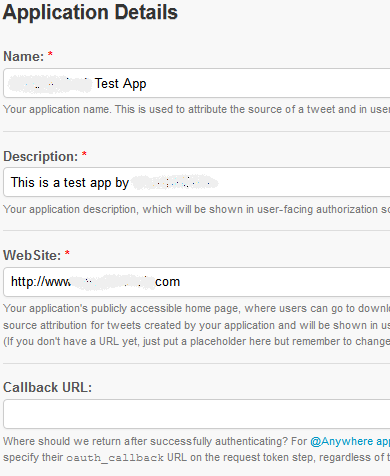
Step 2: On the Create an application screen, enter the required details like Name, Description, and Website for your new Twitter app. Callback URL isn’t necessary and you may leave it blank. Accept the Developer Rules of the Road agreement. Enter the captcha and click Create your Twitter application.
Step 3: If your Twitter app is created successfully, you will see the app screen. On this screen under the OAuth Settings section, copy+paste the Consumer Key and Consumer Secret in a text editor for future reference.
Clicking the Create my access token will be of no use at the moment, since the Access Level is still Read-Only. We need it to be with Read-Write permissions.
Step 4: Go to the Settings tab. Under the Application Type section, select Read and Write or Read, Write and Access direct messages if your application requires access to Direct Messages too. Click the Update this Twitter application’s settings button.
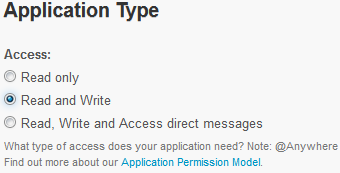
Step 5: Now, go back to the Details tab. You should see Access Level changed to Read and Write under the OAuth Settings section.
Under the Your access token section, click Create my access token button. If successful, you will see newly generated Access Token and Access Token Secret under the OAuth Tool tab. Copy ‘Access Token’ and ‘Access Token Secret’ in a text editor for future reference.
Step 6: Download the OAuth.php and twitteroauth.php files and place them in a directory on your server (say under domainname.com/mytwitterbot). Both of these files should be at the same directory level.
IMPORTANT: Twitter retired the API v1 version on June 11, 2013. We now have to use Twitter’s API v1.1 version. Therefore, we need to make some changes in the twitteroauth.php file.
Open twitteroauth.php in a code editor to modify the host and ssl_verifypeer values. Make the changes as follows:
$connection->$host = "https://api.twitter.com/1.1/";
$connection->ssl_verifypeer = TRUE;
Step 7: Create a new file called index.php and add the following code to it.
<?php

// Include twitteroauth
require_once('twitteroauth.php');

// Set keys
$consumerKey = 'XXXXXXXXXXXXXXXXXXXXXXXXXXX';
$consumerSecret = 'XXXXXXXXXXXXXXXXXXXXXXXXXXX';
$accessToken = 'XXXXXXXXXXXXXXXXXXXXXXXXXXX';
$accessTokenSecret = 'XXXXXXXXXXXXXXXXXXXXXXXXXXX';

// Create object
$tweet = new TwitterOAuth($consumerKey, $consumerSecret, $accessToken, $accessTokenSecret);

// Set status message
$tweetMessage = 'This is a tweet to my Twitter account via PHP.';

// Check for 140 characters
if(strlen($tweetMessage) <= 140)
{
    // Post the status message
    $tweet->post('statuses/update', array('status' => $tweetMessage));
}

?>
What the code does: This code includes the twitteroauth.php file which already includes the OAuth.php file. Define variables for Consumer Key, Consumer Secret, Access Token, Access Token Secret and copy the respective keys. Create an object of the class TwitterOAuth by passing the keys as parameters. Define a variable which holds the actual status message to be tweeted to your Twitter account. Before posting, it’s safer to check the length of the status message to be below 140 characters – else, the code may show an error. Call the post function as shown with your status message.
Place index.php too in the same directory, i.e. domainname.com/mytwitterbot.
Now, open the URL in your browser. In our case, it would be like http://domainname.com/mytwitterbot. In few seconds, you should see a tweet update in your Twitter account with the set status message.
The status message can be populated from an array, XML file, plain text file, database, or from another API.
Automate Tweets in PHP via CRON
To schedule an auto-tweeting functionality at regular intervals, you can add the above created index.php file to your CRON jobs. This way, the tweet will automatically go to your Twitter account at set intervals.
Did you face any problem while implementing the above method? Please share your experience in the comments below.
David
hi, unf. the oauth files do not exist any more. Could u plse update this article? 😉 so i can buy u a coffee or a tea? 🙂
Shital Pimpale
worked for me.thank you.but need to post image also,i don’t know to to do it.
Tormy Van Cool
your code doesn’t exist anylonger
dejansoftware
hi,
I would like to send 96 tweets per day, that is 1 tweet every 15 min from preprared txt file (one line is one tweet)
Is this possible with this method?
Thanks
cyberfunk77
Hello and thanks for this tutorial. I followed your instructions but I get “Fatal error: Class ‘TwitterOAuth’ not found…” when trying to execute the php tweet. Any help is much appreciated. All files are in the same directory on my server.
Vemuez
After many errors and trials, i have finally managed to get it working BUT it doesn’t appear even after changing the read-write permission, updating the access token key to apply these changes and etc. It just doesn’t want to appear? Know where the problem may lie?
saif el din hesham
it worked but i can’t see the tweet, i’m working with xamp(php my admin) any help ?
Ivano De Luca
Does not work. What is the matter? I made all, but i have no tweet… and no error messages. How could I do to understand the problem?
JorgeT
I had a similar problem. Not enough to change the permissions to Read -Write for personal credentials remain Read. Create a new Twitter application from the start with Read -Write , because these permissions to personal credentials and through these new credentials are inherited apply the process. So the process work well for me.
Taani
It is brilliant, neat, clean and short code and worked like a charm.
What I want to ask that is there any limitation of posting tweets per minute / per hour or is it simply unlimited?
Best of Luck
Niksilp
I can’t get this code to work and I’m not sure why. 🙁 My app is set to read/write, I generated my access tokens after setting it as such (and have even tried re-generating the tokens a few times since then). I have the latest twitteroauth.php from Abraham at GitHub… His has ssl_verifypeer = FALSE; but I’ve tried with it set to TRUE as well.
I also tried copying and pasting the changes listed exactly from this article ($connection->$host = “https://api.twitter.com/1.1/”; $connection->ssl_verifypeer = TRUE;) but that returns a PHP error (” Parse error: syntax error, unexpected T_OBJECT_OPERATOR, expecting ‘,’ or ‘;’ in … line 21 ” — line 21 is ” public $connection->$host = “https://api.twitter.com/1.1/”; “).
I tried searching around for some other PHP code to achieve the same end as what’s been provided here, but everything else I’ve tried I encountered ” {“errors”:[{“message”:”Could not authenticate you”,”code”:32}]} “. I can’t even get the code provided here at Tech FAQ to give me an error, so I’m not sure if I’m running into the same issue; I just get a blank page when I try to access the index.php and nothing ever gets posted to my account.
Any help would be much appreciated. I’m really stuck and quite disappointed… This seems like such a simple thing and it’s so perfect for what I need. I just don’t have enough knowledge on PHP and Twitter API to troubleshoot it myself.
leobiscuits
Hey!
Great tutorial, works like a charm!
Just one question though, Is there a way to set the tweet to appear on a specific date, like an hour after the user used the API? Thanks!
neveroffguard
Hi,
Thank you for this tutorial.
I am using XAMPP and facing the below error Fatal error: Class ‘OAuthSignatureMethod_HMAC_SHA1’ not found in C:xampphtdocs.
gilbnet
my app no tweet 🙁 return true ???
Elroy Paisley
This is terrific, took some tinkering but I get it working. Could I ask how I could use this code to RETWEET, rather than tweet. For example, if I have a tweet ID# and I would like to retweet it, how would I alter this (great) code to make that happen? thanks!!
WillSpencer
Here’s the code I’m using to retweet:
$status = $twitter_connection->post( ‘statuses/retweet/’ . $retweet, array( ‘id’ => $retweet ) );
Elroy Paisley
I see you’re using $twitter_connection but wouldn’t you want to use $tweet per the code above? Just checking. Thanks for the reply!
WillSpencer
The variable names are different in my current code than in the code above. 😀
Elroy Paisley
Hi Will, thanks for your feedback. Any chance you can help me diagnose my “Sorry, page does not exist” problem? I’ve checked the tweetID (and changed it repeatedly to other tweets) and I’ve checked my tokens/keys.
WillSpencer
I can’t see why you’re getting that error.
Perhaps review this?
https://dev.twitter.com/docs/api/1.1/post/statuses/retweet/:id
Elroy Paisley
Yeah I’ve looked through that, no idea what’s wrong. Going to start from scratch on the retweeting. But thanks so much for your time!
Elroy Paisley
Hmmm. Seems like no matter what I set $retweet to be (no matter the tweet ID) I get this:
object(stdClass)#5 (1) {
[“errors”]=>
array(1) {
[0]=>
object(stdClass)#6 (2) {
[“message”]=>
string(31) “Sorry, that page does not exist”
[“code”]=>
int(34)
}
}
}
Alan Marcel
very nice tutorial. It worked on the first try! thank you a lot!
Nazar
( ! ) Fatal error: Call to undefined function curl_init() in D:ApplicationswampwwwBSHtwittertwittertwitteroauth.php on line 195
No idea what the error means 😐
bob
Fatal error: Class ‘TwitterOAuth’ not found in /opt/lampp/htdocs/testtwitter.php on line 15
WillSpencer
Bob, it seems like you’re missing twitteroauth.php.
Meenu
Hey Very nicely explained.. but ca u please tell me how to send tweets via xml file
Abdulqader Kapadia
You will need to implement XML logic to read from an XML file, where it says “Set status message” in the code.
JDR
Getting an error:
Warning: require_once(twitteroauth.php) [function.require-once]: failed to open stream: No such file or directory in /homepages/20/d98661292/htdocs/mro/twitterbot/index.php on line 4
Fatal error: require_once() [function.require]: Failed opening required ‘twitteroauth.php’ (include_path=’.:/usr/lib/php5′) in /homepages/20/d98661292/htdocs/mro/twitterbot/index.php on line 4
I’m a total php noob so forgive me if this is something obvious
Neeraj
Well done guys
Mushtaq
brilliant guys my best wishes with u guys keep rocking
may god help u guys to help others
Mushtaq
thanks a million man you rock man really
Jason
Worked exactly as you said it would first time. THANKS!!! for this great walk-though
Abdulqader Kapadia
Jason, thank you. We are glad it helped you.
Ivan van Oosterhout
I get this error???
Fatal error: Cannot redeclare class OAuthException in /home/deb00000/domains/website.com/public_html/testtwit/OAuth.php on line 8
Abdulqader Kapadia
This could be the result of declaring/including “twitteroauth.php” multiple times. I recommend you follow the above steps from scratch in a fresh directory.
Abrahim Vos
Great script sofar, thanks, works like charm. Next step I don’t really understand. How to get the status message into a variable.
And further: how to include an image. I tried it with adding the URL of the image in the message but that doesn’t seem to work…
Abdulqader Kapadia
Use https://dev.twitter.com/docs/api/1.1/post/statuses/update_with_media to upload an image with your tweet.
Abdulqader Kapadia
Mattias, I didn’t really understand your question. Can you please elaborate?
Mattias
Great artcile! However, I’d like the same script to post it on the users own Twitter account. Like Dropbox referral: https://www.dropbox.com/referrals. How to? 🙂
WillSpencer
Utpal, try recreating your Access Token and Access Token Secret after setting your Access Level changed to Read and Write.
sujit
hey what you did its not working for me although i regenerated after read write permission please help