

DFS (Distributed File System) provides a mechanism for administrators to create logical views of folders and files, regardless of where those files are physically located on the network. DFS also allows administrators to distribute shared folders and work loads across several servers for more efficient network and server resources use. Fault tolerance network storage resources are also available by using DFS.
DFS is a service that provides a single point of reference and a logical tree structure for file system resources that may be physically located anywhere on the network. Using DFS to share network resources across the network provides the following benefits.
- By using DFS one can organize resources
- It facilitates navigation
- Facilitates administration
- Preserves permission
Types of DFS Roots
A DFS root is the highest level of the DFS topology and is the starting point for the hierarchy of shared folders. A DFS root can be defined at the server or at the domain level. A domain may have any number of DFS roots, each server running Windows 2003 can host any number of DFS roots. You can configure the following types of DFS Roots.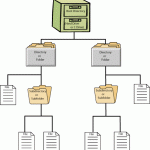
- Standalone DFS Root is stored on a single computer, instead of Active Directory. Standalone DFS root do not have any DFS shared folders in the root level and only one level of DFS link is possible.
- Domain based DFS Root is hosted on member server or domain controller. It has DFS topology which automatically gets stored in Active Directory. Domain based DFS root has root level DFS shared folders with multiple levels of DFS Links.
Accessing File Resources
Because a DFS hierarchy appears just as a regular folder hierarchy, users can gain access to file sources through DFS in the same way that they gain access to regular shared folders. The difference is that DFs provide users with a single access point for resources that can be located in several physical locations. Users can navigate through DFS by using Windows Explorer. When a user connects to a DFS root the user sees all the first level DFS links as folders in the DFS Root. The user can then connect to one of the DFS links by opening the folder that the link represents. The user can also directly connect to a DFS link.
Creating a DFS Root
- Open the Distributed File System from the administrative tools menu.
- On the Action menu. Click New DFS Root.
- Configure the Create new DFS Root wizard options. Select the DFS Root type specifies Domain to host DFS and Server to host DFS. And specify share for DFS Root with the name of DFS root.
Adding DFS Links
A link is mapped to a standard shared folder on the network. A new DFS link can refer to a shared folder with or without sub folders. A DFS link can also point to another DFS Root. This configuration allows you to create large DFS trees that combine other DFS tree.
To add a DFS link:
- In the Distributed File system, click the DFS Root to which you will add a DFS link.
- On the Action menu, click New DFS Link.
- Configure the Add to DFS dialog box options like link name, comment; send the user to this folder and client cache this referral for x seconds.


turkman
I have made a DFS Namespace named \\dc1\bank . There is some other folders from another file servers(for example \\dc1\bank\folder1 is the folder on \\fs1\folder1 ). I want to restrict users to direct access to folders on the other file servers(for example: restricting to direct access to \\fs1\folder1 ). Can i do this issue in windows server 2008 R2 ? i am waiting and thanking a lot…