

An Audible AA file is a type of audio file format that is used with Audible eBooks. Only certain eBook readers are able to open and play Audible AA files but third-party software may be combined with specific PDF readers or other text editors in order to play this file format. Audible AA files are often used to allow the blind to hear books instead of reading them. Audible AA files are also used to allow users to listen to a book while they are doing something else. Because Audible AA files are not compatible with most media players, however, they are usually converted into a more popular file format such as MP3.
What is MP3
An MP3 file, or MPEG Layer-1, is a compressed audio file that offers a similar level of audio quality as professional audio CDs. MP3 is, by far, the most popular audio file format in the world and is used as the default audio format by virtually all media players and media player devices. The MP3 audio format is more practical than the WAV format used by most recording studios as WAV files tend to be around 50 MB for the average song while MP3 files are about 3 MB for the same song with a similar level of quality.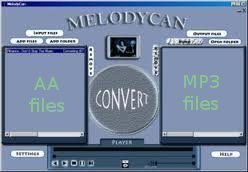
MelodyCan
MelodyCan is a software that allows users to convert Audible AA files to MP3 in addition to a wide variety of other files. MelodyCan supports M4A, M4P, M4B, RAX, RA, FLV, MP4, AVI, WMV, WMA, and Audible AA files and is able to convert any of these file formats into MP3 or WMV files. MelodyCan also includes a DVD ripper that allows users to extract WAV files from a disk and convert them into either MP3 or M4A. MelodyCan can even convert DRM-protected files into a nonprotected file format like MP3 or WAV for use on other operating systems. MelodyCan is available for $39.99 at http://www.melodycan.com/.
SoundTaxi
SoundTaxi is a popular audio and video conversion software that allows users to convert a wide variety of audio files into other audio formats. SoundTaxi is made for the Windows operating system and is able to support WMA, MP3, RA, AVI, WMV, RAX, MP4, OGG, M4P, WAV, SND, AIF, M4V, Audible AA, and AAC file formats as well as any other file that can be played with Windows Media Player. SoundTaxi is available in four different versions ranging from $19.99 for the Platinum version to $59.99 for the SoundTaxi Media Suite. SoundTaxi can be found and purchased at http://www.soundtaxi.info/.
TuneCab
TuneCab is available in two programs: the TuneCab Media Converter and the TuneCab Online Video Catcher. The TuneCab Media Converter is a powerful conversion and DRM-removal tool that allows users to perform conversions between a wide variety of audio and video file formats and remove restrictions placed on DRM-protected files. TuneCab Media Converter is famous in the audible eBook industry because it is easily able to process Audible AA files. TuneCab Online Video Catcher is a separate application and is able to download videos from YouTube, Google Videos, and other online video sources. Both of these applications can be found at http://www.tunecab.com/ and range in price. TuneCab Media Converter is available in three different editions ranging between $19.99 and $39.99 and TuneCab Online Video Catcher is available in three different editions ranging between $25.99 and $49.99.

Ronan
melodyCan CANNOT convert AA (Audible.com) files to any format be it WMA. MP3 etc.