

A NetBIOS name is an identifier that NetBIOS services running on a computer use. It is a combination of a 15 character (byte) name and a 16th character denoting the service. These names identify resources on the NetBIOS network. NetBIOS cannot do name resolution on the Internet because NetBIOS names are single part names and do not have any hierarchical structure.
The NetBIOS namespace is flat, which means that there are no suffixes added to the NetBIOS name and that two computers cannot have the same NetBIOS name. This means that each NetBIOS name in any one network must be unique.
Characteristics of NetBIOS Names
The characteristics of NetBIOS names are as follows: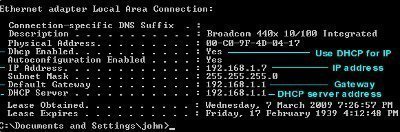
- NetBIOS names support services that require NetBIOS. Windows server 2003, Windows 2000, and Windows XP use DNS names for most functions, but a NetBIOS name resolution method must exist on any network with computers that are running earlier windows versions or for applications that still depend on NetBIOS names.
- A NetBIOS name is an alias that an administrator assigns to a computer to identify a NetBIOS server running on TCP/IP host.
- The NetBIOS name does not have to match the host name.
- NetBIOS names are 15 characters or less in length, compared to 255 or fewer characters for DNS host names. The host name and the NetBIOS name on a computer running Windows Server 2003 are generated together. If the host name is more than 15 characters, the NetBIOS name is the first 15 characters of the host name.
- NetBIOS names must be unique on their networks.
- When a computer is started, various services (such as the server service or the workstation service) register a unique NetBIOS name based on the computer name. The registered name is the 15 character NetBIOS name plus a sixteenth character (byte) that uniquely identifies the server service.
- NetBIOS names are also registered for groups of computers that provide network services. For example, if Mickey.Disney.com is a domain controller, it will register that NetBIOS name (Mickey) and will register names that identify its role as a domain controller in the Disney domain at the same time. This allows clients to search for all NetBIOS hosts that provide domain controller services in the Disney domain without the client knowing the actual names of the domain controllers.
- A NetBIOS name simplifies the way that a user references other TCP/IP hosts. NetBIOS names are easier to remember than IP addresses.
- A NetBIOS name can be resolved if the name and IP address are stored either in a database on a WINS server or an LMHOSTS file. A broadcast can also resolve a NetBIOS name.
- The nbtstat utility displays the NetBIOS names that NetBIOS services use on the computer.
The NetBIOS name is created while the operating system is being installed. When the computer name is created, the install automatically creates both a host name and a NetBIOS name that are based on the entered computer name.
De Ron Eric
What about case sensitivity of NETBIOS names. Are capital letters mandatory?
And what are not authorized characters?
Can other rules apply in Linus/unix and Windows regarding that topic?
Thank you
barzan
what is netbios what is use for in win server 2003
clarkw006
Is there a way to change the netbios name? I have two computers on my network with the same netbios name.
Tarunesh
What is the diferrence between additional domain controller and child domain controller?
jacky
don’t know
gorave
can u give me a example how netbios name wil look like ?? with suffix?
Will.Spencer
NetBIOS names don’t use suffixes. They are a maximum of 15 characters in length and cannot contain a space, forward slash, backslash, colon, semi-colon, asterisk, quotation mark, question mark, or pipe. A NetBIOS name might look like one of these: SERVER, PRINTER, HP, IBM, DELL, BOBBY, BASEMENT, OFFICE, LASERJET, etc…
kiran
What is the diferrence between Host name and NetBIOS name?
What is the use of NetBIOS name over Host name?
Will.Spencer
The host name is what the computer thinks it’s name is. The NetBIOS name is what the Windows network thinks the computers name is. On TCP/IP based networks, computers can also have DNS names.
The use of the NetBIOS name is for communicating over NetBIOS networks.