

The “Data Error Cyclic Redundancy Check (CRC)” is a problem with the mathematical process the computer does in order to ensure that data is properly transferred from a particular source to a specified destination. During the cyclic redundancy check, the computer determines if the data being transferred is not damaged. When users get a “Data Error Cyclic Redundancy Check” message, this could very well mean that the data they are transferring is corrupted.
Often times, users encounter “Data Error Cyclic Redundancy Check” while attempting to read and/or copy data derived from a CD or a DVD that has been damaged. Prior to the error message, the common indication of a data CRC error is a grinding or whirling sound in the CD drive or the slowing down of the computer. The grinding or whirling sound is a result of the drive’s attempt to read the CD or DVD disc data a number of times. After several unsuccessful tries, the computer will finally display the “Data Error Cyclic Redundancy Check” message.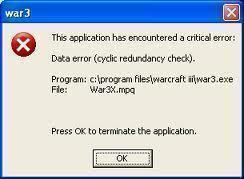
Another instance when the “Cyclic Redundancy Check” error appears is when users try to access a file they acquired from the Internet that was not properly downloaded. System crashes and applications with numerous bugs also commonly cause this error message.
How Does a Cyclic Redundancy Check Verify Data Integrity?
A term used in place of CRC is “Polynomial code checksum.” It is not a secure means of ensuring that data has not been modified by a malicously acting program or user. Instead, it is used to detect an accidental change to the raw data in the file. The CRC capable device or program will calculate a CRC code for each block of data and store this information with the data. When the reading device or drive goes to load the data, it repeats the calculation based on the data to ensure that the CRC values match. If they do not, then a CRC error will be displayed.
How to Resolve this Error
Users can prevent “Data Error Cyclic Redundancy Check” by performing a set of simple procedures. If a user encounters this error while his/her computer is reading data from a CD or DVD, the first thing to do is to eject the disc and clean its surface with a soft cloth. If the computer tried reading data from different discs and encountered the same error each time, check the disc drive for loose cables or replace the drive itself. Moreover, make sure that the computer has properly downloaded Internet files prior to opening them. This will prevent the “Data Error Cyclic Redundancy Check” message from popping up on the screen. Use various download manager software applications in order to manage and monitor the downloaded files’ status.
Another option is to download a management tool or software program that allows incremental information download, as this gets around connectivity hiccups.

frederik
try to use “Long Path Tool” program
ylheart
To copy files with the “Data Error Cyclic Redundancy Check” error, you need CBD(Copy Bad Disk) .
michael daniels
is it possible for the CDC to also happen when the data is transferring then the computer restarted on itself
majlinda
when i try to copy music from my computer to my USB i get the message Data Error Cyclic Redundancy Check and I can not copy the folders .How can I resolve this problem?
Marlon Franco
maybe you need to check your USB drive. Try to reformat it, and copy the files again.
Aaron
I inserted a dvd into my lappy right, then the disk drive E: icon appears but it couldnt read the media I inserted earlier. I downloaded CDCheck, no good and also, MicrosoftRun, also no good. Then to my surprise, by SIMPLY, I repeat BY BLOODY SIMPLY rubbing the DVD with soft cloth, I realized that that technique really worked and now my lappy can read my media. The only way to remove the CRC is to rub the dvd with soft cloth.
THANK YOU !!!
Ray
A HDD password was created, locking the harddisk with no software to crack it open, I’ve tried everything, and trust me, EVERYTHING. Then it occur to me that maybe I can zero the harddisk, overwrite the security codes. I used a software called: “Active@ KillDisk” to try and do a one pass of zero to all sectors, then a message showed up and said “Error(data error(cyclic redundency check))”, I tried to format the harddisk, went to diskmanager in administrative tools, i notice the harddisk is not initialised, when I tried to initialise it, similar message poped up. I request a solution, regardless of lossing any data, or what so ever, I just want to make use of that 1T harddisk again.
any suggestions are greatly appreciated.
-Ray
memenode
Well, as the article says, this might mean the disk is actually bad, corrupted or damaged in some way. You could, instead of trying to format it, try and scan it for errors and bad sectors. If you have another disk with Windows on it and it can at least detect the 1TB drive you could run scandisk and bad sectors check from there.
Otherwise you can boot from one of the LiveCDs like PartedMagic and check with their tools.
dhruv
i am having same problem pleaseeee help