

Error 1327 invalid drive can be triggered on a Windows computer when installing software that refers to a nonexistent drive, or when a computer attempts to reference the home drive’s default “H” drive when Windows Enterprise is installed. If the “H” drive is neither accessible nor installed on the computer, the software being installed would be looking for operating system components that are not in an expected location, therefore the error is triggered. Unfortunately, error 1327 cannot be corrected by disabling the non-existent drive via the computer’s Control Panel and requires manual intervention to be corrected.
How to Correct Error 1327 Due to a Missing Networked Drive
Step 1 – Open “My Computer.”
Step 2 – Left click the missing networked drive letter that is causing error 1327 (normally the H drive).
Step 3 – Choose the “Hardware” menu option in the uppermost menu tab, then remove the drive from Windows Explorer.
Step 4 – Choose “Start” and select the “Run as Administrator” option.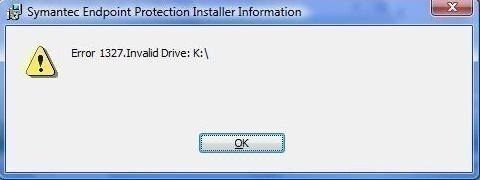
Step 5 – Enter Net Use s: servernamesharename in the subsequent prompt.
Step 6 – Press the “Windows” and “E” keys to open Windows Explorer again, then select “Map Network Drive.”
Step 7 – Choose the “s:network Drive” and enter the “servernamesharename” into the folder that now appears, which will result in the invalid drive being removed and the problem on the computer being corrected.
How to Correct Error 1327 while Installing Microsoft Office
Step 1 – Select “Start” then click “Program.”
Step 2 – Select the “Administrative Tools” folder, then choose “Disk Administrator.”
Step 3 – Right click the drive letter that will be changed then choose the “Click Assign Drive Letter” menu option.
Step 4 – Select the correct drive letter on the subsequently displayed menu, then click “Ok.”
Step 5 – Restart the computer and run the Microsoft Office setup disk again and the error will be eliminated.
frederik
just suggest to try “Long Path Tool” program
1 AlaskanAssassin
step 2 -How do I left “click the missing drive letter” If I could click it, it wouldn’t be missing!
Had OOffice on a now-dead drive and can’t uninstall to reinstall, please help!