Home     Blog

Error 88780078

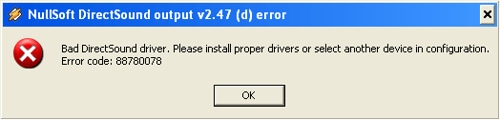
Error 88780078 may occur on Windows computers when attempting to play audio files. This indicates that there is a bad DirectSound driver on the computer. This error is most commonly associated with using WinAmp to play audio files on Windows XP, Vista, or Windows 7. Though this is the case, other audio players can also trigger this error.

How to Fix Error 88780078

Step 1 – Select “Start,” “Settings,” and “Control Panel” to open the “Control Panel.”

Step 2 – Select the “Audio” menu tab and verify the information listed under “Default Device,” found under the “Sound playback” menu label. If the current sound card is not listed in this area, re-seat the card.

Step 3 – After re-seating the sound card, select “Administrative Tools” under the “Control Panel” main menu.

Step 4 – Choose the “Named Services” shortcut on the subsequently displayed menu.Error 88780078 Error 88780078
Step 5 – Right click “Windows Audio” and choose the option to restart audio services.

Step 6 – If the error persists, open the WinAmp media player and right click it to display the list of its available functions.

Step 7 – Click “Options” then open “Preference.”

Step 8 – Select “Plug-ins” then “Output.”

Step 9 – Change the “Sound Card Settings” configuration in the “Output Box” and change any sound card settings that do not reflect the computer’s current sound setup.

Step 10 – Select “Save” or “Ok” and error 88780078 will be corrected.
VN:F [1.9.17_1161]
Rating: 6.0/10 (1 vote cast)
Error 88780078, 6.0 out of 10 based on 1 rating
Follow javanx3d on

Leave a Reply

Related Posts

  • Error 815

    Windows error 815 occurs when a Windows computer fails to make a DSL connection. This code replaces traditional error codes 676, 678, 691, and 769 from Windows XP, and no less than four different causes trigger it. The error’s four possible causes include DSL server problems (or an indicator that the phone line is busy), [...]...


  • Error 1327 Invalid Drive

    Error 1327 invalid drive can be triggered on a Windows computer when installing software that refers to a nonexistent drive, or when a computer attempts to reference the home drive’s default “H” drive when Windows Enterprise is installed. If the “H” drive is neither accessible nor installed on the computer, the software being installed would [...]...


  • I/O Device Error

    A common error encountered by Microsoft Windows users when trying to read or write from a drive, disk, or portable media device is the I/O device error. When this error is generated, the transfer mode that the operating system is attempting to use for the operation may not be recognized. The I/O error may be [...]...


  • Error Code 80072efd

    Error code 80072efd often occurs when users try to update Windows Vista through the Windows Update service. Overloaded Microsoft update services or incorrect firewall settings can trigger this error. If the Microsoft server causes the error, it can be corrected within the hour. When this occurs it is typically due to unusually high demand on [...]...


  • Error 0×80070052

    Error 0×80070052 can occur when adding or accessing files on a USB flash drive. Although the error indicates that the drive is full or that files may not be created or saved, it can be triggered when the drive is not near capacity. The error is normally generated based on how the flash drive is [...]...