Home     Blog

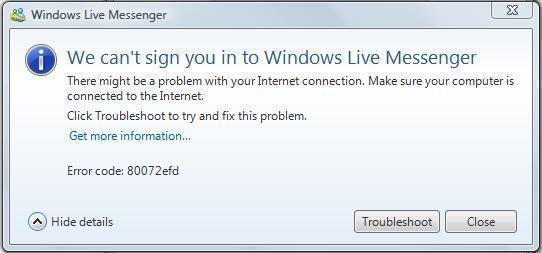
Error Code 80072efd

Error code 80072efd often occurs when users try to update Windows Vista through the Windows Update service. Overloaded Microsoft update services or incorrect firewall settings can trigger this error. If the Microsoft server causes the error, it can be corrected within the hour. When this occurs it is typically due to unusually high demand on the server. If the error happens due to a Windows firewall error, then the firewall has to be manually configured to correct the problem.

How to Fix Error 80072efd on the Windows Update Server

Step 1 – Close the Windows Update window.

Step 2 – Wait approximately 30 minutes.

Step 3 – Select “Start,” type “update” in the search text field, then click the “Windows Update” menu button.

Step 4 – Select “Check for Updates” then click “Install updates.” If the error persists, troubleshoot the Windows Firewall.error code 80072efd Error Code 80072efd
Step 5 – Restart the computer if no errors are received after completing step 4 and error 80072efd will be corrected.

How to Fix Error 80072efd when Windows Firewall Causes it

Step 1 – Right click the Windows firewall icon on the Windows system tray.

Step 2 – Choose “Options” or “Preferences.”

Step 3 – Choose “White List” or “Exceptions” on the firewall options display.

Step 4 – Enter the following URLs on the “White List” or “Exceptions” URL listing:

http://download.windowsupdate.com

http://*.update.microsoft.com

https://*.update.microsoft.com

Step 5 – Add port “80” and “443” to the Windows Update Service in the “Allowed Programs” list and click “save” or “apply” to save the Windows firewall changes made.

Step 6 – Restart the computer and error 80072efd will be corrected.
VN:F [1.9.17_1161]
Rating: 0.0/10 (0 votes cast)
Follow javanx3d on

Leave a Reply

Related Posts

  • MSN Error Code 80040154

    MSN Messenger (now called Windows Live Messenger) is the Microsoft instant messaging program that is deployed with all versions of the Microsoft Windows Operating System (OS). The application is also installed on the Xbox 360, the Blackberry OS, the Zune HD, and the Symbian OS 9.x. The program connects the user to the Microsoft .NET [...]...


  • Error 0x8000ffff

    Microsoft has bundled their basic Firewall application with the Windows Operating System (OS) since Windows XP SP 3. The firewall is used to provide consistent protection against Internet intrusion and attacks on computers and will block connection attempts that have previously been associated with malicious behavior. Error 0x8000ffff can be generated when the Microsoft Firewall [...]...


  • Error 1327 Invalid Drive

    Error 1327 invalid drive can be triggered on a Windows computer when installing software that refers to a nonexistent drive, or when a computer attempts to reference the home drive’s default “H” drive when Windows Enterprise is installed. If the “H” drive is neither accessible nor installed on the computer, the software being installed would [...]...


  • 0x800a0007 Windows Update Error

    Even though it might be alarming to see “0x800a0007 Windows Update Error” on one’s computer, it is quite easy to repair. Computer users receive this error message for various reasons, especially when trying to update software. Some common reasons for receiving the 0x800a0007 Windows Update Error are incorrect settings in Secure Socket Layers (SSL), incorrect [...]...


  • 0x800a138f Windows Update Error

    The causes of the “0x800a138f Windows Update Error” are plentiful, and there are quite a number of ways to go about fixing this problem. The steps used to repair this error, are similar to the steps completed to repair the 0x800a0007 Windows Update Error. These steps include correcting the date and time settings, the language [...]...