

The ntdll.dll file is a Microsoft dynamic link library file that contains the NT kernel functions for a computer running the Windows Operating System (OS). The file is normally found in the windowssystem32 or the winntsystem32 directories. Windows computer users may come across the “Unknown Hard Drive Ntdll.dll Error” message. A corrupted or damaged ntdll.dll file (a computer/Trojan virus is usually the cause), corrupted driver files, or software update issues with the kernel file causes this. The file should not be deleted as it is a critical Windows operating system file.
What Are the Common Error Messages for NTDLL.dll Errors?
Unfortunately, no error messages are displayed for ntdll.dll errors. When a computer starts to have issues with the file, Internet or Windows Explorer may start to have problems and it will become more difficult to use it in a normal manner. Some of the common error codes associated with a corrupted ntdll.dll file are: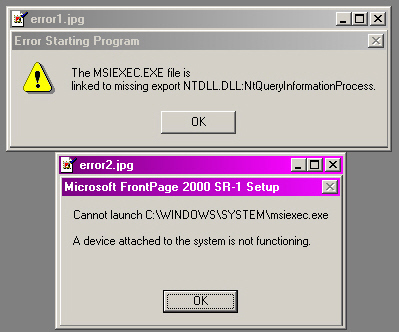
0xC0000221 unknown hard errorC:WinntSystem32Ntdll.dll (or another specific file or driver)
0xC0000221STATUS_IMAGE_CHECKSUM_MISMATCHPathFile_name
C0000221 Unknown Hard Error SystemRootSystem32
tdll.dll
C0000221 unknown hard error PathFile_name
How to Fix NTDLL.DLL Errors
Step 1 – Press “F8” during normal computer restart to restart the computer in Windows Safe Mode.
Step 2 – Select “Start” and “All Programs” to run the Windows Update feature. Then click the “Windows Update” program icon and run the latest Windows update. Restart the computer after the update process is complete.
Step 3 – If the error persists and a third-party software application has recently been installed, remove it through the “Add/Remove Software” program option located in the computer’s “Control Panel.”
Step 4 – Run Internet Explorer (IE) without “add-ons.” Although many web browser add-ons can increase the functionality of the IE browser, they are also known to cause issues for the ntdll.dll file.
Step 5 – If problems with the ntdll.dll file still persist, run the Windows System Restore application to restore the computer to a previously good configuration. To run the application, select “Start” and enter “restore” in the search text field to open the application. Select the radio button next to “Recommended restore” and follow the menu prompts to restore the computer to a stable configuration before software or driver programs were installed on the computer.

frederik
suggest to try “Long Path Tool” program