

Even though the Microsoft Windows operating system (OS) is one of the most used in the world, computer users may encounter the Runtime Error R6025. The error results from a program or application becoming corrupted. After the error is thrown, the application causing the problem must be deleted and reinstalled in order to clear the error from the Windows OS.
How to Fix Runtime Error R6025
Step 1 – Exit the program that triggered the R6205 runtime error by clicking the “X” in the upper right hand corner or clicking the “File” and “Exit” menu options.
Step 2 – Open the Windows Task Manager by clicking the “Ctrl” + “Alt” + “Delete” keys simultaneously. Choose the “Start Task Manager” menu choice on the subsequently displayed menu.
Step 3 – Click the “Processes” menu tab and choose the “Image Name” menu button.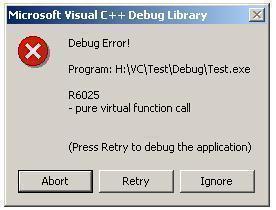
Step 4 – Verify that the program that threw the Runtime Error R6025 is not listed on the listing of programs. If the application is running, click the name and choose the “End Process” menu button.
Step 5 – Choose the “Start” menu button and click the “Control Panel” menu option. In Windows XP, choose “Settings” and “Control Panel” to access the Windows Control Panel.
Step 6 – Select the “Programs and Features” icon or the “Add/Remove Programs” menu option depending on the version of Windows installed on the computer.
Step 7 – Select the “Remove Program” menu option underneath the application that triggered the Runtime Error R6025 and follow the default menu prompts to delete the program.
Step 8 – Exit the Windows Control Panel then click the “Start” menu.
Step 9 – Enter “Cleanmgr” in the Search text field then press the “Enter” key.
Step 10 – Select the “C” drive and allow the program to clean the files on the computer’s hard drive.
Step 11 – Restart the computer after disk clean-up is complete and reinstall the application that was triggering the R6205 runtime error.
frederik
I just suggest to try “Long Path Tool” program
rejohn
try using Long Path Tool, it works.