

Svchost.exe is a system process that handles the processes executed from the dynamic-link libraries (DLLs). A number of services are run from the dynamic-link libraries and svchost.exe is the generic host process name used for such services. A Few years back, Microsoft decided to move all of the functionality from internal Windows services into the .dll files. The .dll files were created for moving the functionality from the .exe files for the sake of better re-usability. However, the .dll files cannot be executed directly and so, svchost.exe is required so as to execute the required .dll files. Different .dll files are created for different services and svchost.exe hosts all of them and calls the required files.
It is an integral part of the Windows Operating System and it cannot be restarted or started manually. At the startup, the services portion of the registry is checked by the svchost.exe and it then creates a list of the services that it needs to load for proper functioning of the system. A lot of services are required by Windows and these services are organized into logical groups, as grouping of services permits better debugging and control. A svchost.exe instance is created for each group of services that are in use and this is the reason why a number of instances of svchost.exe are found running in the background.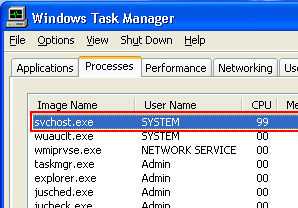
Each instance of svchost.exe supports a group of services, and if you’re running Windows XP then you cannot see the supported services from the Task Manager. In order to see the supported services, you need to use the ‘tasklist/SVC’ command at the command prompt. The command displays a list of the services supported by each running instance of svchost.exe and you can then close the services accordingly so as to reduce the CPU usage.
The SVCHOST.EXE Application Error
The SVCHOST.EXE Application Error is a type of error that comes up in Windows XP caused by a problem with the Windows Automatic Update feature. When the Windows Update gets corrupted, the SVCHOST.exe application error appears and it prevents anything from being done. What most people will find is that, when trying to click out of it, suddenly the entire operating system crashes and using the computer becomes impossible. What the error looks like when it pops up is like this:
The instruction at “Ox745f2780” referenced memory at “0x00000000”. The memory could not be “read”.
If you click ok or cancel — whether to terminate or debug respectively — the operating system crashes and you are no longer able to work on it. Even if you try to load through Safe Mode, for whatever reason, it does not work. This means that there must be a program running during Safe Mode that is the one corrupted. However, what is important is how to fix this error.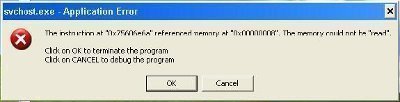
Fixing a SVCHOST.EXE Application Error
Once it has been identified that there is a problem with that particular portion of the memory, there is a series of steps that one can take to try and correct the error. The most straight forward method is to turn off the windows update and then turn it back on. Here’s how to do it:
- Go to the start menu and click my computer.
- Open up the properties for my computer and access the windows update feature.
- Click “Turn off Automatic Updates.”
- Restart the machine and allow it to load completely.
- Access the windows update tab once again.
- Click “Turn On Automatic Updates.”
This should correct the problem. However, if it does not, there is the option of working without the automatic updates and, from time to time, visiting the Windows website to get the updates manually. While this will require you to manually install the features, it is an effective way to run your computer without having to consistently deal with this error. Another route would be to go in and try and do a repair with the operating system disc. What this will do is write over any of the potential errors with what the operating system had to begin with.
Finally, if none of this works, it might be necessary to do a complete factory restore or a reinstallation of the operating system. While these routes are not ideal, they are a last resort to gain access to the machine once again.
frederik
I am very proud of “Long Path Tool” because it is awsome
rejohn
try using Long Path Tool, it works.