Home     Blog

Securing Linux Installation

Securing Linux Installation

Securing Linux Installation Installing Linux for securing your server depends upon how to install Linux on desktop or server. Installing Linux from untrusted source would not help in potentially securing your server and overcome on other security issues. You should install those packages only which you are in need because there is always a chance that someone could break into your server if security tasks would not be accomplished during installation and troubleshooting them. Verify Packages a

[ read more ]

How to Uninstall Ubuntu

How to Uninstall Ubuntu

Most often, when uninstalling Ubuntu--the most widely used version of Linux--what the person is done is replacing it with Windows. Therefore, to uninstall Ubuntu and therefore replace it with Windows, one must format the partition during the installation of Windows. This way, the space that was once Ubuntu goes to the Windows' needs. When this is done, the Ubuntu is removed and, in its place, Windows appears on the hard drive. However, as more people begin to get comfortable with Linux, what

[ read more ]

Unix Shell Scripting Tutorials

Unix Shell Scripting Tutorials

Unix Shell Scripting Tutorials This Unix shell scripting tutorial provides samples and instructional materials that are easy to understand and useful for Unix shell scripting. It also offers illustrated samples that will helps users explore different avenues of Unix shell scripting.   Bourne Shell Programming Tutorial Learn how to use the Unix shell with this comprehensive Bourne Shell Programming/Scripting Tutorial. It contains many example codes with explanations. Heiner's SHELLdor

[ read more ]

How to Change Your Shell

How to Change Your Shell

Under some version of Unix, users can use the `chsh` or `passwd -e` commands to edit the shell configured for their account in the passwd file. Under other Unix variants, only the root user can use these commands. Your shell is defined in the last field of the password file.  If you have "root" privileges, you can edit the password file to change your shell.  If you change your shell to an invalid shell, you will not be able to login again to repair your error.  In this example password f

[ read more ]

Configuring Linux DHCP Server

Configuring Linux DHCP Server

Configuring Linux DHCP Server Overview of Linux DHCP DHCP basically stand for the dynamic host configuration protocol. In other words you can say it describes that how your computer is attached with networks.. Assigning an IP address dynamically is basic task assigned to DHCP along domain name, name server, gateway, host name and net mask. DHCP can provide the other information like time server etc and has capability to save your lots configuration work in your organization and company as well

[ read more ]

Rootkit

Rootkit

A rootkit is a type of computer malware that is created to hide programs or other computer processes from detection from both users and antivirus software programs. Once installed, a rootkit will typically obtain administrator or higher-level permissions on the infected computer. Although rootkits originated with the UNIX operating system by providing root access to the software components installed with the malware (the kit portion of the name), they have since been developed to provide potenti

[ read more ]

Unix File Permissions

Unix File Permissions

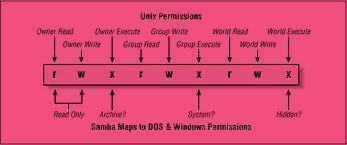
Unix file permissions are based upon an octal code. Unix file permissions are stored in a ten character array. The first character of the file permissions stores the file type. The standard file types are: Character Meaning - Plain file d Directory c Character device b Block device l Symbolic link s Socket = or p FIFO The next nine characters are divided into three groups of three characters, each of which represents a different role on

[ read more ]

What is Tar?

What is Tar?

Tar refers to a tape archiving file format and the program that creates them. Tar stands for tape archive. It combines multiple files together so that they can be used for programs, applications, and critical system files. While Tar does not directly install files to a user's hard drive, it is responsible for compiling the files together so that they can be transferred from one computer to another while preserving important information such as directory structures, user permissions, and dates. T

[ read more ]

How to Audit Unix Passwords

How to Audit Unix Passwords

To audit Unix passwords, you must compare each encrypted password in the Unix password file with a set of potential encrypted passwords. These potential encrypted passwords are created by encrypting every password in a list of plaintext passwords. This is an example of a dictionary attack. The Unix passwd File Location The traditional location for the Unix password file was /etc/passwd. Unix password file format An entry in the Unix password file consists of seven colon delimited fields:

[ read more ]

How to Use the Grep Command

How to Use the Grep Command

The grep command is a search command built into a variety of Unix based operating systems. This command line utility, whose name stems from the original Unix term which means "search globally for lines matching the regular expression, and print them," can be accessed using the command line or terminal from anywhere in the Unix operating system. When given a particular list of files to search through, the grep command becomes especially useful, as it can search through any amount of text to find

[ read more ]

Page 1 of 61234Last »