

For high-quality free video editing software, the TopBits staff actually recommend two excellent Open Source solutions.
When utilized together, these two video editing productivity tools provide a reasonably comprehensive digital video editing “bay”.
Movica
Movica is an ultra-compact Windows application that will allow you edit WMV and ASF files (using Asfbin) and MPEG files (using Mpgtx), which are two very decent command line editing tools.
Movica provides you with a clean graphical user interface that makes the above two line editors user-friendly, and utilizes an exhaustive array of hot key combinations for editing movie files.
Though the initial learning curve is a bit longer, this greatly helps prevent the errors and delays normally associated with attempting to click on options while editing, and will massively speed up your overall editing efficiency.
Movica Features
- Select and delete multiple sections of your video file (with full copy and paste capabilities);
- Fine tuning options;
- Automatically combine multiple files together, from different sources;
- Also acts as a simple scene player (without editing your clips);
- Movica will work with any computer running Microsoft Windows with the Microsoft .NET framework installed, and utilizes your Windows Media Player for movie play-back.
VirtualDub
VirtualDub has been hailed by many adoring fans as the ultimate Open Source AVI video editing solution and justly so. Upon initial inspection VirtualDub looks far less capable than it actually is.
Unfortunately, while many programs allow you to “edit” video, they can be intimidatingly complex for even some of what should be the simplest tasks.
To that extent, VirtualDub is not an editor application, in the conventional sense.
Rather VirtualDub is a pre-video and post-video production editing ‘engine’ that greatly extends the usefulness of any video editing software you are currently using, as well as a stand-alone utility for editing and creating clips.
Basically, you can import a captured video clip, trim the clutter, clean up the noise, play with filters, and convert it to the proper frame size.
Even cooler, is that if you do not see a filter you like, you can simply write or outsource the one you need (i.e. RentACoder), with the filter SDK.
And while the documentation for VirtualDub is scantily-clad (and could certainly use a real Ghostwriter), it is somewhat adequate – provided that you have no objection to trial and error style learning.
To its credit, not only is VirtualDub extremely robust- most of the most commonly useful options and utilities have been laid out in a semi-intuitive manner with a pleasant graphical user interface.
VirtualDub runs under Microsoft Windows; and although it cannot be compared to the editing power of a commercial editor (such as Video Wave or Adobe Premiere), it is ideal for lightning-fast linear operations (over video).
VirtualDub supports large file quantity batch-processing capabilities, is supported by numerous third party AVI video filters, can also import (not export) MPEG-1, handle BMP image sets, will work with nearly all Windows-compatible capture devices, and has a loyal support and development Global community following .
VirtualDub Features
- Fractional frame rates (not just a whole frame rate, like 29 or 30- now you can get it right to 29.44, if you want);
- Optimized hard drive access for more consistent hard drive usage and expedient rendering and launching;
- Supports OpenDML AVI2 (and multi-segment AVI clip file) import and export-
- This means that you are no longer shackled to the 2GB AVI barrier or having to split your production into multiple files to get around the 4GB FAT32 limitation!
- Integrated histogram and volume meter cmbination for monitoring input level;
- Real-time noise reduction, field swapping and downsizing;
- Verbose monitoring (including CPU usage , available disk space and compression levels);
- Allows you to access ‘hidden’ video formats your capture device or card may, in fact, support- albeit with no user-friendly default setting selection (i.e. 352 x 480);
- Integrated decoders and MPEG-1 decoders;
- Strip and add audio tracks, without altering the audio tracks within your original video clip;
- Impressive video filter selection (such as sharpen, blur, smooth, emboss, 3×3 convolution, resize, rotate, flip, brightness and contrast, levels, de-interlace, and threshold);
- Supports bi-linear and bi-cubic re-sampling- no more blocky resizes or rotates!
- Decompress and re-compress both video and audio;
- Conveniently remove specific segments of your video clip, then save the rest (without any additional re-compressing required);
- Adjust the frame rate, and decimate specific frames;
- Support for 3:2 pull-down removal.
ZS4 is a video editing and compositing software which aims to provide media experts with a facility to combine a variety of media types (currently photos, videos and audio files) into one (or more) output file(s).
ZS4 Video Editor can be used like an object oriented photo-manipulation program with a timeline: things that can be manipulated in a photo (workshop) program can be manipulated in ZS4 using parameters which alter over time.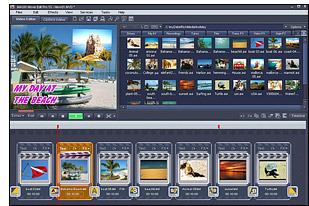
The ZS4 Video Editor is worth using when:
- The final output is a combination of more than 2 media sources rendered simultaneously. (like nine talking heads separately filmed, but later arranged in a 3×3 video wall combination)
- Every aspect of the compositing process needs to be ‘tweened with an adjustable interpolation algorithm, from rotation angles to audio volume and chroma key sensitivity etc…
- It becomes necessary to create custom effects and imaging processes by combining any number of effects using a highly flexible and infinitely variable toolbox of imaging “primitives”.
- The user likes to be limited by their own imagination instead of the software-makers ideas of the “desirable”.
Jahshaka was written from the ground-up to work in different environments, and lets you use the tools you need to get the job done in real time. Thanks to the power of OpenGl and OpenMl you can do this on anything from PC’s to Mac’s to high-powered Sgi workstations and not have to worry about mixing video, audio and graphics card, installing custom hardware and drivers, or spending millions of dollars for high end speed, power and functionality.
Jahshaka uses todays next-generation hardware to do everything in real time, regardless of what box you are running on. Thanks to the power and economics of mass markets, todays pc’s come with everything you need to create any kind of media you want. Todays graphics cards would have cost hundreds of thousands of dollars just a few years ago and deliver an unbelievable level of power and speed into your hands. This is the power that drives Jahshaka.
Jahshaka’s morphing interface allows you to work as a editor when you are editing, to work as a compositor when you are creating effects, as a audio enginer when you are mixing, and as a animator when you are doing 3d. It will even allow you to create your own hybrid interfaces to match your workflow.
This power and flexability has been unheard of, but its coming your way soon. Imagine a system simple enough to edit home videos and mix audio tracks, but powerful enough to edit HDTV, create film effects or animate a flock of seagulls.
Jahshaka fixes many of the compatability and file sharing problems that xist in large facilities today. The ability to run multiple seats of Jahshaka off a single server, with full project and media sharing solve the problems of distributed vs shared storage. Everybody can use the same disk-array
jacksan
nise i like
spiderm81
What is up with this site? I’ve tried to download two different programs…spent much time…couldn’t get either. Registered…couldn’t log in because my name was not enabled?
I’m open to suggestions!
Gary