

Nowadays, most consumer electronic devices support the HDMI (High Definition Multimedia Interface) output for video and image downloads. Before HDMI became popular in the electronic industry, RCA connectors (yellow, white, and red cables) were primarily used to connect DVD players, video game consoles, and set top boxes to televisions or monitors. A common issue for consumers is converting their HDMI devices to RCA cable inputs in order for them to play on older television sets or monitors.
How to Convert HDMI to RCA
Step 1 – Search for an HDMI to RCA converter at a local electronics store or online. The output that the HDMI format will be converted to will determine the type of converter needed. The more complex converters will have outputs for S Video, Composite, as well as the classic RCA video and audio output cables from the device.
Step 2 – Connect the video converter to a power source (such as a wall socket or power strip).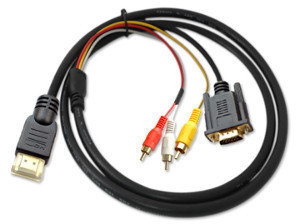
Step 3 – Connect the HDMI cable from the device that only produces HDMI output to the HDMI input plug on the converter.
Step 4 – Connect the Red and White audio cables to the RCA audio outputs on the converter then connect to the television.
Step 5 – Connect the Yellow video cable from the video converter output to the tv’s video input.
Step 6 – Change the television channel to the one that the converter requires (normally channel 3 or 4 for televisions that do not support the “input” function) or press the “Input” button on the remote control (if supported) to view the video from the device on the television.
richard gero
Why can’t I have a working secondary display when I connect HDMI to my Dell laptop and RCA cable to my monitor ?
jabu
hi I’m using ps3 with a broken rca cable port. so I’ve tried to buy hdmi to rca cable but it doesn’t work so I wonder if the is other. way around of using mi ps3 on mi old tv
Ian
What a load of nonsense. That cable can’t work. Google the pin-outs of HDMI and you’ll see there is NO pins that carry analogue audio. You can’t just go and marry up RCA connectors with an HDMI connector and hope…those are digital output signals that you’re going to shove into analogue inputs…good luck with that and let’s hope you don’t burn out something! I never understand why people make these cables or even what the hell they solder up!
Rick
Is there a way to convert HDMI out to RCA in?
mike moore
yep – agree. I bought one online in the hope that it would arrive with some sort of electronics embedded somewhere – but no. On the other hand you can buy a very cheap little powered converter box lots of places online that has a socket for HDMI input at one end and RCA o/p the other. They work well. Don’t know if hifi as such, probably not, but you’ll get a usable analogue signal
Rasheed Ismail
pls how can i get this cable
jtxl
I’m getting a rolling picture- also bad quality. I’m using a mini white box from ebay
Mark Tapia
Same here. Got the cable but it doesn’t have built in converter/chip. Need to purchase a New VGA CARD with Smart Chip from my understanding or SoundCard with Converter chip built in??
Shane
Yea that cable does not work. I bought that very cable and could get nothing. Definitely need a convertor as well as cables.
JustANote
The cable in the image of the above description is useless. The article doesn’t even mention the worthless cable that is shown above. It says to use a CONVERTER and then composite cables. The crappy cable above cannot connect to a converter in the manner mentioned.
beyondthetech
Agree, I hope the writer of this article is aware enough to correct this. People will look for this cable, thinking it will be the solution, when in fact it requires an active digital to analog conversion box. Google HDMI2AV and you’ll see the right kit to use.
Dreamweaver
I have devices that is hdmi and I want to hook these devices up to my tv which is not hd or hdmi it has RCA jacks how can I hook them up together and where can I get something that will work.
H3llas
You can get hdmi to rca converter on ebay. But maybe you can borrow one for testing in your local hardware store.
http://www.ebay.com/bhp/hdmi-to-rca-converter
rob
I have Tech questions… I have a TV that claims to be 1080p, but does not have an HDMI hook up. My HD Direct TV Receiver does have the HDMI, as well as other options. The installer used a 5 plug AV connecting cable to hook everything up and now I’m starting to have problems with the connections. I would like to see if there are different options out there for hooking up my TV and still have some HD. As the standard RCA’s caused my picture to return to standard definition.
Thanks all…
SURYADI
How to order cable hdmi to rca audio video plus vga
John
I have a direct tv box that only has RCA red yellow and white I have a hd tv but using the RCA or cable is not clear will the hdmi to RCA cord work for me and will it make the tv more clear?
nikhil mistrri
hello i have a sony dsc hx 9v camera . i need to connect the camera to my old sony tv. it has many rca inputs , please help if can i get a cable so that i can connect my camera hdmi output to my tv.
Doug
I have a lower-end HDTV in the bedroom that, unfortunately, doesn’t have audio-out. Currently I have a really kludgy workaround to split the audio out to the stereo – I would like to be able to tap the audio from my HDMI input and split it off to the stereo, which only accepts RCA in.
Suggestions?
Asim Qaiser
I have tried to connect two of my laptops separately to my tv using an hdmi /3rca cable but i am not getting any signal on the tv please some budy can help
Charles
To my knowledge the HDMI interface caries digital signal. The RCA interface requires analog signal. Therefore you need the digital to analog converter to transfer the digital signal to analog
jayson flores
is there an hdmi storage drive that can store videos and audio files?
Georgia
will a HDMI to Composite 3RCA work if I’m trying to hook up an rca enable device to my hdmi tv
Chris
I tried using an HDMI to RCA converter to send video signal from my Dell XPS 17 laptop to a television. The desktop extends to the televsion but only in a very fuzzy black & white picture. I tried using all available resolutions on my laptop and the same problem persists. I have tried using the HDMI to HDMI and it works perfectly so it’s not the laptop’s video card or the tv. I need to use the converter for business purposes since I have multiple video displays with RCA inputs. Am I missing something or is it likely the converter is defective?
frank
i have a simular problem.i just bought a gateway sx2370-ur30 desktop computer to use as a vj preformance computer.i have a grand vj program on the computer witch is saposed to project out to video projectors in a nightclub. the only out put from the video card besides the monitor port is a HDMI out.i bought a box thats saposed to transfer the signal to analog becaus composit is what all the clubs have.but every time i click the full screen mode on my computer i get the blue screen of death.and windows shuts down and it says it may have damaged my computer?
sebi
Hi I’m having the exact same problem. Did you ever get this resolved?
Abhishek
I have purchased a HDMI to RCA cable when i am plugging one end i.e HDMI Cable port to my Computer HDMI input and another end in TV, but there is no signal. it is not woking please suggest me some option to run from my computer HDMI port to TV RCA.
memenode
Sometimes the TV has multiple RCA ports and not all will work for the AV signal. Are you sure you plugged into the right ones? Also did you check all modes? If it’s still not working HDMI output might not be enabled on your computer.
Brennan
I connect my HDMI from laptop to plasma tv.there’s visual but no sound.please advise
memenode
You might need to route sound separately. You can get a minijack to RCA cable and connect that from your laptops sound out to your TV RCA input. Sometimes HDMI doesn’t handle sound for some reason (PS3 is the same for example).
Harry Hauer
I have laptop and tv both are having HDMI port. when i tryed to connect laptop to tv thru hdmi port…on tv it says no signal. I have used hdmi cable of my tv HDMI…..pls advice.
memenode
You have to enable the second monitor in your display properties (you need to see two screens), and send the picture to the TV in a resolution it is capable of displaying which should be noted in your TV’s manuals if not on the box or the TV itself. If it’s a FullHD TV that should be 1920×1080.