Home     Blog

How to Program a Sanyo Universal Remote

Programming a universal remote–be it a Sanyo or any other–requires that you have the codes that correlate the remote to all the other hardware in the room. For example, if you are going to be using the universal remote to handle the DVD player and the TV, it is important to have the codes for both those pieces of hardware that correlate specifically to the Sanyo Universal Remote.

The first step in programming the remote is to get those codes. To do it, find the model number and manufacturer's number of both the TV and the DVD player. If you were also installing a sound system, get the information for that too. Write these down on a piece of paper so that you have them to reference.Sanyo Universal Remote How to Program a Sanyo Universal Remote
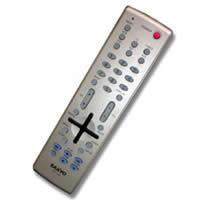
Go to the user manual that came with the universal remote and then search for each item. For example, the TV will be listed under TVs and then have the model number and manufacturer's number. Next to this information, there will be a code. The length varies, but write this down. This code is what the remote will use to connect the hardware to the remote control.

Click the setup button that is to the top left of the remote control. The light at the top will start flashing. On the top right is the TV button. Hold that down and while holding it down, punch in the code that you found. Repeat for each other piece of hardware that you have in the room. Hold the button down and then type in the code that you found in the user manual.

Once you have added each code, make sure they work. To do this, try and change channels on the TV. Try to turn the DVD player on. If all of this is working while using the Sanyo universal remote, you've successfully configured the devices in the room to the remote. If it isn't working, you might have punched in the incorrect code and will have to go back to the user manual to find a new one.
VN:F [1.9.17_1161]
Rating: 0.0/10 (0 votes cast)
Follow Will.Spencer on

Leave a Reply

Related Posts

  • Universal Remote Control

    A remote control is an electronic device that is used to operate a machine remotely i.e. it is used to issue commands to control the machine and these commands are issued from a distance. A universal remote is a remote control that can be easily programmed so as to operate the various brands of one [...]...


  • How Do I Program my Philips Remote?

    The problem with the technology age is that there are so many different remote controls to go with each piece of hardware we purchase. Programming the Philips universal remote requires that you have the codes of all the different pieces of hardware to configure with the remote. Once you've configured, you'll be able to use [...]...


  • How Do I Configure My RCA DirectTV Remote?

    To configure your RCA DirectTV remote, you need to have the receiver's brand and model number. This can either be found within the instruction manual or it can be found on the back or the bottom of the box. Write this down so you don't have to keep going back to the box to get [...]...


  • Law of Universal Gravitation

    The law of universal gravitation gives the attraction force between two objects due to gravity. Definition: For any pair of objects, they attract each other with a force that is directly proportional to the product of the masses of the objects and inversely proportional to the square of the distance between their centers of mass. [...]...


  • USB (Universal Serial Bus)

    USB is an external hardware interface and communication standard used for connecting varied peripherals to a computer. These peripherals include mice, keyboards, scanners, digital cameras, mobile phones, printers, digital audio players, external hard drives, memory sticks, gaming peripherals and so on. It supports plug and play installation and hot plugging. USB has almost entirely replaced [...]...