

The Server Message Block (SMB) protocol is designed to support file sharing, serial ports, printers, and other communications interfaces such as mail slots and named pipes established between two or more computers. The protocol can be used on top of the TCP/IP or other network protocols such as NetBEUI on the Internet. SMB primarily allows client programs or applications to read, write, create, and update files on a remote server.
How does the SMB Protocol Work?
SMB functions as a request-response or client-server protocol. The only time that the protocol does not work in a response-request framework is when a client requests an opportunistic lock (oplock) and the server has to break an existing oplock because the current mode is incompatible with the existing oplock. Client computers using SMB connect to a supporting server using NetBIOS over TCP/IP, IPX/SPX, or NetBUI. Once the connection is established, the client computer or program can then open, read/write, and access files similar to the file system on a local computer.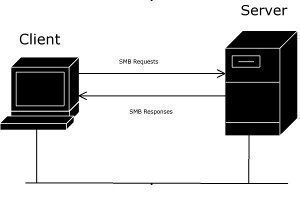
SMB Protocol Security
The SMB protocol supports two levels of security. The first is the share level. The server is protected at this level and each share has a password. The client computer or user has to enter the password to access data or files saved under the specific share. This is the only security model available in the Core and Core Plus SMG protocol definitions. User level protection was later added to the SMB protocol. It is applied to individual files and each share is based on specific user access rights. Once a server authenticates the client, he/she is given a unique identification (UID) that is presented upon access to the server. The SMB protocol has supported individual security since LAN Manager 1.0 was implemented.
SMB Protocol Variants
A number of protocol variants have been created since the original SMB protocol definition. These variants were created in order to handle the online environment’s increased complexity. The first variant was the Core Protocol or PC NETWORK PROGRAM 1.0 that supported connecting to and from file and print shares, opening and closing print files, opening/closing/writing/deleting files and directories, setting file attributes, and locking/unlocking byte ranges in files. Newer variants have added additional functionality to the base protocol.
What are the Available SMB Servers and Clients?
Some of the available SMB clients are: Microsoft Windows clients (Windows NT, Windows for Workgroups, etc.), SMBlib, Samba’s smbclient, Linus’s smbfs, and Digital’s PATHWORKS clients. There are also a number of SMB servers on the market. Some of these include: Samba (Unix, Solaris, and Linux deployments), Microsoft Windows Servers, LAN Manager and LAN Manager for UNIX, VisionFS, TotalNET Advanced Server, Advanced Server for UNIX, PATCHWORKS, and LAN Server for OS/2.
john
What ports does SMB use? does it still use port 137,138 and139
memenode
Yes, port 139 usually, but sometimes it runs over TCP on port 445.
mike
I have a Nas hard drive and can’t figure out how to get smb to work on it with out having to have a computer always. the pc is on the same netowrk as the nas drive .I feel its a waste of energy having the PC on only to use it to gain access to the nas drive via networked drive. any help on how to do this would be great. sorry if this is posted in the wrong area of this site I found it thru Google
memenode
Windows has this built in as a sharing feature so you can use a Windows computer for a server. Right click on a folder with the files you want to be accessible and go to properties. Then click on a “Sharing” tab and then a “Share” button. You can select which user on the computer should have access (or you can add a new user). Windows will then show the address of that folder on the local network (something like \\ComputerName\SharedFolder) which can be used on other computers to connect (go to Network in Windows Explorer and it should list other computers on the network).
At least this is how it is in Windows 7, but even Windows XP has sharing. Mac OS X and Ubuntu have the same thing. They all use SMB as a protocol.