

DNS (Domain Name Server) is the web server used to resolve a website’s name to its Internet Protocol (IP) address. DNS servers across the Internet are either considered authoritative with regards to a website name and corresponding IP address or are required to verify the IP address with another DNS server that will in turn request verification from another DNS server if it is not the authoritative resource for the name resolution. As a result, Internet performance could be significantly impacted if there were not some method around the large number of DNS lookup requests that could result from resolving domain names versus IP addresses.
How does DNS Cache Work?
In order to save time and reduce traffic on the Internet, the DNS cache concept was developed. This system permits the Internet Service Provider (ISP) to cache DNS resolution requests for a set time-frame on its DNS server. The cached or stored information is referred to as the DNS cache. The length of time that a DNS lookup may be stored in the DNS cache is called the TTL (time to live). The authoritative server that has control over the DNS resolution for the domain name determines the TTL. If the TTL value for the web page’s cached information has expired, the caching server will delete the current entry and request new information from the Authoritative DNS server. Although this will result in the end-user detecting a delay for unique website lookups or lookups on expired DNS entries, subsequent queries for pages on the same URL will be faster.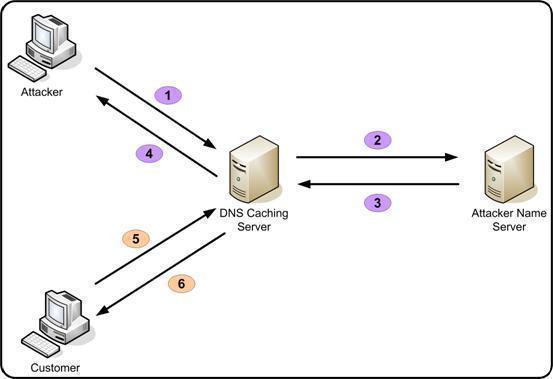
DNS Cache Issues
Although DNS caching increases the speed for the domain name resolution process, if a major change is made to a domain name it can take up to a day or more for the new changes to be reflected worldwide. For example, if a new website is registered at a domain registrar, the domain name may not resolve to the web host’s IP address for up to a day. The same issue can arise when transferring a domain name to a new Internet host. In recent years, Operating System manufacturers have also implemented DNS client caching, which stores the resolution for websites that the user has surfed recently in order to further speed up the name resolution process. If a major change to a website’s name or IP address has occurred since the last visit, flushing the DNS cache on the client computer is required to speed up the resolution process.
DNS Poisoning
DNS poisoning is another term for a computer security vulnerability exploited over the past decade, where the DNS resolution for either a client machine or DNS host will be attacked. The result of the exploit is that a malicious website is entered as the resolved website for valid sites that the user normally visits such as CNN, Google, and ESPN. When the user enters the URL or selects a bookmark in the web browser, he/she will be redirected to a malicious website.

Andrew Walsh
Helpful explanation in this post; thanks. I also wasn’t aware of the term DNS poisoning although I recall some of those attacks.