

It is important to check regularly if a Linksys product has a new firmware update. Firmware updates are quite common in computer peripherals and devices and in many cases must be updated in order to run properly. However, before upgrading LinkSys firmware, it is important to understand what firmware is and why it should be updated once new versions are available.
What is Firmware?
Firmware is a type of computer program that is included in many computer devices. It should be noted that it is not categorized as solely software or hardware, but a mix of both. Firmware is categorized this way because it is both an executable program as well as integral piece of computing device such as a router or cell phone.
Why Upgrade LinkSys Firmware?
Firmware upgrades are quite common for computer devices. Upgrading firmware often adds enhancements to a device, such as an added feature in a cell phone or the ability to decode specific types of files in an MP3 player. A new firmware version is often available to fix bugs or to add security measures. For instance, if a security flaw is found in a router, a new version of firmware might be available in order to reduce the risk of the security flaw being exploited.
How does Firmware Upgrade?
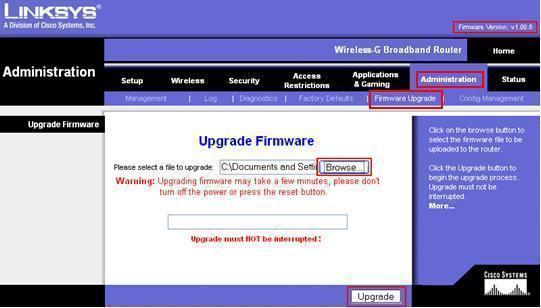
Generally speaking, in order to upgrade firmware, the user needs to contact the device manufacturer. Most manufacturers can be contacted via the web. However, in certain circumstances the user will have to request a CD ROM that has the firmware upgrade on it.
For most consumer devices, upgrading firmware is a very simple and convenient process. Devices that are automatically connected to the Internet (for instance, a printer) can regularly check the manufacturer’s website for firmware updates, download the firmware update, and install it into the device without any human intervention. However, most devices require the administrator to contact the manufacturer to see whether or not a new firmware update is available. If one is, the device administrator must download it and install it into the device.
How to Update LinkSys Firmware
Updating LinkSys firmware is quite simple. For the most part, LinkSys manufactures and sells wireless routers that make it easy for a home or business computer to receive broadband Internet in an environment without having to attach the computer directly to the broadband modem.
Step 1. Determine whether the Device Has a New Firmware Update Available
In order to upgrade LinkSys firmware, first check to see if a new firmware upgrade exists. Do this simply by visiting the LinkSys website at www.linksys.com. Once at the website, click on the link for support and choose “Technical Support” on the drop down menu. Once at the technical support page, search for information about the desired product. For most consumers, it should take only a few seconds to locate their product of choice. Once the item is located, there should be a link to download the user manual, firmware, or special codes. Click “download” to see whether there is a new update for the firmware. If unsure about whether a specific firmware version has been downloaded, download the most recent firmware update and install it on the computer.
Step 2. Download the Firmware
It is quite simple to download the firmware, just click the newest version or the firmware that best fits the computer, for instance, if the computer has Windows XP or Vista. Click the download link and begin the download process. For most LinkSys firmware updates, users will be walked through the download and installation process with easy to follow menus and screens. For instance, when the user clicks download, he/shewill have the choice to either save the firmware download to the computer’s hard drive or open it up from the Internet. Most people choose to save it on their hard drive so that it can be utilized if need be later on. Click “Save As” and choose the location that the firmware should be downloaded to.
Step 3. Installing LinkSys Firmware
Installing LinkSys firmware should be painless. Just follow the prompts once the firmware update is downloaded. Usually, firmware updates are quite small programs compared to today’s intensive applications. Most installations take only a few minutes. Once the LinkSys firmware is updated, the user will receive a confirmation message. At this time, reset or reboot the device and the computer in order for the changes to take effect. If there are any problems or questions regarding the process, contact customer support at the LinkSys web site.
Falcon
Linksys WAG320N: I accidentally set the wireless setup to Wi-Fi Protected Setup, while the default is MANUAL. Now I am unable to re-setup it to manual. Help Please. Thank You!
memenode
Reset the router, login with the default password and try again.
Shadi
My network got disconnected while i am upgrading the firmware for the WRT54G V7 router, and now i cant access it anymore, any idea how to make it working?
Alex.Rizvi
How to upgrade your Linksys PAP2T firmware in just one easy step.
Hello everybody. If you are owning a Linksys PAP2T like me, you would also willing to keep your box up to date, too.
If you search internet, you will find not only dozens but millions of content in this regard.
Here is the easiest and most useful way.
Open your browser and paste the following URL into it:
http:///upgrade?http://www.nomado.eu/prov/pap2t/pap2t-5-1-6.bin
Where format is : x.x.x.x
Thats it. Yes! believe me thats it. Your router’s LED will start blinking like mad. It is actually downloading the firmware.
After it get normal, please view the firmware version on status page.
Courtesy & Credit :
Special thanks to the best ITSP and Voip Provider in the world. Nomado Telecom is always co-operative with their best technical support ever.