

Domain Name System (DNS) is an Internet Engineering Task Force (IETF) standard name service which enables applications and users to connect to hosts in TCP/IP based networks by specifying a name. DNS makes it possible to assign domain names to organizations independent of the routing of the numerical IP address. DNS is a hierarchically distributed database that creates hierarchical names that can be resolved to IP addresses. The IP addresses are then resolved to MAC addresses. DNS therefore provides the means for naming IP hosts, and for locating IP hosts when they are queried for by name.
The protocols and standards of DNS provide the following key components:
- The method for updating address information in a DNS database.
- The method for querying address information in a DNS database.
- The schema of the DNS database.
- The ability of replicating address information between DNS servers in the DNS topology.
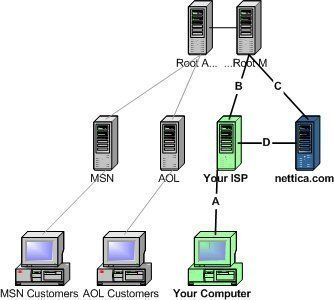
The HOSTS files were used to resolve host names to IP addresses before DNS was in existence. The HOSTS files were manually maintained by administrators. The HOSTS file was located on a centrally administered server on the Internet. Each site or location that needed to resolve host names to IP addresses had to at regular intervals download a new copy of the HOSTS file. The size of the HOSTS file grew as the Internet grew. The traffic that was generated from downloading a new copy of the HOSTS file also grew. This led to the design and implementation of Domain Name Service (DNS) in 1984, the hierarchically distributed database that can resolve host names to IP addresses.
The main design requirement of DNS provides the following key features over the HOST file.
- A hierarchical name space
- Hostnames in the DNS database can be distributed between multiple servers
- The database has an unlimited size.
- Extensible data types
- Together with supporting host name to IP address mappings, different data types are supported as well.
- No degrade in performance as more servers are added . the database is scalable.
- Distribution of administration . naming can be managed individually for each partition.
Troubleshooting DNS Errors
Users may sometimes try to connect to a system by name and get a DNS error because the name did not resolve to the proper IP address. There are several causes for this:
- The DNS server is down
- IP connectivity gets lost and thus the DNS cannot resolve it
- DNS cache poisoning
- Update and zone issues
- The DNS server does not have network connectivity to the root servers
There are a number of ways to find out whether a system is resolving properly, nslookup can be used to verify name resolution. The nslookup command can be used to find various details relating to a particular DNS (Domain Name System) such as IP address, MX records, etc.
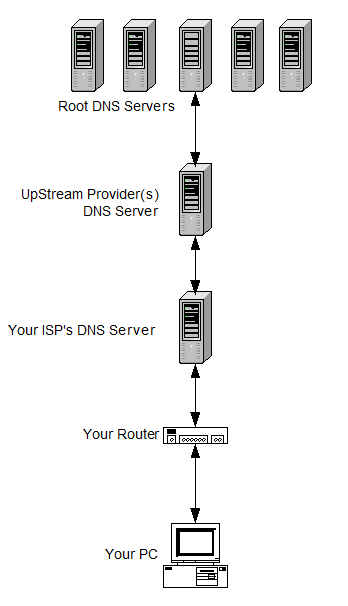
Go to the command prompt and type in nslookup host_name server_IP_address. Replace the actual host name to be resolved for host_name and the IP address of the DNS server for server_IP_address then press enter.
This allows the user to verify if an error is on the server, if there is a widespread resolution error, or if the server is possibly down. Nslookup will also display the various types of DNS records, not just primary (A) records, or all records for a domain. Users can then ping with the switch to also verify if DNS resolution is working fine.
Troubleshoot the dns client since most problems start with failed queries at the client. If a dns server provides incorrect data to queries that it successfully answers, then the most likely causes are:
- Resource records (RRs) were not dynamically updated in a zone.
- An error was made when manually adding or modifying static resource records in the zone.
- Stale resource records in the DNS server database left from cached lookups or zone records not updated with current information or removed when they were no longer needed.
If the DNS server does not resolve names for external networks, then the possible causes could be:
- The recursive query times out before it can be completed.
- A remote DNS server fails to respond.
- A remote DNS server provides incorrect data.
- DNS server recursion has been disabled.
Also troubleshoot the connectivity to the root servers. Verify that the DNS server used in a failed query can ping its root servers by IP address. If a ping attempt to one root server fails, it might indicate that an IP address for that root server has changed.
The Differences between the NetBIOS Naming System and DNS
The name differences between the NetBIOS naming system and DNS namespace are noted below:
- A NetBIOS name cannot be greater than 16 characters.
- With DNS, up to 255 characters can be used for names.
- The NetBIOS naming system is a flat naming system.
- The namespace used by DNS is a hierarchical space, or hierarchical system. The DNS naming system is called the domain namespace. If you decide to use a private domain namespace, and there is no interaction with the Internet, it does not have to be unique.
Understanding the DNS namespace
The naming system used by DNS is a hierarchical namespace, called the DNS namespace. The DNS namespace has a unique root. The root can contain numerous subdomains. Each subdomain also can contain multiple subdomains. The DNS namespace uses a logical tree structure wherein an entity is subordinate to the entity which resides over it. Each node in the DNS domain tree has a name, which is called a label. The label can be up to 63 characters. Nodes that are located on the same branch within the DNS domain tree must have different names. Nodes that reside on separate branches in the DNS hierarchy can have the same name.
Each node in the DNS domain tree or DNS hierarchy is identified by a FQDN. This is a DNS domain name that specifies the node.s location in relation to the DNS domain tree/hierarchy. A domain name can be defined as the list of labels along the path from the root of the DNS domain tree/hierarchy to a particular node. The FQDN is the entire list of labels for a specific node.
Each domain registered in DNS is connected to a DNS name server. The DNS server of a domain provides authoritative replies to queries for that particular domain.
Internet Corporation for Assigned Names and Numbers (ICANN) manages the DNS root of the Internet domain namespace. ICANN manages the assignment of globally unique identifiers which are key to the operation of Internet. This includes the following components:
- Internet domain names
- IP addresses
- Port numbers
- Protocol parameters
Below the root DNS domain are the top-level domains. These top-level domains are also managed by ICANN. The top-level domains managed by ICANN are:
- Organizational domains: Organizational domains have the following characteristics:
- Organizational domains can be used globally.
- They are named via a three-character code.
- The code defines the main function of the organizations of the DNS domain.
- Geographical domains: Geographical domains have the following characteristics:
- Geographical domains are usually used by organizations not residing in the United States.
- They are named via a two-character country and region codes.
- The codes were established by the International Organization for Standardization (ISO) 3166.
- The codes identify a country, such as .uk for the United Kingdom
- Reverse domains: These domains are used for IP address to name mappings. This is called reverse lookups.
The additional top-level domains defined by ICANN in late 2000 are:
- .aero; for the air transportation industry
- .biz; for businesses
- .coop; for cooperatives
- .info; for information
- .museum; for museums
- .name; for individual names
- .pro; for credentialed professions such as attorneys.
The common top-level domain names used are:
- .com; commercial organizations
- .edu; for educational institutes.
- .gov; for government.
- .int; for international organizations.
- .mil; for military organizations
- .net; for Internet providers, and networking organizations
- .org; non-commercial organizations
- .uk; United Kingdom
- .us; United States
- .ca; Canada
- .jp; Japan
Understanding DNS Components and Terminology
The components which DNS is dependant on and the terminology used when discussing and managing DNS are listed below:
- DNS server: This is a computer running the DNS Server service, or BIND; that provides domain name services. The DNS server manages the DNS database that is located on it. The DNS server program, whether it is the DNS Server service or BIND; manages and maintains the DNS database located on the DNS server. The information in the DNS database of a DNS server pertains to a portion of the DNS domain tree structure or namespace. This information is used to provide responses to client requests for name resolution.When a DNS server is queried it can do one of the following:
- Respond to the request directly by providing the requested information.
- Provide a pointer (referral) to another DNS server that can assist in resolving the query
- Respond that the information is unavailable
- Respond that the information does not exist
A DNS server is authoritative for the contiguous portion of the DNS namespace over which it resides.
The following types of DNS servers exist:
- Primary DNS server: This DNS server owns the zones defined in its DNS database, and can make changes to
these zones. - Secondary DNS server: This DNS server obtains a read-only copy of zones via DNS zone transfers. A secondary DNS server cannot make any changes to the information contained in its read-only copy. A secondary DNS server can however resolve queries for name resolution. Secondary DNS servers are usually implemented for the following reasons:
- Provide redundancy: It is recommended to install one primary DNS server, and one secondary DNS server for each DNS zone (minimum requirement). Install the DNS servers on different subnets so that if one DNS server fails, the other DNS server can continue to resolve queries.
- Distribution of DNS processing load: Implementing secondary DNS servers assist in reducing the load of the
primary DNS server. - Provide fast access for clients in remote locations: Secondary DNS servers can also assist in preventing
clients from transversing slow links for name resolution requests.
- DNS zones: A DNS zone is the contiguous portion of the DNS domain name space over which a DNS server has
authority, or is authoritative. A zone is a portion of a namespace . it is not a domain. A domain is a branch of the
DNS namespace. A DNS zone can contain one or more contiguous domains. A DNS server can be authoritative for multiple
DNS zones. - Zone files store resource records for the zones over which a DNS server has authority.
- DNS client: This is a machine that queries the DNS server for name resolution. To issue DNS requests to the
DNS server, DNS resolvers are used. - Queries:The types of DNS queries which can be sent to a DNS server are:
- Recursive queries
- Iterative queries
- DNS resolvers: These are programs that use DNS queries to request information from the DNS servers. A DNS resolver can
communicate and issue name queries to remote DNS servers, or to the DNS server running locally. When a DNS resolver
receives a response from a DNS server, the resolver caches the information locally. The local cache is then used if the
same information is requested. - Resource records: The DNS database contains resource records (entries) that are used to resolve name
resolution queries sent to the DNS server. Each DNS server contains the resource records it needs to respond to name
resolution queries for the portion of the DNS namespace for which it is authoritative. - Root servers: A root server performs the following functions when a query cannot be resolved from the local
zone files:- Returns an authoritative answer for a particular domain.
- Returns a referral to another DNS server that can provide an authoritative answer
How DNS Resolves Queries
A DNS client queries a DNS server to resolve a name. The query contains the following important information:
- The DNS domain name in the FQDN format.
- The query type
- The class for the DNS domain name
A DNS client uses one of three query types to query a DNS server:
- Iterative queries: The DNS server provides the best answer it can. This can be:
- The resolved name
- A referral to a different DNS server
- Recursive queries: The DNS server has to reply with the requested information, or with an error. The DNS server cannot provide a referral to a different DNS server.
- Inverse queries: The query sent to the DNS server is to resolve the host name associated with a known IP address. All the domains have to be queried to provide a correct answer to the query.
If a DNS server cannot find a match for a queried name in its zone information, or in its cache; the DNS server performs recursion to resolve the name. This is the default configuration for DNS servers. Recursion is the
process whereby which the DNS server queries other DNS servers for the client. By the initial DNS server querying the other DNS servers, recursion actually ends up making the initial DNS server a DNS client!
In order to perform recursion, root hints assist the DNS server in determining where in the DNS namespace it should commence searching for the queried name. Root hints is a collection of resource records which the DNS Server service utilizes to locate DNS servers who are authoritative for the root of the DNS domain namespace structure.
If however recursion is disabled for the DNS server, and the DNS server cannot find a match for the queried name in its zone information, or in its cache; the client begins to perform iterative queries. The root hint referrals from the DNS server are used for iterative queries. When a client performs iterative queries, the client sends repeated requests to different DNS servers to resolve the queried name.
The events that occur to resolve a name requested in a query are explained below:
- The resolver sends a recursive DNS query to its local DNS server, to request the IP address of a particular name.
- Because the local DNS server cannot refer the resolver to a different DNS server, the local DNS server attempts to resolve the requested domain name.
- The local DNS server checks its zones.
- If it finds no zones for the requested domain name, the local DNS server sends an iterative query for the requested name to the root DNS server.
- The root DNS server is authoritative for the root domain. It responds with an IP address of a name server for the specific top-level domain.
- The local DNS server next sends an iterative query for the requested name to this name server who in turn replies with the IP address of the particular name server servicing the requested domain name.
- The local DNS server then sends an iterative query for the requested name to the particular name server servicing the particular domain.
- The name server responds with the requested IP address.
- The IP address is returned to the resolver.
The different query response types which can be returned from the DNS server are:
- Authoritative answer: This is a positive response which is returned to a client. The authority bit set in the DNS message indicates that the reply was received from a DNS server that has direct authority for the name queried in the message.
- Positive answer: This response type returns the queried resource record that corresponds to the name and record type queried in the original query.
- Referral answer: A referral response is returned if the DNS server does not support recursion. A referral contains additional resource records for resolving the request.
- Negative answer: A negative answer is returned to the client when the following events occur:
- The name queried does not exist in the DNS namespace. This information is obtained from an authoritative server.
- The authoritative server indicated that the name queried does exist in the DNS namespace. However, there are no resource records of this type present for the requested name.
How caching works in DNS
In DNS, caching is used to reduce traffic on the network that is generated from queries sent to DNS servers. The DNS Server service and the DNS Client service both utilize caching to improve DNS performance, and reduce DNS specific traffic.
- DNS Server Cache: When the DNS server performs recursive queries for clients, the DNS server stores the resource records in its DNS server cache. If the same information is requested again, the cached information is used. The contents of the DNS server cache is removed when the DNS Server service is stopped. You can also manually remove the contents of the DNS server cache by using the DNS console, the management console for administering DNS.
- DNS Client Cache: This cache is also referred to as the DNS resolver cache. Information is added to the DNS client cache when the following events occur:
- The DNS Client service starts: The records in the HOSTS file are loaded into the DNS client cache.
- The DNS server responds to a client.s request: When the DNS server returns a response to a query, the information is added to the DNS client cache.
The contents of the DNS client cache is removed when the DNS Client service is stopped.


Michael Gordon
http://www.tech-faq.com/what-is-dns.html
“DNS server: This is a computer running the DNS Server service, or BIND”
Good heavens. That’s like saying “RPM’s per minute” when the “PM” already means “per minute”.
Expanding DNS you get “computer running the Domain Name Server Server service” !!
BIND, by the way, stands for “Berkeley Internet Name Daemon”.