

FTP (File Transfer Protocol) is the generic term for a group of computer programs aimed at facilitating the transfer of files or data from one computer to another. It originated in the Massachusetts Institute of Technology (MIT) in the early 1970s when mainframes, dumb terminals and time-sharing were the standard. Although the FTP programs have been improved and updated over time, the basic concepts and definitions remain the same and are still in use today.
FTP Concepts and Definitions
The key definition to remember is the term “protocol,” which means a set of rules or standards that govern the interactions between computers. It is a key component in many terms that are now taken for granted: Transmission Control Protocol / Internet Protocol or TCP/IP, the governing standards for Internet communications; Hyper Text Transfer Protocol or HTTP, which established the benchmarks for Internet addresses and communications between two computers in the internet; and File Transfer Protocol (FTP) which, as has been said, sets the rules for transferring files between computers.
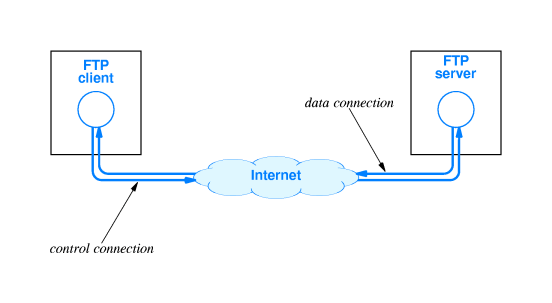
The primary objective in the formulation of File Transfer Protocols was to make file transfers uncomplicated and to relieve the user of the burden of learning the details on how the transfer is actually accomplished. The result of all these standards and rules can be seen in today’s web interactions, where pointing-and-clicking (with a mouse) initiates a series of actions that the typical Internet user does not see or even remotely understand.
Differences between FTP and HTTP
The major difference between FTP and HTTP is that FTP is a two-way system – it can be used to copy or move files from a server to a client computer as well as upload or transfer files from a client to a server. HTTP, on the other hand, is strictly one-way: “transferring” text, pictures and other data (formulated into a web page) from the “server” to a client computer which uses a web browser to view the data.
Another point to bear in mind is that File Transfer in FTP means exactly that: files are automatically copied or moved from a file server to a client computer’s hard drive, and vice versa. On the other hand, files in an HTTP transfer are viewed and can ‘disappear’ when the browser is turned off unless the user executes commands to move the data to the computer’s memory.
Another major difference between the two systems lies in the manner in which the data is encoded and transmitted. FTP systems generally encode and transmit their data in binary sets which allow for faster data transfer; HTTP systems encode their data in MIME format which is larger and more complex. Note that when attaching files to emails, the size of the file is usually larger than the original because of the additional encoding involved.
FTP Software
FTP software is divided into two categories: FTP server and FTP clients. Server software is necessary to run an FTP server; Client software is necessary to transfer files to and from an FTP server.
Almost all versions of Unix ship with a free FTP server and a free FTP client. Microsoft Windows ships with a free FTP client, but without an FTP server.
The basic FTP clients tend to provide only a Command Line Interface (CLI), which is not terribly user friendly. Luckily, both free and commercial FTP clients are available which add Graphical User Interface (GUI) front-ends to the FTP protocol.
Another advanced feature of better FTP clients and servers is the ability to restart incomplete file transfers, which can be very useful when transferring large files.
Free FTP Client Software
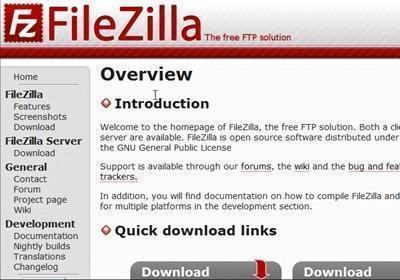
FileZilla is a free, open source FTP application that can be run as a client or a server, depending on the version chosen. FileZilla is very easy to use and has a comprehensive layout that allows users to upload data files by browsing various Windows-based file lists. Users can also search for specific files by browsing their computer. FileZilla comes with full documentation and features a supportive community that helps users who seek answers to problems, shares experiences and ideas, and suggests useful tips and ideas.
CoreFTP is a free FTP application that features an SSH/SSL encryption. CoreFTP allows users to securely upload and download files between a client and a server, modify existing websites, and even transfer files between two different computers (via a Virtual Private Network). CoreFTP features browser integration, command line transfers, file viewing and editing, drag and drop support, FTP URL parsing, custom commands, firewall support, and filters. CoreFTP is also capable of site-to-site transfers, remote file searching, advanced directory listings, file masking, file compression, and much more.
CoffeeCup Free FTP is a free FTP software that is able to process multiple FTP transfers simultaneously and can manage multiple FTP accounts. The software logs all settings and organizes them in one master account. It also organizes FTP lists so that users can quickly browse them, and displays current jobs in an intuitive table at the bottom of the user interface. CoffeeCup Free FTP encrypts all files it uploads or downloads via an SFTP, FTPS, SSH, or SSL shell. The software is specifically designed for simplicity and speed, and exceeds expectations in both. CoffeeCup Free FTP allows users to bookmark webpages and specializes in archiving.
While GoFTP is completely free and very easy to learn and use, it is recognized worldwide as the fastest FTP application on the planet. GoFTP was built for speed with a 314% increase in speed compared to its competitors. GoFTP can be integrated with virtually any HTML editor, supports multiple languages, and has drag and drop features. GoFTP has a Site Manager with a built-in timeout detection and Keep Alive system. GoFTP provides file compression, customizable commands, firewall support, and data encryption.
FTP Commander is a free FTP software specifically designed with security in mind. FTP Commander is specifically designed for commercial purposes, such as a company uploading/downloading files to and from their website. FTP Commander is able to automatically correct user errors, automatically restart file transfers when the connection is interrupted, synchronize directories, and display hidden files and folders. FTP Commander maintains a constant level of security throughout all transfers by using an SSH, SSL, SFTP, or FTPS encryption standard.
FOFF: Free Open FTP Face
Free Open FTP Face is a lightweight graphical (GTK+) FTP client written in python. It is multiplatform, emphasizes on simplicity and ease of use, while providing a rich set of convenience features.
Platform(s): Unix, Microsoft Windows
YAFC: Yet Anther FTP Client
YAFC is an OpenSource console mode FTP client. YAFC has support for Kerberos 4/5 authentication and sftp (ssh2). Other features include tab completion, directory cache, powerful aliases, recursive file commands and bookmarks with autologin.
Platform(s): Unix
Free FTP Server Software
FileZilla
FileZilla is a fast and reliable FTP client and server with lots of useful features and an intuitive interface.
Platform(s): Microsoft Windows
smallftpd
Small ftpd is a small and simple muli-threaded ftp server for Microsoft Windows.
Platform(s): Microsoft Windows
Java Secure FTPd Server
jFTPd is a free, pure java FTP server and runs on almost every platform where Java VM is available.
Platform(s): Unix, Microsoft Windows
mftpd
mtfpd is an FTP server which runs on a PalmOS device. You can use it together with a FTP client on your desktop computer in order to transfer files to and from your device.
Platform(s): PalmOS
Asrar
Really Nice Explanination . Thanks