

Computers are the basis for both modern technology and modern society. The world of today thrives on information and getting that information from one place to another is crucial to survival. Even in one’s own home, multiple computers must be able to communicate with one another and other devices. This may seem like a daunting task for the inexperienced user who has never setup a computer network before but it is rather simple. This article will explain what a computer network is and what it is capable of, go over the two types of computer networks, and list several routers that can be used for high speed networking.
What is a Computer Network
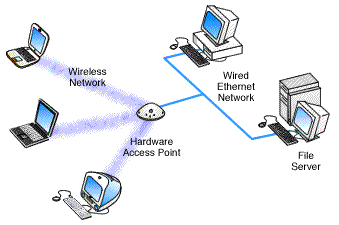
A computer network is a connection between two or more computers that allows information to be shared between them. Computers in a network can be in the same room, the same office, the same building, or in some other close environment in which signals can be transferred to each computer. Computer networks allow each computer to communicate with each of the other computers in the network and can even be extended to devices such as printers, scanners, cameras, and mobile devices. While the Internet is a type of computer network, it is usually set aside as its own entity as it does not follow the rules of a standard computer network.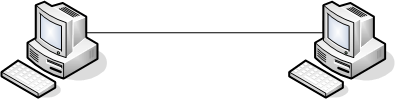
LAN/Ethernet Connection
A LAN (Local Area Network) or Ethernet connection is a type of wired connection that allows multiple computers to communicate with each other. A LAN connection uses an Ethernet cable (usually blue) to physically attach the computers to the same modem or router. The modem or router is able to collect information from each computer and forward it to the Internet as if it came directly from the computer. Likewise, the modem or router is able to take information from the Internet and pass it on to the appropriate computer. The computers in the network are even able to communicate with each other without using the Internet at all.
WLAN/Wireless Connection
A WLAN (Wireless Local Area Network) is the same thing as a LAN but does not involve the use of cables. Instead, a WLAN is entirely wireless. WLANs use a router to transmit and receive radio signals that are carried to and from the user’s computer. A WLAN can extend far outside of the home and can be used for multiple computers at the same time. The user should keep in mind that desktop computers may need a wireless adapter for each computer that the user wishes to add to the wireless network.
Linksys Wireless-G Broadband Router
The Linksys Wireless-G Broadband Router is the latest in wireless technology and is built for lightning-fast speeds. Though it has wireless-G, it is also compatible with wireless-B devices so that users do not have to upgrade their current equipment. The device includes a Wireless Access Point, four Ethernet ports, and an automatic wireless encryption software to block intruders. The Linksys Wireless-G Broadband Router sells for $59 at Walmart.
Belkin’s N+ Wireless Router
Belkin’s N+ Wireless Router uses some of the most recent router technology to expand the range of any user’s wireless network to cover their house or office, no matter how big it is. Belkin’s N+ also features multiple Ethernet ports for wired connections. The device’s main feature, however, is the USB port that it includes which allows the user to add a USB drive or external hard drive to the network and access it from any of the network’s computers.
How to Connect Two Computers Together
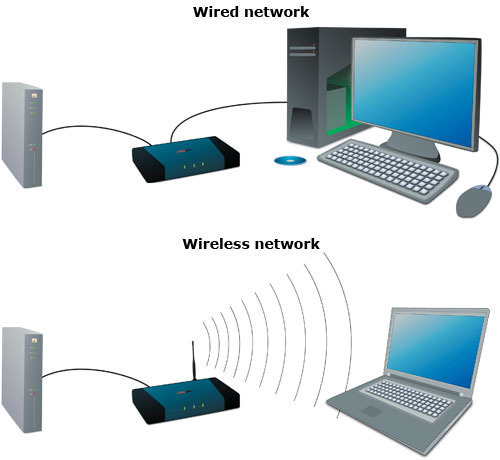
For setting up a wired home network between two computers, you will need Ethernet cable and make sure both the computers have network cards installed. If the computers do not have a built-in network card, you will need to plug network cards into one of the PCI slots present in the computers expansion area. To set up a wired network between two computers with Windows XP installed, perform the following steps:
- Take one end of the Ethernet cable and insert it into the Ethernet port of the first computer. You should hear a click when the Ethernet cable connector fits correctly.
- Take the other end of the Ethernet cable and insert it into the other computer’s Ethernet port.
- Turn on both computers. Windows XP should automatically recognize the other computer and you should be able to see the network connection icon flashing in the system tray. If this is not the case, proceed to step 4.
- Click Start and then click the menu option My Network places.
- The My Network places window appears.
- Click the option Set up a home or small office network located on the left pane of the screen.
- The Network Setup Wizard appears.
- Follow the onscreen instructions to setup the network between the two computers.
To setup a wireless home network or ad hoc network, you must have two or more personal computers or laptops with wireless network interface cards. To setup a wireless or an ad hoc connection on a home computer, perform the following steps:
- Click Start and then Control Panel.
- Double-click the Network Connections icon.
- Right-click your wireless network connection, and click Properties.
- The Wireless Network Connection Properties window appears. Click the Wireless Network tab.
- Click the Add button present under the Preferred networks section.
- The Wireless Network Properties window appears.
- Type a name for your network in the text field Network Name (SSID), present under the tab Association.
- Check both the The key is provided for me automatically and This is a computer-to-computer (ad hoc) network check boxes.
- Click Ok to save the made changes. The Ad hoc network is now set up.
Note: To ensure security for the ad hoc network, you can clear the The key is provided for me automatically check box and specify your own 13 digit password.
To connect another computer to the wireless network, perform the following steps:
- In the lower right hand corner of your desktop screen, right-click the Wireless Network icon and then click View Available Wireless Networks.
- The Wireless Network Connection window appears. It will display your newly created ad hoc network with the SSID name you specified. Highlight your connection on the list and then click Connect.
- Type your encryption key in both the Network key and the Confirm network key text boxes and click Connect, if you have chosen a password earlier.
- A progress bar will be displayed as the connection is established. Once the connection is through, you can exit the Wireless Network Connection window.
VILAS
How to use internet connection of datacard on two or more computers at a same time through LAN.?
We are having three computer & only one data card only.