

Bluetooth dial-up networking (DUN) is a wireless Internet technology that refers to connecting to the Internet with a Bluetooth enabled cell phone as a modem. Bluetooth DUN offers a low band alternative where there are no local hotspots to provide high speed wireless Internet access. Bluetooth is a wireless protocol that allows wireless communication to take place in a Personal Area Network (PAN). It uses the frequency hopping spread spectrum to transmit data over short distances from fixed or mobile devices. It is mainly used to exchange information between mobile phones, digital cameras, laptops, printers, etc.
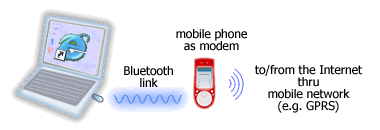
In order to use Bluetooth DUN, users need a Bluetooth enabled laptop, a Bluetooth DUN capable device such as a mobile phone, a broadband access subscription, and supporting drivers for their Bluetooth DUN capable phone. Users may need to verify that their laptop indeed has Bluetooth. If the laptop is not Bluetooth enabled, use a Bluetooth USB adapter or configure it first to allow Bluetooth connectivity. Also, install a Bluetooth program. Use this software to scan for Bluetooth devices. The laptop should be able to recognize all Bluetooth enabled devices within its perimeter. A broadband access subscription is obtained from the Internet Service Provider who also provides a username and password to set up the Bluetooth DUN. A dial-up access phone number is also required. If using a cell phone, the phone must also be Bluetooth enabled.
Once the cell phone is turned on, the laptop should be able to detect it as well as all other devices within its range. Once the cell phone is discovered, depending on the operating System, there will be various options to choose from. Simply look for the dial-up networking available service and select it. Once the service is found, the Bluetooth adapter software will allow users to create a dial-up connection. However, it is important to note that not all Bluetooth adapter software will allow users to create a dial-up and the software chosen is therefore very important for this stage. This scenario has popularly termed the whole process as the Bluetooth dial-up networking hack. The phone may require the user to accept or decline the connection request and may sometimes need the user to key in a security code. The phone and the laptop will then be paired and a connection formed. The connection is now complete.
Advantages of Bluetooth DUN
- Can be used as a modem when no other means of connecting to the Internet is available.
- Bluetooth DUN uses Bluetooth technology, meaning that it benefits from all the advantages that Bluetooth offers such as the fact that Bluetooth does not require direct line of sight connection.
- Bluetooth DUN can be used on several Operating Systems including Windows XP, Linux, and Mac OS.

melinda_houston2
====
satya
What exactly PAN differs from DUN??
teresa jackson
Someone installed bluethootth dun thru my android how do i find out what device is doing it. Thank u
shaun
@Teresa Jackson , same with me. I always click “stop”, but it always comes back on.
welshcake
Hi
I would like to know if the following is possible using DUN or some other method: send from PC a known http: address example (www.microsoft.com) via bluetooth dongle or embedded in PC to Mobile phone with bluetooth then over 3G network to open up the website on the phone screen.
SJ
does bluetooth have a SSID?
Marlon Franco
Yup, it has SSID also, and you’d be able to set it up also