

A Cantenna is a waveguide antenna that is directional in nature, and is used to better detect or broaden a wireless network’s range. The original Cantenna was a 50 ohm resistive load that amateur radio enthusiasts used. It is a simple product that can be created with an empty Pringles can (and more recently, wider cans). It can be used to transmit and receive signals. Most users make a Cantenna in order to use a wireless network that is out of their computer’s reach.
How to Create a Cantenna
Step 1 – Take out the screw on the wireless card’s external antenna connection. If there is an existing antenna connected, remove it. If not, the existing screw can be removed.
Step 2 – Purchase an “N” connector online or from an electronics store. It must have four mounting holes in the corners to support its connection to the Cantenna.
Step 3 – Purchase a pigtail that has an N-male connector on one end with the opposite matching the connection on the WiFi card.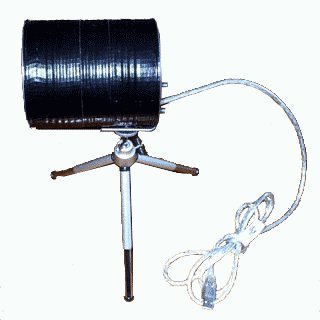
Step 4 – Locate a large soup can to use for the Cantenna. The label must be removed and the can thoroughly cleaned.
Step 5 – Drill a hole 1.75 inches from the base of the can with a drill bit slightly larger than the “N” connector.
Step 6 – Cut a 1.2 inch piece of copper wire and then solder it into the “N” connector. Place the wire into the hole that was drilled into the can. Use the small screws to mount the connector.
Step 7 – Take the N-male end of the pigtail and connect it to the N connector. Then, attach it to the external connection of the Wi-Fi card.
Step 8 – Point the Cantenna in the direction of a known wireless signal. Many users setup their laptops near a window that gives the Cantenna a clear line of sight to the desired target network.
bob
Need more photos to see some details.
aaron
can u attach a cantenna to a wireless modem with an internal antenna i have opened it and maneged to spot ant 1 by a silver deal, ant 2 by some writing and maybe soldering ant 3 next to a chip vertical compared to the rest of the bored i want to hook one up and i also is it possible to use coaxial instead of n type connecters??