

If you want to add a printer to a wireless network, you need to:
1) Ensure that the printer has at least one USB port.
2) Purchase a wireless adapter and connect it to the printer’s USB port. Since wireless adapters work on Plug-and-Play technology, the printer should automatically detect it and begin installing all of the drivers necessary for the wireless adapter to function properly.
3) In order to specify which wireless network the printer should connect to, connect the printer to the router via an Ethernet cable and access the router’s control panel by typing the default IP address into any Internet browser’s address bar.
4) When you log into the router, a tab for printers, fax machines, and/or other devices will appear. Click on this tab and enter the printer’s MAC address into the appropriate field. Once the changes are saved, the printer should connect to the router via a wireless connection.
How Does a Wireless Printer Adapter Work?
A wireless printer adapter is a device that allows you to use printers and fax machines without a cable, DSL, or dial-up connection. Wireless printer adapters allow printers to be placed anywhere without the limitations of direct cable connections. A wireless printer adapter may either be a regular wireless adapter or Bluetooth adapter.
Wireless printer adapters work in the same way as all other wireless adapters. It connects to a printer or fax machine via a USB port or Firewire port. While the computer converts digital information into radio signals for the adapter to receive, the adapter converts the radio waves back into digital information and sends the data to the printer, where it is interpreted and carried out as a print task. When the task is finished, the printer uses the wireless printer adapter to send a signal to the computer to alert the user.
Applications
Libraries, schools, and offices often use one, central printer in order to save space and decrease equipment costs. Rather than connecting each computer to the printer via Ethernet cables, most institutions use wireless technology.
Advantages
Using wireless adapters is actually a less expensive solution than physically tethering several computers to the same printer. Additionally, wireless printer adapters remove limitations concerning how many computers can be connected to the same device, while physical connections may be restricted due to a lack of network ports.
How to Setup a Wireless Printer
It is important to place the printer close enough to the router, because that way, the signal will be stronger. Setting up the printer is very simple: you have to turn it on and then install software on your computer. 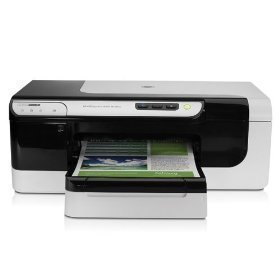
Access the control panel. Look for the printer button and double click. This will open up a list of the printers you’ve successfully installed on the computer. Click the Add Printer button. It will give you the option to pick either a local printer or a wireless/Bluetooth printer. The obvious choice here is to click the wireless/Bluetooth tab.
Once you do this, it will open up a scrolling bar as it searches for any wireless printers in the area. When your printer appears, double click. The computer will then add it to its list of printers to print from. Once this is done, open up a text document. Click print and select the new wireless printer to see if it works.
Printer Sharing
The least expensive solution is to add a local printer to one of the computers on a wireless LAN and then enable printer sharing on that computer.
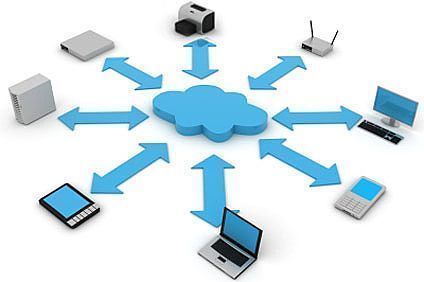
To share a printer in Microsoft Windows:
- Click the Start button
- Click the Control Panel menu option
- Click the Printers and Faxes icon
- Select the printer to be shared
- Click the File menu
- Click the Sharing menu item

mud
I have a printer that I want to make wireless so I can print wirelessly to it.
You would think this would be easy right? Not!
Like I’m the only one in the world who has tried to do this..
I also have a Glock 45 and I plan to teach both my printer and computer a few things about balistics!
LARRY
I TOO HAVE SEVERAL NICE PRINTERS THAT ARE NOT WIRELESS. I WANT TO FIGURE HOW TO ADD AN ADAPTER TO THE PRINTER AND THEN BE ABLE TO PRINT WIRELESS TO PRINTER. I KNOW THE TECHNOLOGY EXIST BUT I DONT KNOW HOW TO FIND IT..GOOD LUCK
jrad239
Do you have McAfee AV ? If so , turn the firewall off…it causes more trouble than it’s worth. The try again to add a network printer
chris
hello. i have bought a new printer for my laptop which is wireless. i have set up the printer to the router and it has detected it , my problem now is my laptop doesnot recognise the printer and when i try to do it manualy the name advent is not one of the printer names to come up. i tried using the cd that came with it ,but i dont know why but i cant get it to play for the wizard to help me. it has never played cd or dvds, how can i achieve this please.. im not to clever on computers i know very little so need any information in easy to understand term please. thank you so much.
ryan
I have a wireless printer working on my wireless lan. In my house I also have a wired lan. Is there some way I can use this wireless printer on my wired lan also. Ie can computers connected to the wired lan also use this wireless printer?
memenode
I believe you can, the same way that your wireless computers can. I think it’s a matter of it being in the same network, regardless of how are computers and devices connected to it. Your printer should have its own hostname so you just need to point your PC to that, and set it up the same way as you would a computer on wireless.
Joe Michaels
Originally posted by memenode: “Originally posted by Joe Michaels: “I have an HP LaserJet 6MP that’s connected to a wireless router with a print server (HSHPS1P by Hawking Technology). It sits next to an iMac – but is not connected to the iMac. I cannot figure out (nor find) a way to print to it from laptops. Can you point me in any direction? Thank you, in advance, for your help.”
Might this Apple support page: http://support.apple.com/kb/HT3500 be of any help?”
Thank you, Daniel. My daughter’s Mac laptop prints to the printer just fine. (Took me about 30 seconds – no lie – to get it to work.) The issue is with my wife’s PC (running Windows XP). By contrast, 3 1/2 hours got me nowhere. (Her PC DOES access the internet wirelessly.) That said, should I be creating some other kind of network? Thanks, again!
Daniel Memenode
Originally posted by Joe Michaels: “I have an HP LaserJet 6MP that’s connected to a wireless router with a print server (HSHPS1P by Hawking Technology). It sits next to an iMac – but is not connected to the iMac. I cannot figure out (nor find) a way to print to it from laptops. Can you point me in any direction? Thank you, in advance, for your help.”
Might this Apple support page be of any help?
Joe Michaels
I have an HP LaserJet 6MP that’s connected to a wireless router with a print server (HSHPS1P by Hawking Technology). It sits next to an iMac – but is not connected to the iMac. I cannot figure out (nor find) a way to print to it from laptops. Can you point me in any direction? Thank you, in advance, for your help.
Daniel Memenode
I think you should be able to connect through the access point so long as both the computer and the printer are on the same wireless network and one can talk to the other.
There might be something about it in the printer’s manual. I’ve set one up for someone long time ago and there were instructions, and if I remember correctly, it just had to be connected to wifi and recognized by the computer.
clinton byrd
my printer is wireless and i have a 2wire dsl wireless access point. can i connect the printer this way?? or do i need to have a wireless nic in my computer as well. i just need to know if i need to take it back. or just buy a usb cable or something. thanks in advance for any advice