

Most Windows computer users need to adjust the screen brightness of their laptop or desktop computer monitor at some point. However, brightness settings are different, depending on what you have (desktop or laptop) and which graphic card you have (AMD, nVidia or something else).
How to Adjust Screen Brightness on a Desktop Windows computer
Regardless of which version of Windows you have (Windows XP, Vista, Windows 7 or Windows 8) if you use a Desktop computer, to change brightness from the Windows settings, you need to access monitor on-screen menu (literally a button on the monitor), then from there navigate to brightness/contrast section and set it up according to your preferences.
You could alternatively setup brightness from the graphic card control panel (eg. nVidia Control Panel or AMD control panel). To access it, right click on a desktop and pick nVidia Control Panel, AMD Control Panel (this depends on the manufacturer settings of your graphic card).
The third way to change brightness on a Windows desktop PC is to install a third party program such as PowerStrip.
How to Adjust Screen Brightness on a Laptop computer
On a laptop computers (in 99% cases) you can change the brightness in the following way (regardless of the Windows version):
Take a look at your laptop keyboard. Locate the “Fn” button (it is usually somewhere in the bottom left corner of the laptop keyboard); after that, locate the two little sun signs (often on function buttons on top of the keywords or the navigational cursor buttons). When you hit one sun button while you are holding the “Fn” button, your brightness will decrease, and when you hit the other sun button again while holding the “Fn” button you brightness will increase. Repeat the steps until it gets bright enough.
You can also change screen brightness on a laptop computer from within the Windows. Steps can be different, depending on which Windows version you have installed, but don’t worry – we will show you how to do it for each specific Windows version. Note that the steps bellow are for laptop computers, not for desktops.
Changing Screen Brightness on a Laptop with Windows XP
Step 1 – Select “Start” then click “Settings.”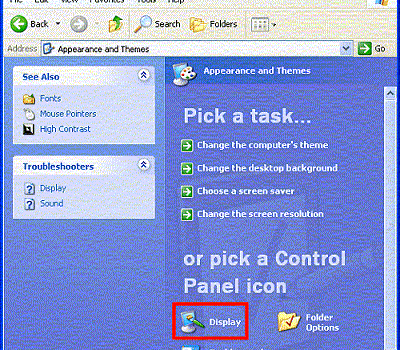
Step 2 – Click “Control Panel” then select “Appearance and Themes” if viewing the subsequent panel in the “Category View.” If the Control Panel is set to “Classic View” then click the “Display” menu icon.
Step 3 – Click the “Settings” menu tab located on the Display Properties window.
Step 4 – Choose the “Advanced” menu button, which displays the computer monitor’s display properties. If the computer has an ATI graphics card, click the “Color” menu tab.
Step 5 – Change the “brightness scale” to configure the display adapter’s overall brightness to the desired level.
Step 6 – Click “OK” to complete setting the screen brightness for the Windows XP computer.
Changing Screen Brightness on a Laptop with Windows Vista
Step 1 – Select “Start” then “Control Panel”.
Step 2 – Open “Power Options”.
Step 3 – Click on “Change Plan Settings”.
Step 4 – Find the brightness slider and set it up on desired value.
Step 5 – Save settings and exit back to desktop.
Changing Screen Brightness on a Laptop with Windows 7
Step 1 – Select “Start” then “Control Panel”.
Step 2 – Open the “Power Options”.
Step 3 – On the bottom of it there is a brightness slider. Set it up on desired value.
Step 4 – Save settings and exit back to desktop.
Changing Screen Brightness on a Laptop with Windows 8
Step 1 – With the mouse cursor hit the bottom left corner to open Menu.
Step 2 – Click on “Brightness” and set the slider to desired value.
Step 3 – Exit back to desktop.
p.s. If you have Windows 8.1 and brightness slider does not produce any effects (does not work), download and install the newest drivers for you graphic card and restart your computer.

bkg
Thanks so much bro. Solved the brightness issue.. the button is literally on the monitor 🙏
Arturo Sanchez
Even though I follow the steps for Windows XP to adjust the brightness, which by the way, I have to use a LED Lamp to be able to see the screen; the brightness does not respond at all or even the contract, even though I set it up to the maximum. I have a Compaq Presario V2000, and I was trying to fix it to let my 8 year old son play with it.
Is there any other thing you may recommend me to do?
Harriana Potter
I am 17 years old with this dinosaur laptop and I have been trying to turn down my brightness for 5 years now. I can’t begin to express my gratitude to this website. After years of using my laptop with sunglasses at risk of a headache, I can now enjoy the simplicity of using my computer. THANK YOU!!!!!!!!!
Dinna Mircheva
Thank you tech god!
Marek
Is it possible to change the screen brightness by means of keys? Operating System: Windows XP
Marek
Anonymous
Ctrl-Alt-F12