

Multimedia Messaging Service (MMS) is an upgraded version of the SMS (Short Messaging Service) through which users can send and receive multimedia messages such as texts, pictures, video clips, audio clips, etc. with any compatible cell phone. It is an advanced messaging service that lets users send multiple media in one single message to one or more recipients.
How Multimedia Messaging Service (MMS) Works
How can one create a multimedia message? The answer is quite simple – take pictures with one’s built-in camera phone or upload audio/video clips into one’s cell phone via the Internet, a USB port, or Bluetooth wireless technology. The only condition is that the recipient should have a compatible cell phone. If one’s phone does not support MMS, one cannot send or receive multimedia messages via MMS.
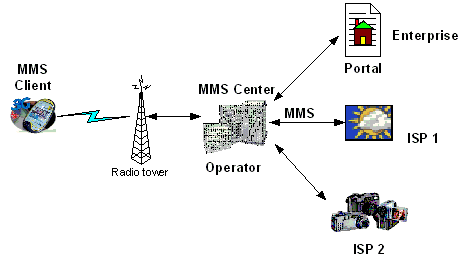
Once someone sends an MMS file, the intended recipient will receive the message even if his/her phone is switched off. The recipient receives the MMS as soon as the phone is switched on. In a non-roaming situation, the message goes directly into the phone and is downloaded automatically without prior notification. Users can save their MMS and send it to any other users’ phone.
Each multimedia message may contain more than one page, just like a PowerPoint slide show. Each page may have some text, audio file, or video clips attached, with specified time periods.
There is a general procedure to understanding how MMS works. In this procedure, a photo is being sent to another compatible phone.
- Step one: Take a photo from a camera phone or download one via the Internet.
- Step two: Personalize the text, graphics, audio, or video clips.
- Step three: Add recipients’ number and send.
The recipient will receive a message alert. Once he/she opens the message, a picture message will appear on the screen. If there is any text, it will appear below the image. In case an MMS is sent to an incompatible cell phone, the recipient will receive the SMS with the default line, “You have been sent a picture message!”
The MMS has many challenges:
- Adaptation of multimedia content: There may be a difference in the compatibility of multimedia content for different cell phone brands. If the network operator is supporting one’s content adaptation, one can enjoy compatibility with more networks and vice versa.
- Cell phone configuration: Multimedia Messaging Service requires some parameters to be correctly placed in one’s handset. Sometimes, due to poor configuration, one may not receive messages.
- Bulk messaging: Sometimes when someone sends an MMS to a large number of subscribers, they might have difficulty sending the message. Transactional overloads are now being optimized.
Moreover, there are several similar services such as Enhanced Messaging Service (EMS) that are very similar to SMS (Short Messaging Service), which allow users to send or receive messages with some special text formatting options such as bold, color, sound effect, icons, etc.

melinda_houston2
===
Rex
Are unwanted parties able to see texts I am receiving via the internet.
Ali
when i configure MMS setting on my nokia 6303i set and when i select Multimedia messages then it shows please wait…… i use jazz connection somebody help me
Babalola shoboyejo
I just need a vivid guidelines and procedure on the issue of configuration and downloading system
Babalola shoboyejo
How can I download successfully on my device ?. I’m using Nokia 2630
Sara
It will let me send mms then it shows 205 and brings up boxes what is happening
chaithra
please tell me how cancel mms subscription as i dont have mms friendly phone set .please mail me.
mampata
i have a problem with my phone i cant read mms, when i try to download it shows APN ERROR SO IM WORRIED PLIZ HELP ME
memenode
You need to set the right APN in your settings. You should be able to find this info on your mobile carrier’s site or just call them about it to guide you through.
rose
i received message from 5919823 that MMS hand set settings. second message receive from same numbers that, hi, you have MMs from.logon to http:/………/ with login my mobile number and password …….. to see your MMS. SMS to “543210” with “MMS” in body to get
Question: can i check my mms message through that link mentioned in the message. its is safe or not?
please send answer my question to my email ID
madhav
How Multimedia Messaging Service (MMS) Works
You must be wondering, how one can create a multimedia message. The answer is quite simple – you can take pictures with your built-in camera phone, upload audio or video clips in your cell phone via the Internet or via a USB port or Bluetooth wireless technology. The only condition is that the recipient should have a compatible cell phone. If your phone does not support MMS, you cannot send and receive multimedia messages via MMS.
Once you send the MMS file to the recipient, and if the recipient phone is switched off, in that case also, your message will be sent. The recipient will receive the MMS as soon as the phone is switched on. In non-roaming situation, the message goes directly in your phone and is downloaded automatically without prior notification. You can save your MMS and send it to any other users phone.