

A DLL (Dynamic Link Library) consists of instructions to operate hardware units, system, utility, and application software.
A DLL is a type of executable file that cannot be executed manually. Only other executable files such as .exe or .dll can execute it.
Typically, Microsoft Operating Systems do not allow users to view .dll files (or various other system files for that matter) until they opt to “Show hidden files and folders” in the folder containing .dll files. To do this in Windows XP follow these steps:
 Open a Windows Explorer window.
- Open the “Tools” menu, and go to “Folder Options”.
- Click the “View” tab.
- Ensure that “Show hidden files and folders” is selected, and click “OK”.
- Click the Start button (Windows logo), and go to Control Panel.
- Go to “Appearance and Personalization”, and then “Folder Options”
- Click the “View” tab.
- Under Advanced settings, select “Show hidden files, folders, and drives”, and then click “OK”.
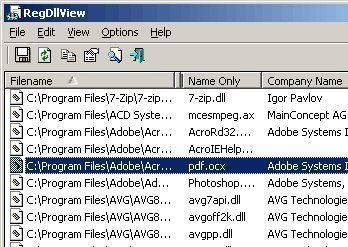
Alternately, use a third party application such as RegDllView to generate a list of all of the registered .dll files on the computer. Further functionality allows users to unregister .dll files no longer needed on their system. Be very careful when doing this.
Follow Us!