

Active Desktop was a feature included in Windows Operating Systems from Windows 95 to Windows Vista. It allowed users to insert HTML data directly into his/her desktop so that applications could be viewed and accessed without visiting a webpage. While Microsoft did not continue this feature in Windows 7, a technology called “desktop widgets” that allows users to do the same things as Active Desktop replaced it. Desktop widgets are available through Microsoft and a variety of vendors on the market, including Google.
How to Restore Active Desktop
When Windows does not shutdown properly or improper changes are made, it replaces the user’s desktop wallpaper with a large notice that says “Active Desktop Recovery” and provides instructions on how to restore settings that were established before the error occurred. The notice also displays a button that says “Restore my Active Desktop” that automatically restores the user’s wallpaper. However, the button does not always work and may display a “script error” notice. If this is the case: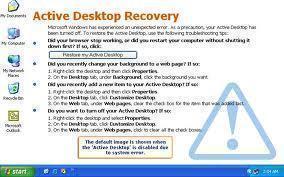
1) Right click the desktop and select “Properties.”
2) In the “Display Properties” window that appears, select the “Desktop” tab and choose a background image from the list or click “Browse” to search for an image on the computer. This will replace the “Active Desktop Recovery” notice with a wallpaper.
Applications
Active Desktop allows users to perform a variety of tasks directly from their desktop without browsing the Internet. Active Desktop, like desktop widget technology, allows users to retrieve HTML data from online applications and access those applications with nothing more than an Internet connection. For example, desktop widgets that Google provide (collectively known as Google Desktop) allow users to receive weather alerts, check the stock market, write and save notes, and even shop directly from the desktop computer.
Advantages
Active Desktop allows users to access web applications directly from the desktop. It is easy to use and allows users to quickly add new HTML codes to the desktop without interrupting other services. Active Desktop also provides convenience and entertainment for the user by making the Windows Desktop more interactive and allowing it to communicate with the user’s social networking websites, favorite online stores, and news outlets.


Follow Us!