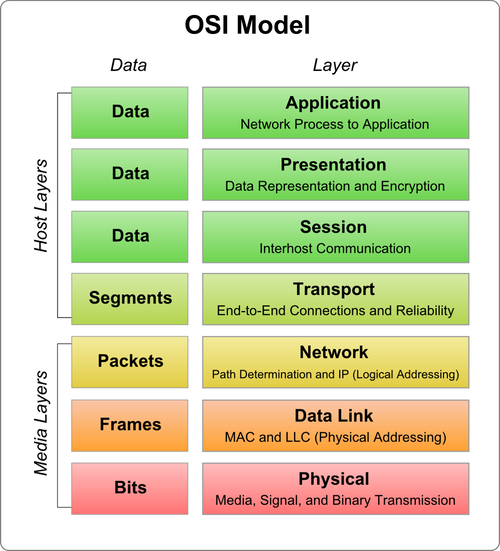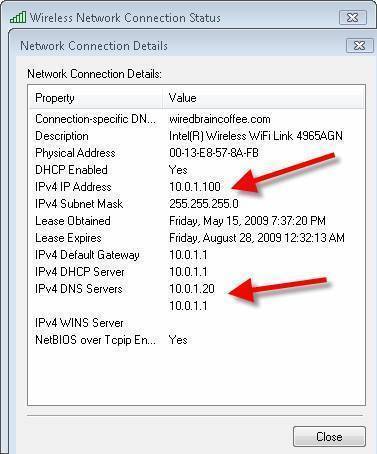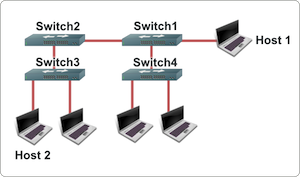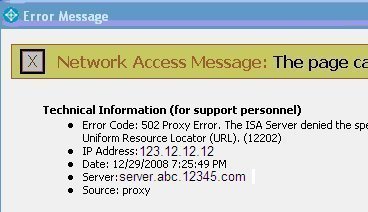
ARP (Address Resolution Protocol) Cache is a technique used to store “mappings” of OSI Model Network Layer addresses (IP addresses) to corresponding OSI Model Data Link addresses (MAC addresses). Due to a variety of possible circumstances, ARP cache can become damaged requiring the end user or administrator to determine how to clear the ARP cache for the respective computer system or device. Symptoms that the ARP cache requires clearing include the computer’s operating system failing to
[ read more ]
One of the most popular router brands on the market is the Linksys router. Despite this popularity; however, end-users are commonly challenged to setup the device in the home, office, or other locations. There are a number of types of Linksys routers on the market to include the WRT54G, WRT610n, and the Linksys e4200 which support both wired and wireless network configurations using an omnidirectional antenna.
Popular Types of Linksys Routers
Linksys WRT54G
The WRT54G has been one of the most
[ read more ]
Ethernet at the Data Link Layer
Ethernet provides services corresponding to Layers 1 and 2 of the OSI reference model, and IEEE 802.3 specifies the physical layer (Layer 1) and the channel-access portion of the Data Link (Layer 2). In addition, IEEE 802.3 does not define a logical link control protocol but does not specify several different physical layers, whereas Ethernet defines only one.
Ethernet Addressing
Every network device has a unique physical identity that is assigned by the manufa
[ read more ]
The easiest way to find DNS servers is by using the 'nslookup' tool.
Start nslookup
Set the search type to NS. This tells nslookup to search for nameservers
Finally, enter the domain name for the nameservers being searched for
Here are some search examples for the most popular searches:
Finding the Lincsat DNS Servers
$ nslookup
> set type=ns
> lincsat.com
Server: 66.37.143.12
Address: 66.37.143.12#53
Non-authoritative answer:
lincsat.com nameserver = ns2.anywarenetwo
[ read more ]
EIA/TIA 568B is a standard for the pin arrangements of RJ-45 connectors on Unshielded Twisted Pair (UTP) wire.
The 568B standard was developed by AT&T under the name 258A.
568B Color Codes
Pin (Jack)
Pin (Plug)
Color
Pair
1
8
White/Orange
2 - Tip
2
7
Orange
2 - Ring
3
6
White/Green
3 - Tip
[ read more ]
The Routing Information Protocol (RIP) is the IGP standard protocol that is used on Local Area Networks (LANs). It helps to ensure a higher degree of network stability by quickly re-routing network packets if one of the network connections goes offline. When the RIP is active on a network, users experience little to no service interruptions due to single router, switch, or server outages if there are sufficient network resources available to continue routing network traffic.
When was the Routin
[ read more ]
The Data Link Layer is layer two of the OSI model. It resides above the Physical Layer and below the Network Layer. The Data Link Layer is responsible for communications between adjacent network nodes. Hubs and switches operate at the Data Link Layer. The Data Link Layer is logically divided into two sub-layers: The Media Access Control (MAC) Sub-layer and the Logical Link Control (LLC) Sub-layer.
Media Access Control Sub-layer
The MAC Sub-layer is responsible for addressing on the Local Area
[ read more ]
There are a number of problems that can cause your computer to be unable to resolve anything:
The DNS settings in your computer could be misconfigured
The network settings in your computer could be misconfigured
Your DNS servers could all be broken
The network between your computer and your DNS servers could be down
A firewall could be blocking your DNS requests, or the DNS replies
Troubleshooting Being Unable to Resolve Anything
The first thing to do when tro
[ read more ]
The application layer of a software is a protocol that is used for communication between a software and the network layers that it uses. The application layer allows a computer’s network to interpret requests made by the program and allows the program to interpret data from the network. Likewise, the application layer ensures that both parties are available and can communicate with another, authenticates messages from both parties, and ensures that both parties agree about privacy, data integr
[ read more ]
Users can connect to a Linksys router manually by attaching an Ethernet cable from the router to a computer and typing 192.168.1.1 (the default IP address) in the web browser. This kind of connection is used to setup a router for the first time or troubleshoot problems when a wireless connection is not available. By default, the username and password are "admin" and "password" respectively, but can be changed once the user is logged into the Linksys interface.
How to Wirelessly Connect to a
[ read more ]